26
Diagnostic Error
Messages
* Prior to Jan 1999 this was a flashing “
”.
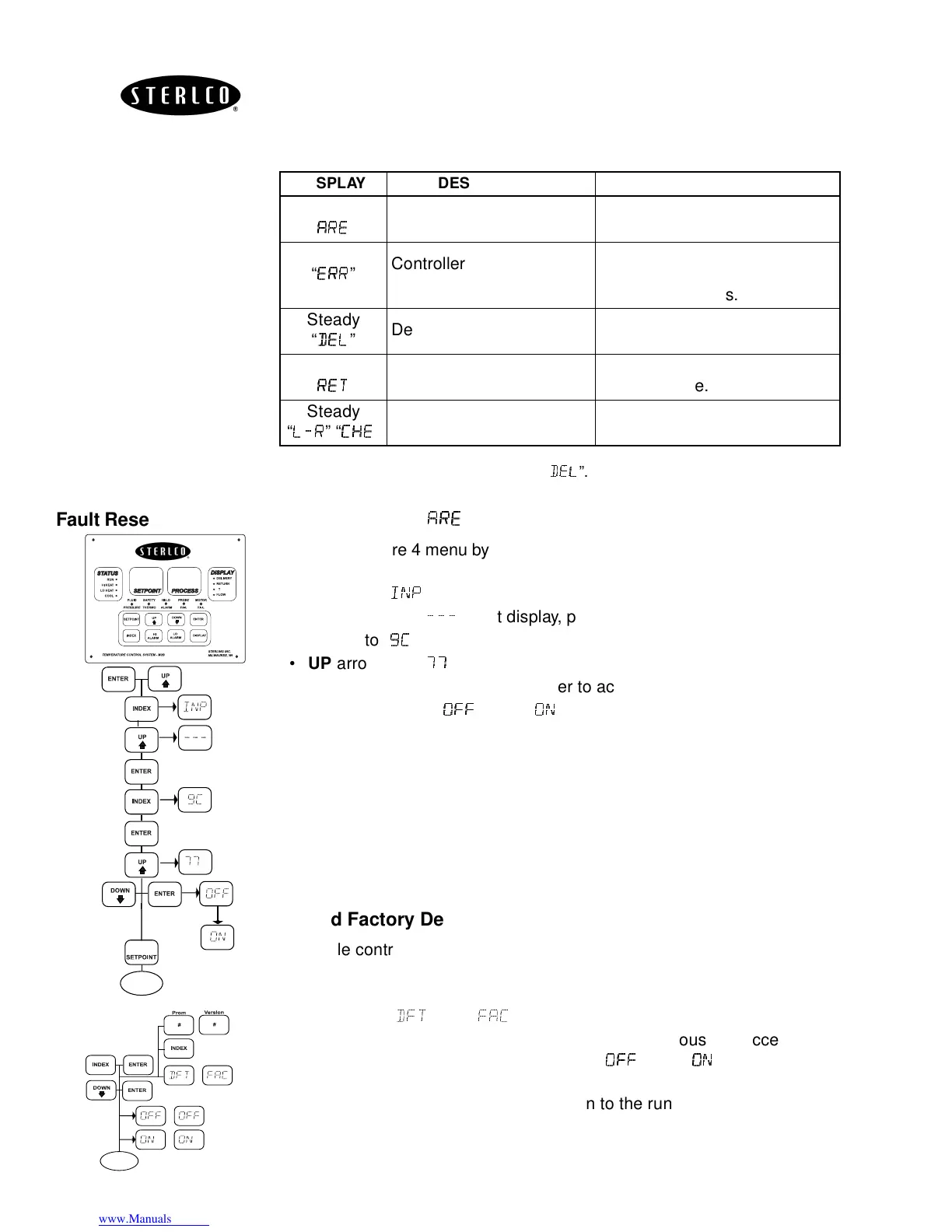
Fault Reset Procedure Reset Flashing “
”
• Enter Secure 4 menu by pressing
UP
and
ENTER
simultaneously for 3
seconds.
•
INDEX
to “
”
•
UP
arrow until “
+++
” right display, press
ENTER
.
•
INDEX
to “
$)
$)$)
$)
” left display, press
ENTER
, 9 flashes.
•
UP
arrow until “
,
,,
,,
,,
,
” in right display.
• Press
DOWN
and
ENTER
together to accept.
• Display will flash “
”, then “
” steady.
• Press
SET POINT
to exit to run.
Reload Factory Default
• Cycle control power to system Off and On.
• While M2B controller is performing the self test, simultaneously depress
the
INDEX
and
ENTER
keypads together.
• Index until “
&
” and “
” appears in the display.
• Press the
DOWN
and
ENTER
keypads simultaneously to accept the
factory default. Both displays will flash “
&&
&&&&
&&
” then “
“indicating re-
boot is complete.
• The controller will automatically return to the run mode.
DISPLAY DESCRIPTION ACTION REQUIRED
Flashing
“
”
Ambient temperature out
of range
Reduce ambient temperature
at controller, consult factory.
Flashing*
“
”
Controller Ram violated,
static discharge.
Controller must be reset to
factory defaults. Consult
factory for causes.
Steady
“
”
Delivery probe fail.
Check probe connection or
replace probe.
Steady
“
”
Return probe fail.
Check probe connection or
replace probe.
Steady
“
+
++
+
” “
)
))
)-
--
-
”
4-20 mA input failed Check polarity.
P
S
P
S
RUN
∆
S P
S P
RUN
S P


 To Next Page