29
4. Use the
UP
arrow key to go to CAL 1 (“
"
""
")
))
)
”). Adjust the input to 2351.38
ohms. Make sure the calibration value is within the acceptable range
(See Table 1) and press the
ENTER
and
DOWN
arrow keys
simultaneously to accept.
5. Press the
UP
arrow key to go to CAL 2 (“
)
))
)
”). Move the RTD connector
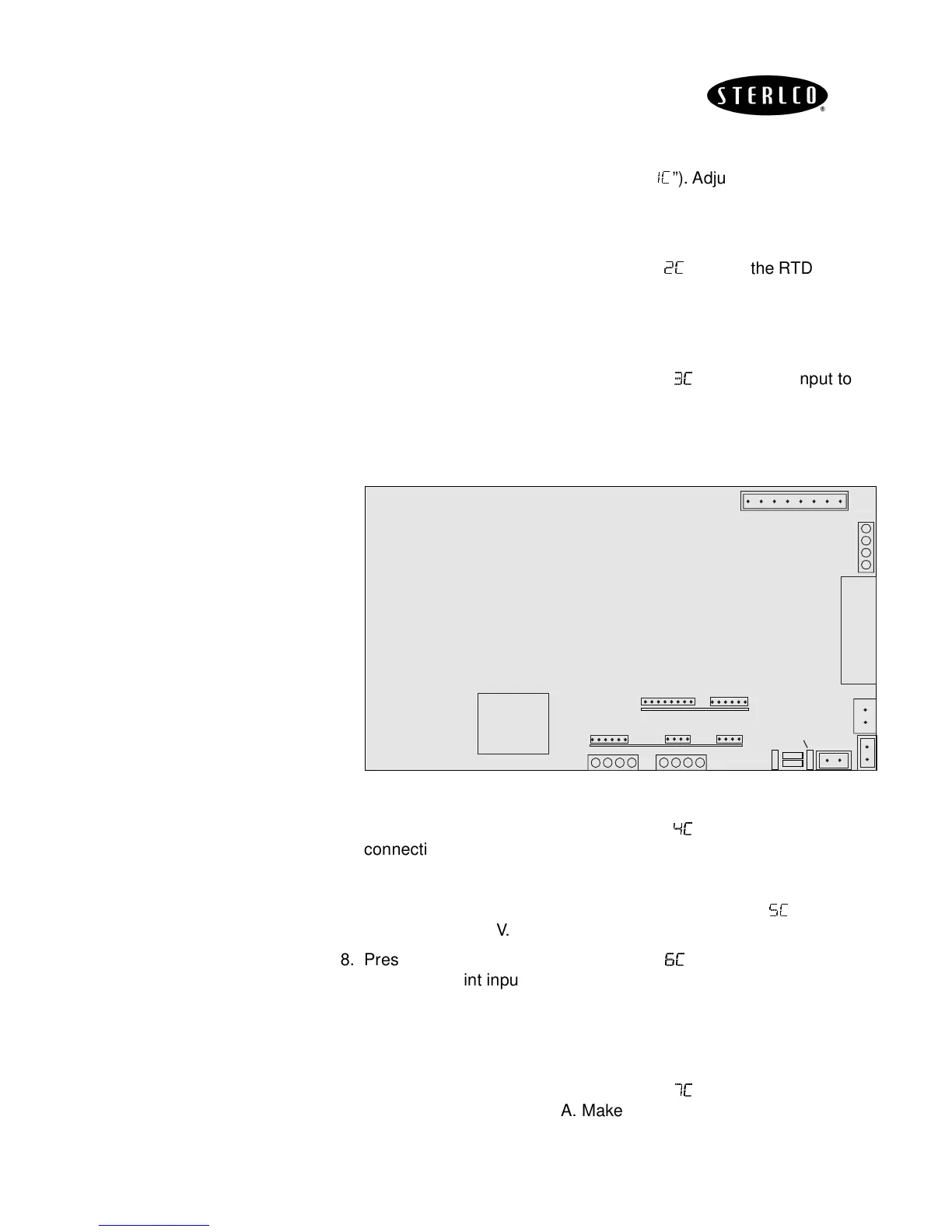
from D to E (See Figure-4) and adjust the Input down to 99.114 ohms.
Make sure the calibration value is within the acceptable range (See
Table 1) and press the
ENTER
and
DOWN
arrow keys simultaneously
to accept.
6. Press the
UP
arrow key to go to CAL 3 (“
/
//
/)
))
)
”). Adjust the input to
2351.38 ohms. Make sure the calibration value is within the acceptable
range (see Table 1) and press the
ENTER
and
DOWN
arrow keys
simultaneously to accept.
Figure-4
7. Press the
UP
arrow key to go to CAL 4 (“
.
..
.)
))
)
”). Place the millivolt
connection into connector C (see Figure-4). Adjust your millivolt signal
to 4.663 mV. Make sure the calibration value is within the acceptable
range (see Table 1) and press the
ENTER
and
DOWN
arrow keys
simultaneously to accept. Repeat this step for Cal 5 (“
0)
0)0)
0)
”), adjust the
input for 73.953mV.
8. Press the
UP
arrow key to go to Cal 6 (“
1)
1)1)
1)
”). Place the wires for the
remote setpoint input into the last 2 terminals of connector A2. See
Figure-4. (+ to terminal 3 and - to terminal 4). Adjust your input to 1.224
mA. Make sure the calibration value is within the acceptable range (see
Table 1) and press the
ENTER
and
DOWN
arrow keys simultaneously
to accept.
9. Press the
UP
arrow key to go to CAL 7 (“
,
,,
,)
))
)
”). Adjust the remote
setpoint input to 19.721 mA. Make sure the calibration value is within
the acceptable range (see Table 1) and press
ENTER
and
DOWN
arrow
keys simultaneously to accept.


 To Next Page