ASTOPAD
®
Instructions for Use
16
5 Symbols
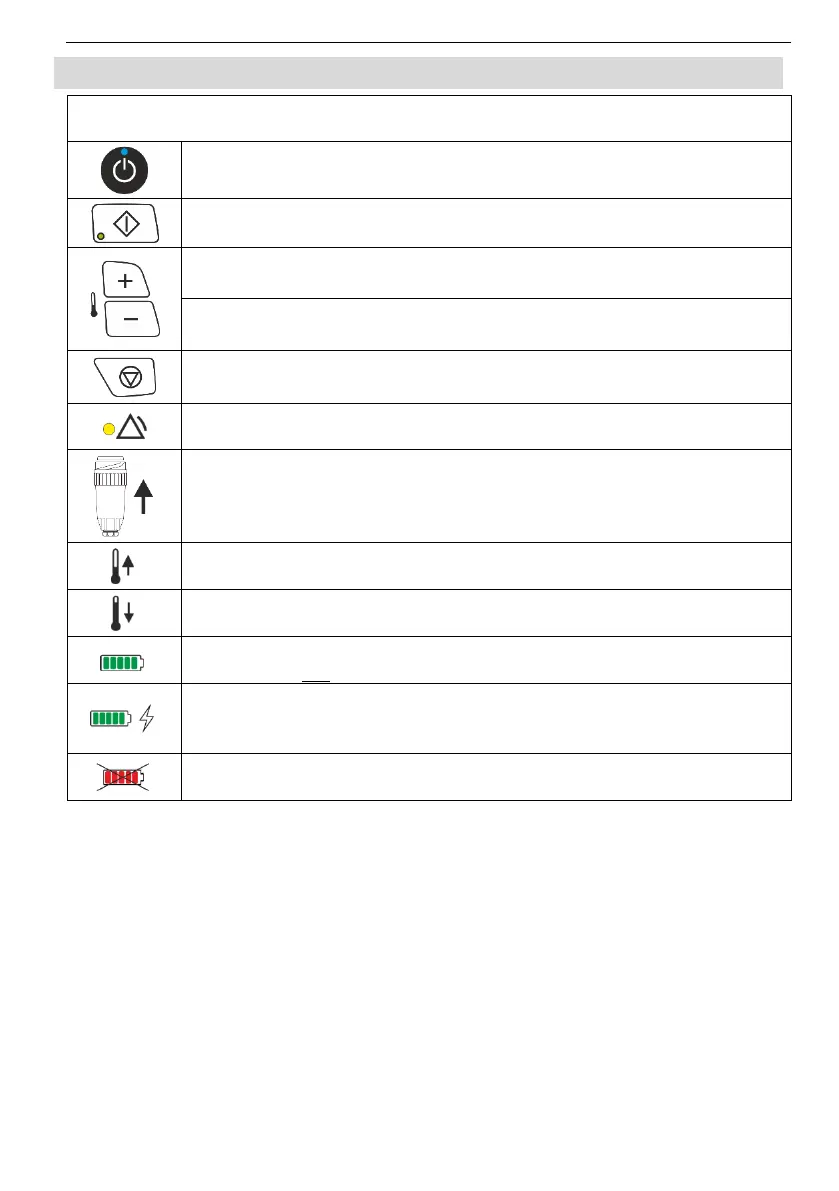
Symbols and indications on the control panel
Standby button: Switches between Standby mode and On mode.
When the blue LED is lit, ASTOPAD is in Standby mode.
Start button: Starts the heating process.
Plus button: Temperature increase set value.
Minus button: Temperature decrease set value.
Stop button: Stops the heating process.
Alarm condition when the yellow LED is lit or flashing.
No ASTOPAD applied part is connected to the control unit.
Wait until the temperature of the applied part rises to reach the set
temperature.
Wait until the temperature of the applied part drops to reach the
set temperature.
Battery charge level
(control unit not connected to mains power).
Battery charge level
(control unit connected to mains power and battery is being
charged).
Battery status
(defective or incorrect battery).


 To Next Page