Stonex R60 – User Manual 19
4.2. R60 Technical app
This group contains the applications necessary to manage R60 total station in all its functions (Note.
These apps are necessary for instrument configuration, update and management, please don’t unistall
them). There are four pre-installed applications on the total station: MiStore, MiUpdate, R60 Manager
and Cube-a. Below their description.
4.2.1. MiStore
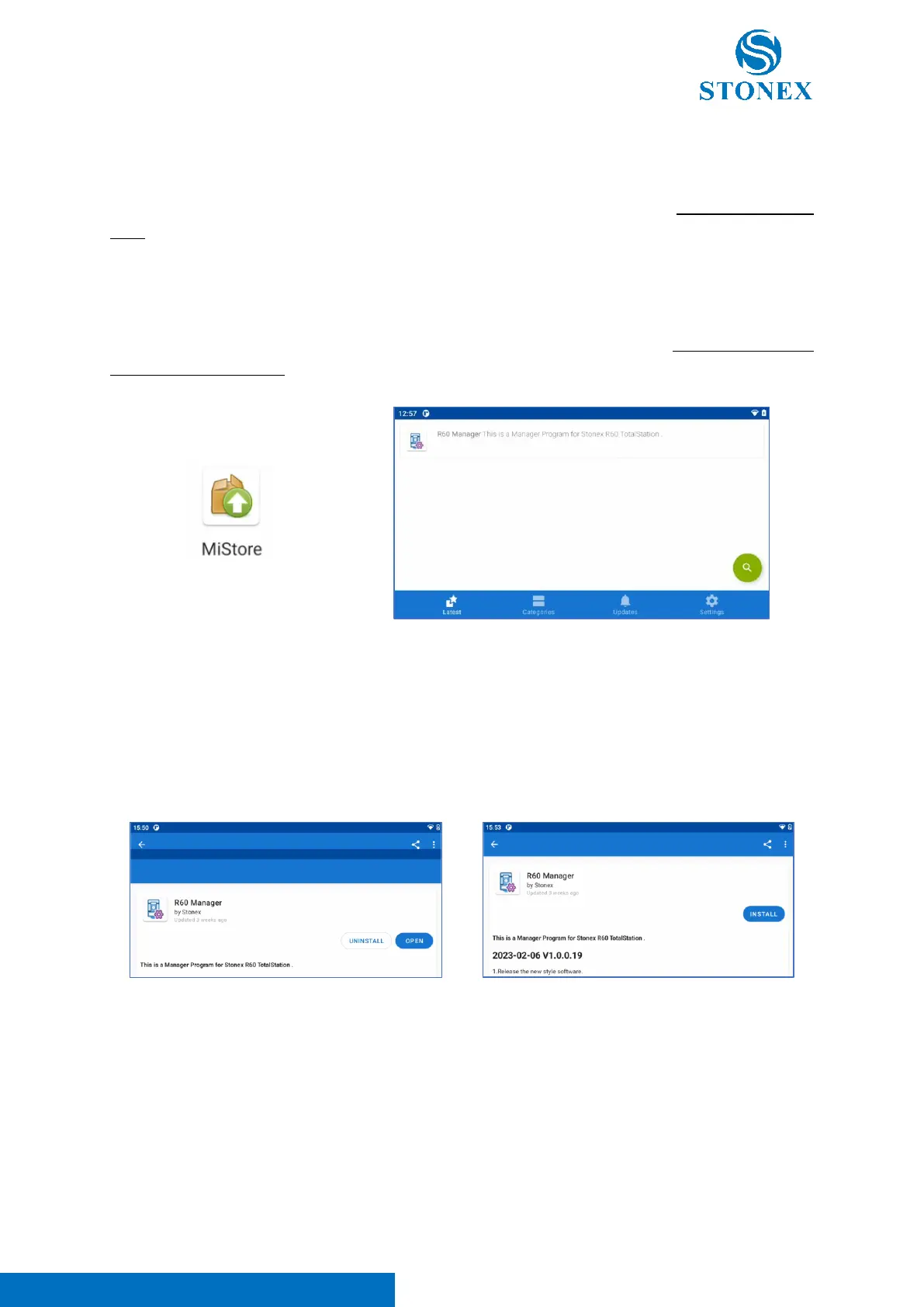
MiStore app is dedicated to “R60 Manager” application update via Internet (Note. The instrument must
be connected to Internet)
Enter in MiStore app and swipe down to refresh the page. The application finds on the server the
last “R60 Manager” version, as visible in the image above. Click on the icon to install it.
Before updating “R60 Manager” app, it’s necessary to uninstall the old one. Click on the icon in the photo
above to enter in the page visible in the photos below. Click on “Uninstall” to uninstall the old “R60
Manager” app (left image). After this operation, the “Install” icon appears, like visible in the right image
below. Click on “Install” to install new “R60 Manager” app version.
Note. If the “Install” icon doesn’t appear, enter in “MiStore” app -> “Settings” section and enable “Include
incompatible versions” option.



 To Next Page