Stonex R60 – User Manual 21
4.2.3. R60 Manager
This application is dedicated to R60 management from a functional, operational and configuration point
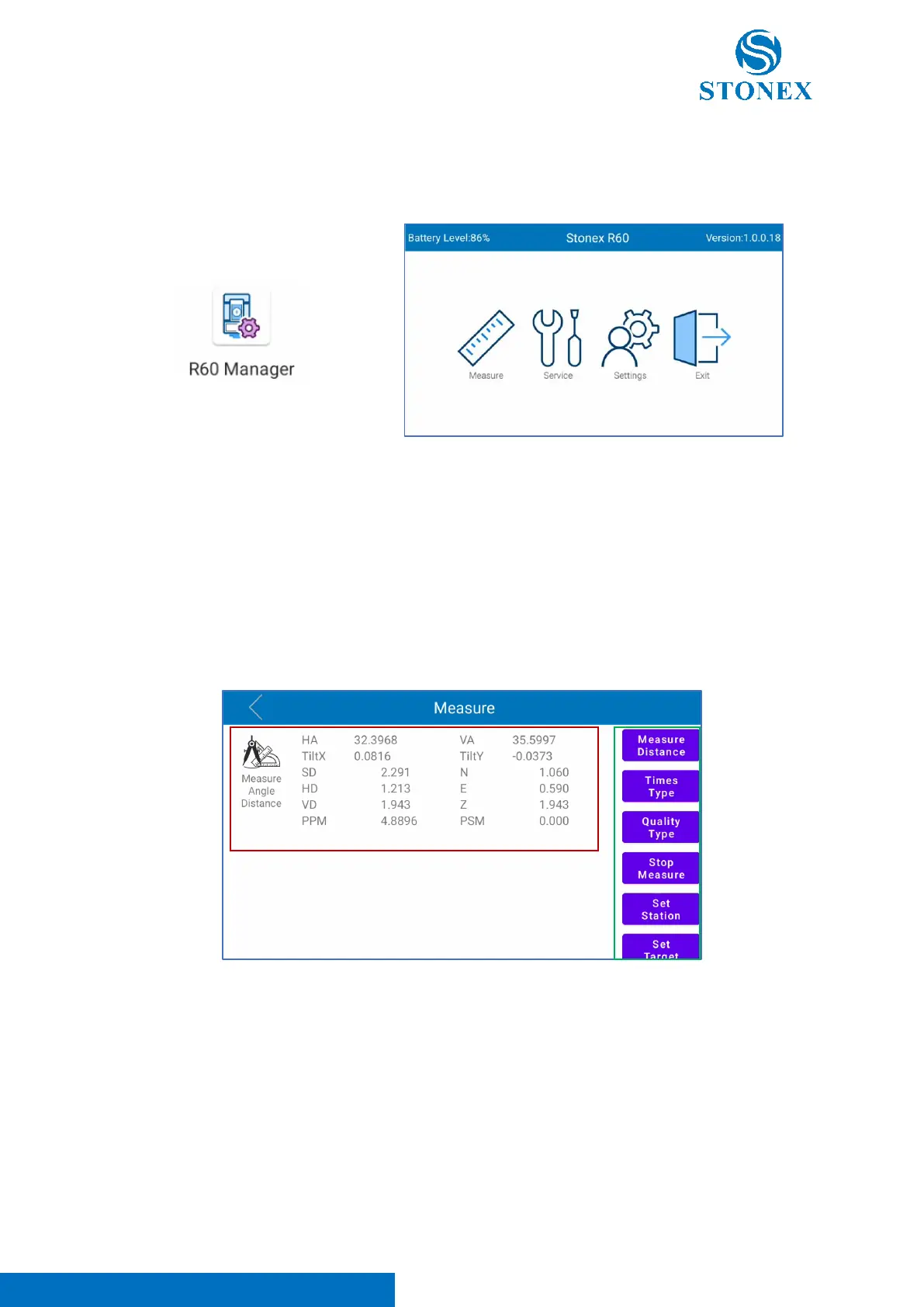
of view. Clicking on the icon the following screen appears.
“R60 Manager” is organized in three menus: Measure, Service and Settings, as visible in the image above.
In the screen upper bar, it’s possible to read the instrument battery level (top-left) and the total station
FW version (top-right). Clicking on “Exit”, the user can close the application.
R60 Manager – Measure menu
In this menu the user can measure and visualize angles and distances without store them. As visible in
the image below, the “measure” interface is organized in two main sections.
The central section (red squared in the photo above) contains all the information related to the
measurements performed by the instrument. Below the list of the data included in this part:
- HA -> Horizontal angle reading
- VA -> Vertical Angle reading
- TiltX -> Tilt reading in X direction
- TiltY -> Tilt reading in Y direction
- SD -> Slope Distance
- HD -> Horizontal Distance



 To Next Page