Stonex R60 – User Manual 20
4.2.2. MiUpdate
This application is dedicated to total station firmware (FW) update.
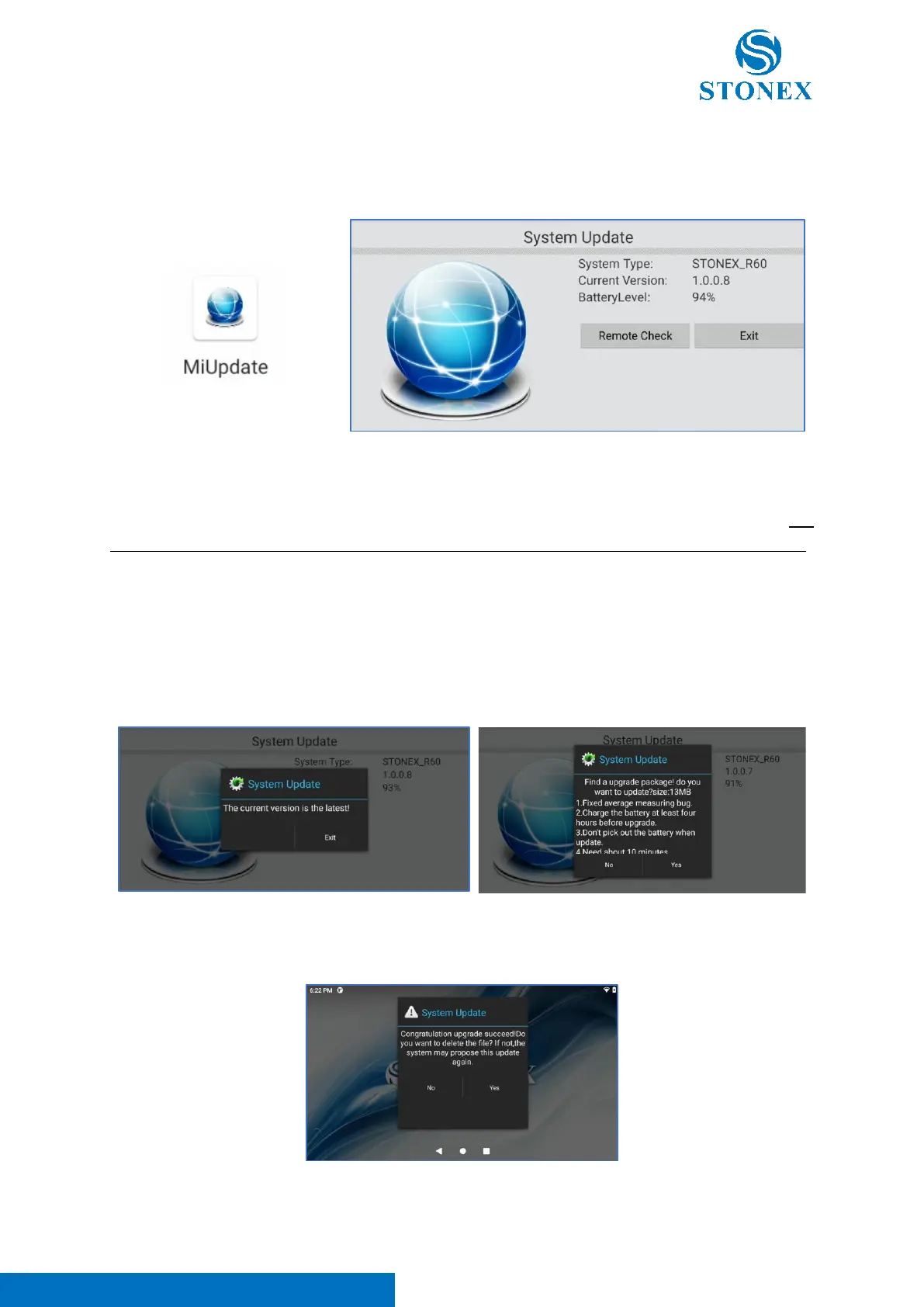
Clicking on the icon the following screen appears.
In this application, it is possible to read the current FW version (in the example above 1.0.0.8), verify the
battery level (in the example above 94%) and check the presence of FW update.
Click on “Remote Check”, the user can verify if it’s necessary to update the FW instrument (Note. The
instrument must be connected to Internet and the battery level must be above 70% for FW update).
Click on “Exit” to close the application. If the FW installed on the total station is the last version, the
message in the left image appears; instead, if it is necessary to update the instrument FW, the message
in the right image appears. This message contains the change log related to the new FW with a resume
about the improvements introduced and bugs solved with the new update. Clicking on “YES” it’s possible
to update R60 FW. This procedure needs about 5 to 10 minutes; after finishing download, the system
will auto reboot and update (Note. Don’t remove the battery during FW update).
After instrument auto reboot, the following message appears. Click on YES to remove the FW file from
the instrument cache memory.



 To Next Page