Page 14
6.3 – REMOTE CONTROL
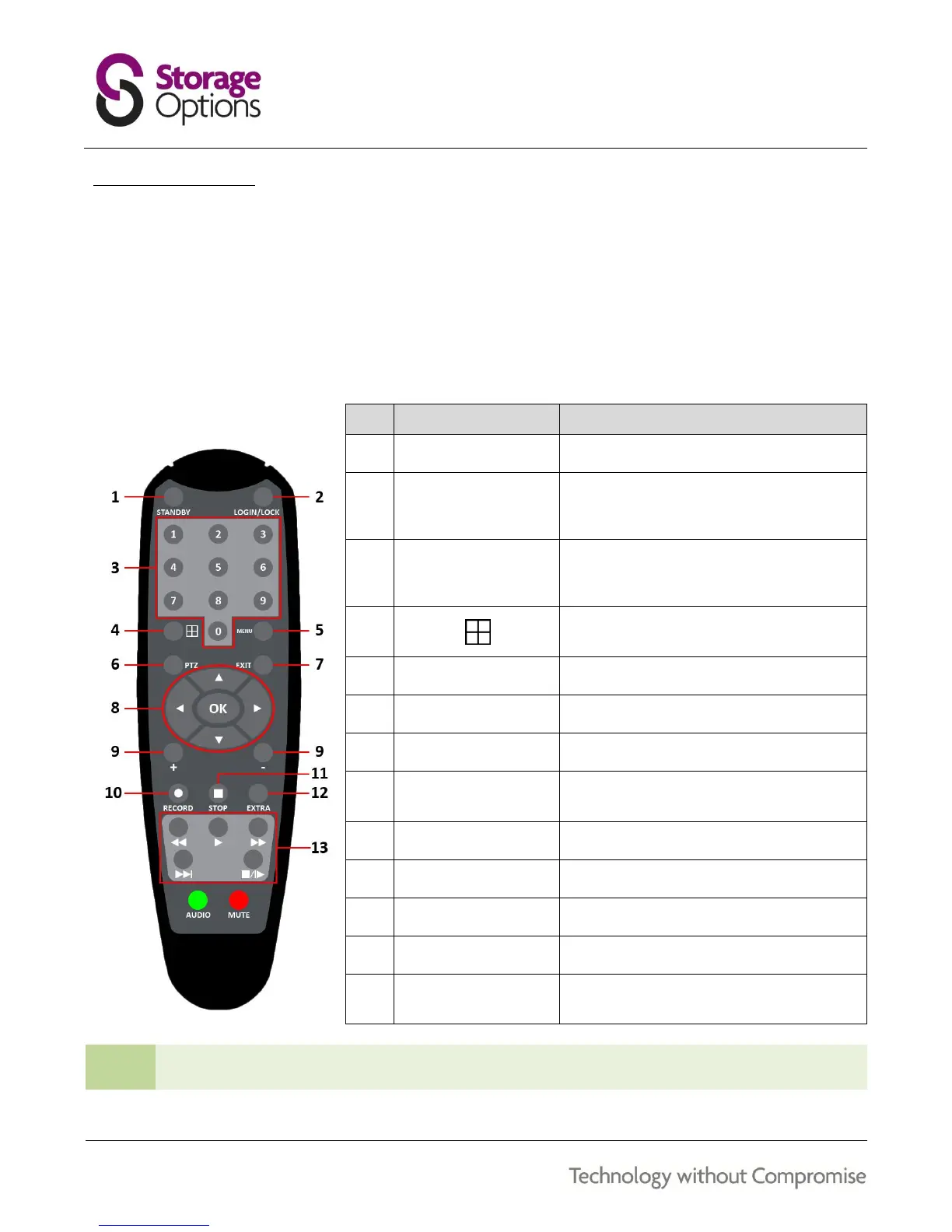
The remote control can be used for navigating system menus. When using the remote control, the OK key performs
the same functions as left-clicking the mouse.
To use the remote control with the DVR system:
1. Insert 2x AAA 1.5V alkaline batteries (not included) into the back of the remote control. Please ensure
correct orientation.
2. Refer to the below diagram for button functions:
Press to sleep / wake up the DVR
If Security is enabled in the Setup menu,
press to open the user pass code login
screen
In menus, press 0-9 to enter values
In live view, press 1-4 to view channels in
full-screen display mode
Press to switch between quad and split-
screen display modes
Opens the Pan Tilt Zoom (PTZ) controls
Press to close menu windows
Use ↑, ↓, ←, → to highlight menu options
Use OK to confirm selections
In menus, press to adjust values
Press to start manual recording
Press to stop manual recording
Controls for play, pause, stop, fast forward,
and skip forward
When using the remote control to enter password and camera titles, select the field using the navigation
buttons, press ENTER, and then press the number buttons. Press Menu to confirm.



 To Next Page