Installing a System Chassis
Installing the System in a Cabinet 9-13
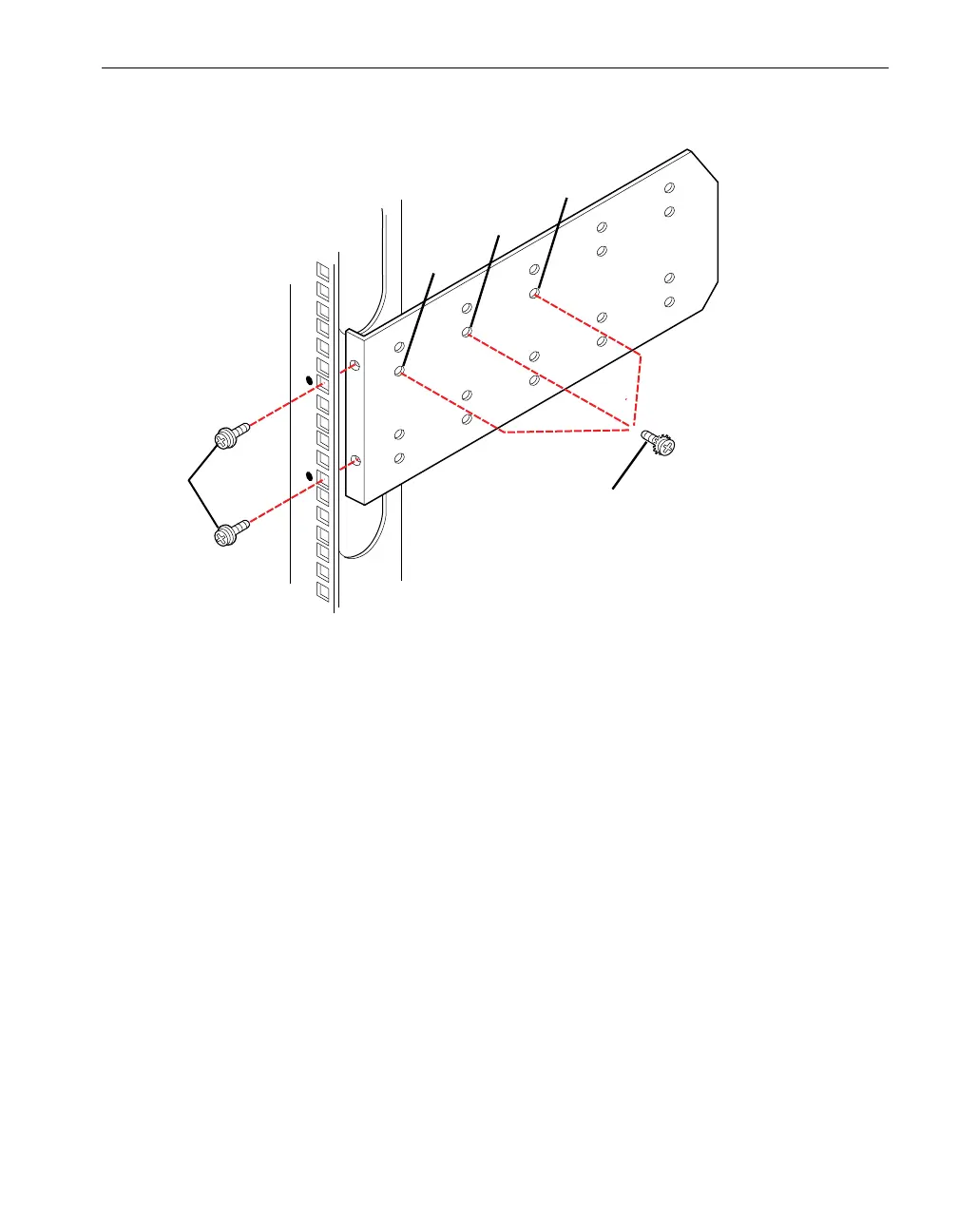
Figure 9-10. Attaching the Mounting Brackets and Inserting Guide Screws (Rear View)
5. Measure the distance between the front and rear vertical rails in the cabinet and
install one guide screw and washer (number 5) as described below and as shown
in Figure 9-10:
If the rail depth is less than 27 in. (68.58 cm), install a flat-head screw with
countersunk lock washer in the hole closest to the rear of the cabinet
(number 2 in Figure 9-10).
If the rail depth is 27 in. (68.58 cm), install a flat-head screw with countersunk
lock washer in the second hole from the rear (number 3).
If the rail depth is greater than 27 in. (68.58 cm), install a flat-head screw with
countersunk lock washer in the third hole from the cabinet rear (number 4).
1 10-32 x 1/2 pan-head crest-cup screw 4 Third hole from rear
2
3
First hole from rear
Second hole from rear
5 Guide screw and washer (to be inserted
in one of three indicated holes)



 To Next Page