10
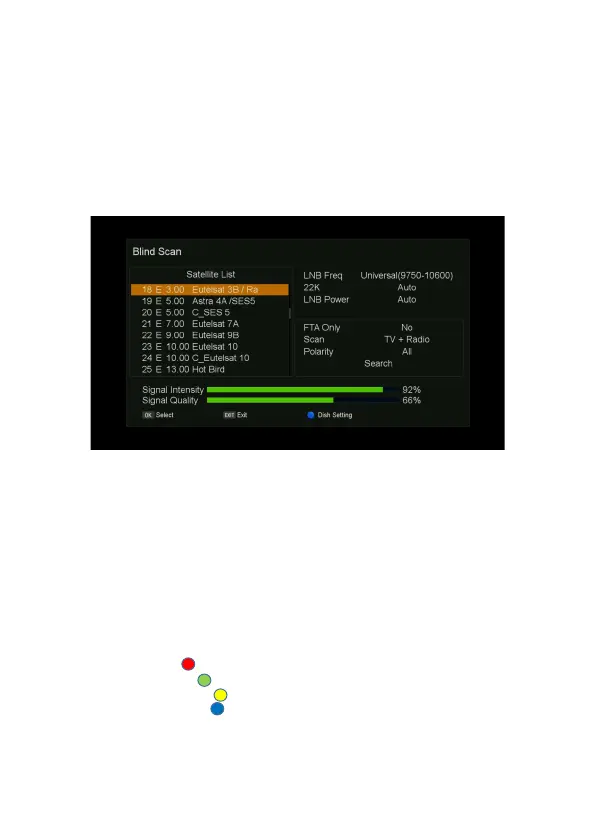
Blind Scan
1. Press MENU button on the remote to display the main menu.
2. Go to the first line(DVB-S2X Installation) and move to right
,
select “Blind Scan” and press OK
button, the “Blind Scan” menu will be displayed.
3. Using the
▲/▼ button on the remote to select satellite.
4. press the
▶ button on the remote, move the focus to “Search”, press OK button on the remote
to start search.
Manual Scan
1. Press MENU button on the remote to display the main menu.
2. Go to the first line(DVB-S2X Installation) and move to right
,
select “Manual Scan” and press OK
button, the “Manual Scan” menu will be displayed.
- Satellite: Select any satellite by pressing
◀/▶/OK buttons on the remote.
- Frequency: Select frequency by pressing
◀/▶/OK buttons on the remote.
- Symbol Rate: Displays the current symbol rate of the selected transponder.
- Polarity: Display the current polarization H/V of the selected transponder.
- Scan Type: Select search type (ALL, TV, FTA).
- Network Search: Select Network Search On/Off.
3. Search: Press Red ( )button on the remote to start search.
4. Add TP: Press GREEN ( )button on the remote to add TP.
5. Delete TP: Press YELLOW ( )button on the remote to delete TP.
6. Dish Setting: Press BLUE ( )button on the remote, step into the “Dish Setting” menu.
7. Edit TP: Press INFO button on the remote to edit TP.



 To Next Page