8
How to setup DiSEqC 1.2 System
1. Press MENU button on the remote to display the main menu.
2. Go to the first line (DVB-S2X Installation) and move to right, choose ‘’Motorized Setting‘’, press
OK button, to display the “Motorized setting” menu.
3. Go to the third line (DiSEqC Motor) and use the
◀/▶ buttons on the remote to select
DiSEqC1.2.
4. Go to “Motor Setup” and press OK button. Wait until the Signal
Operation
Dish Setting
1. Press MENU button on the remote to display the main menu.
2. Go to the first line(DVB-S2X Installation) and move to right
,
select “Dish Setting” and press OK
button, the “Dish Setting” menu will be displayed.
- Satellite: Select any satellite by pressing
◀/▶/OK buttons on the remote.
- Frequency: Select frequency by pressing
◀/▶/OK buttons on the remote.
- LNB Power: Select LNB power Auto/V/H/OFF.
- LNB Type: Select your LNB Type Single /OCS/Universal/SaTCR.
- LNB Freq: Select LNB frequency 9750-10600/9750-10750.
- 22K: Select OFF/ON of 0/22 KHz.
- DiSEqC 1.0: Select DiSEqC 1.0 Port.
-
DiSEqC 1.1: Select DiSEqC 1.1 Port.
3. View All: Press OK button on the remote to view all option.
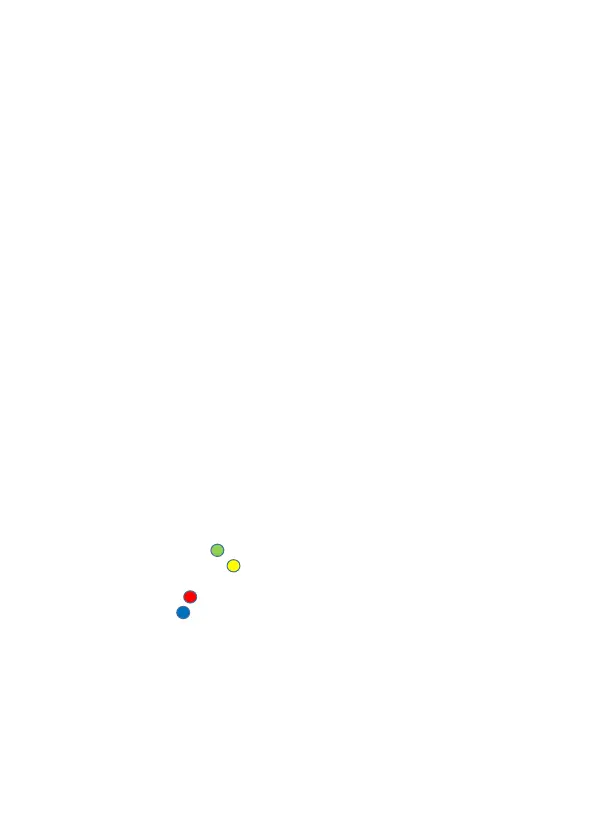
4. Auto Scan: Press GREEN ( ) button on the remote to step into “Auto Scan” menu.
5. Manual Scan: Press YELLOW( ) button on the remote to step into “Manual Scan” menu.
6. Edit: Press INFO button on the remote to edit the selected satellite.
7. Delete: Press RED( ) button on the remote to delete the selected satellite.
7. Add: Press BLUE( ) button on the remote to add satellite.



 To Next Page