Conduit - MIDI Hub
pg 24
D
CBA
MIDI IN
MIDI OUT
CONDUIT
Sends MIDI data
from computer to
pedals and receives
MIDI data from
capable pedals
COMPUTER
Sends and
receives data to
and from Conduit
PEDALS
All connected
pedals receive MIDI
data from Conduit.
Capable pedals
also send MIDI data
to Conduit.
MIDI
CABLES*
MIDI PORT 6
Used to config
TRS JACKS
(See page 17 for
details.)
TRS
CABLES
USB-C
CABLE
MIDI
PORT
1
MIDI
PORT
2
MIDI
PORT
3
MIDI
PORT
4
MIDI
PORT
5
E
MIDI
OUT
MIDI
IN
*NOTE: MIDI cables not included.
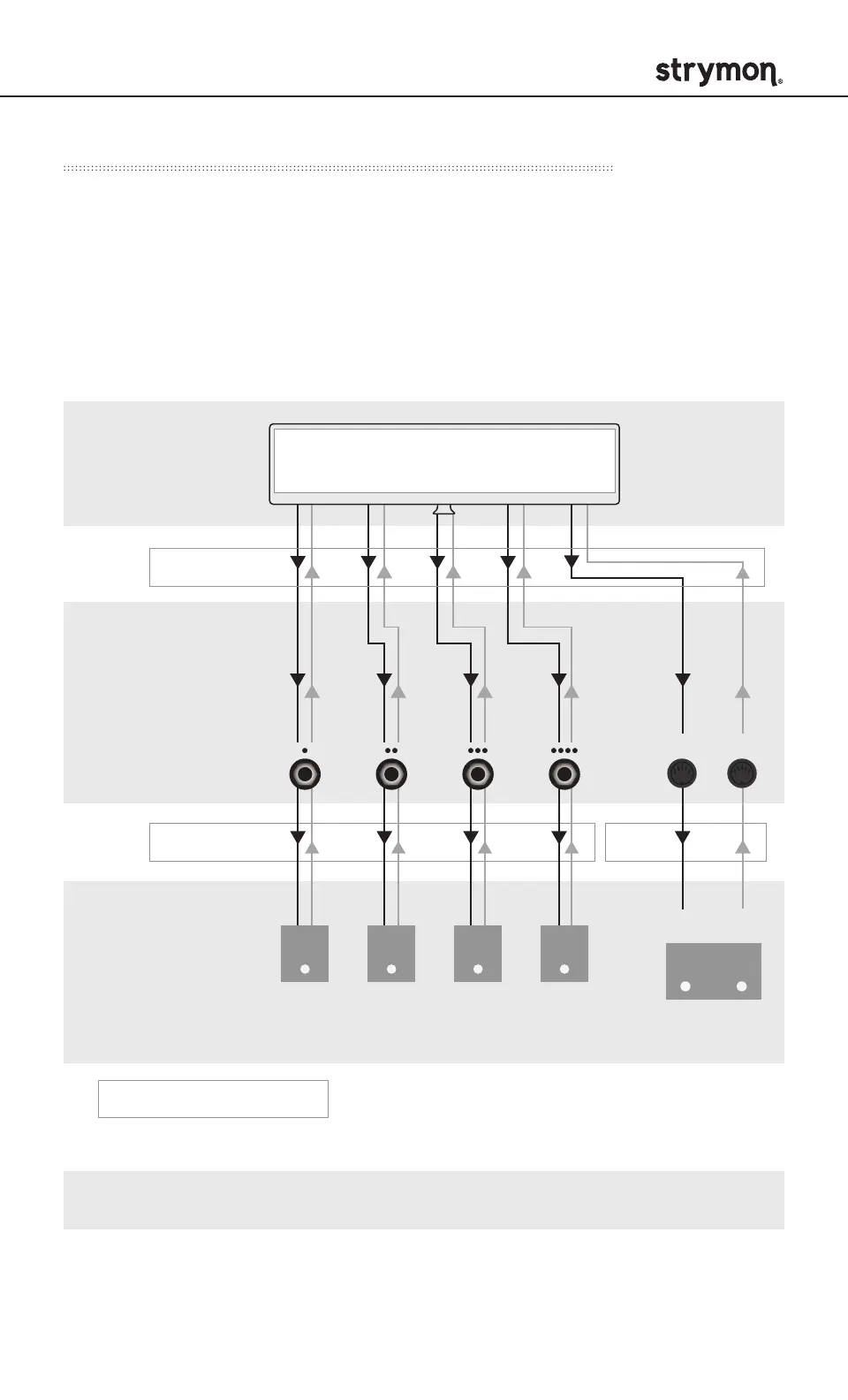
Appendix 2: USB MIDI Interface - Data Flow
When USB is connected, the flow of MIDI data is very different.
Conduit will expose each of the TRS jacks and the 5-pin DIN pair as
an independent MIDI device. The diagram below illustrates the flow of
MIDI data and how the exposed MIDI ports on the computer relate to
the inputs and outputs of Conduit when it is connected to a computer
via USB.
Note: There is no merging of MIDI data in this mode.


 To Next Page