23
SN 94770 - ...
1 2
3
90°
4
180°
6
270°
5
Stûv 30-compact - installation [en] - 01/13
Directing the stove (continued)
Rotation stop
The rotation stop enables you to
choose a maximum angle of rotation
to which the stove can turn.
> First of all, choose your
configuration for the stove (see
previous pages). This will define your
maximum angle of rotation.
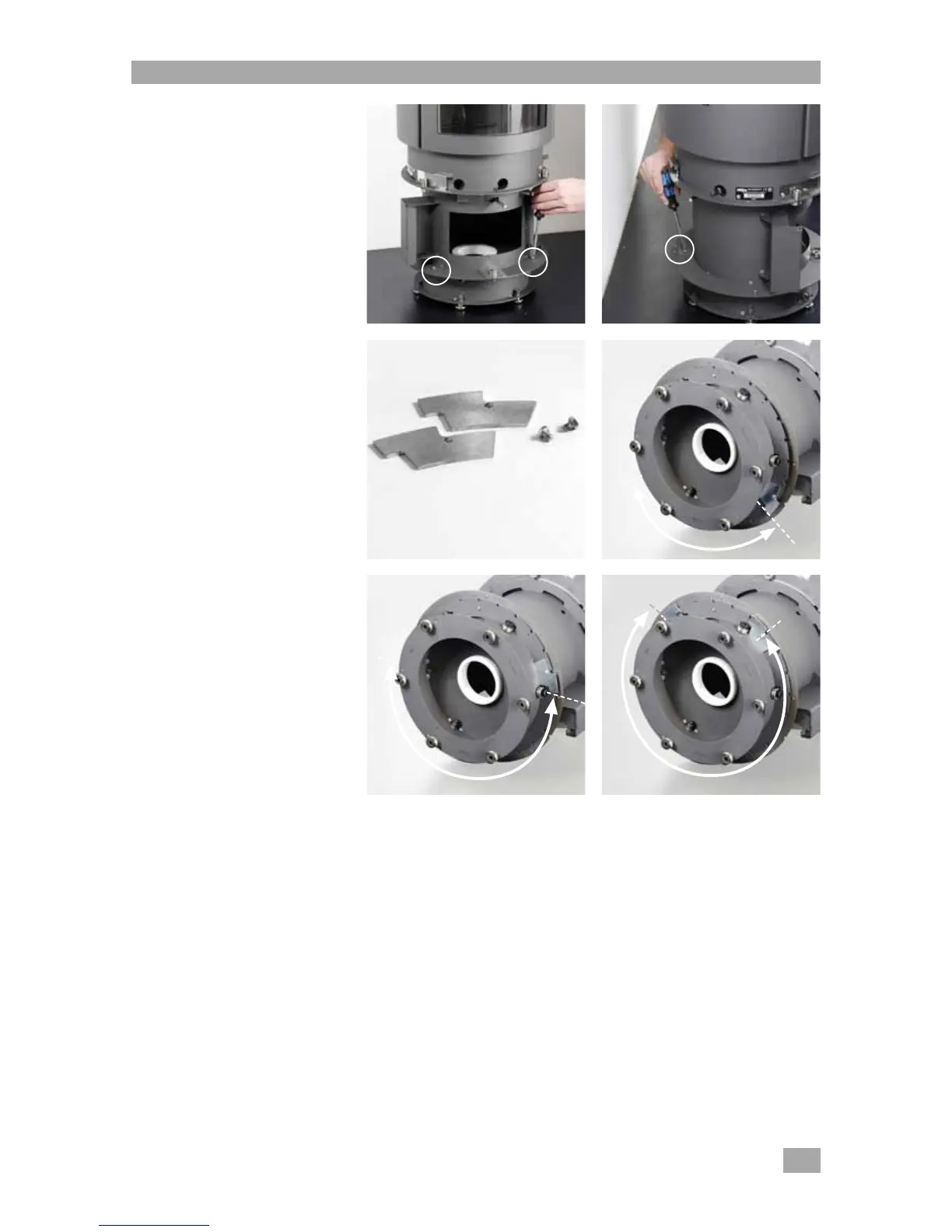
> Take out the 3 stepped screws with
a flat screwdriver (2 screws at the
front, 1 screw at the back)
[photos 1 and 2].
Please note ! Once the 3 stepped
screws have been removed, do not
under any circumstances move or tilt
the stove. This risks damaging the
rotation axle of the stove.
> Limit the angle of rotation to 90°,
180° or 270° by fixing the stops
[photo 3] (with the M5x6 hexagonal
screws) in position :
> for 90° [photo 4]
> for 180° [photo 5]
> for 270° [photo 6]
Please note ! Ensure that you fix
the stop the right way around (look
closely at the photos).


 To Next Page