27
Figure 42
Figure 43
Figure 44
Figure 45
Figure 46
Figure 47
MANUAL FUNCTION
To operate the system in the manual
“MODE” do the following.
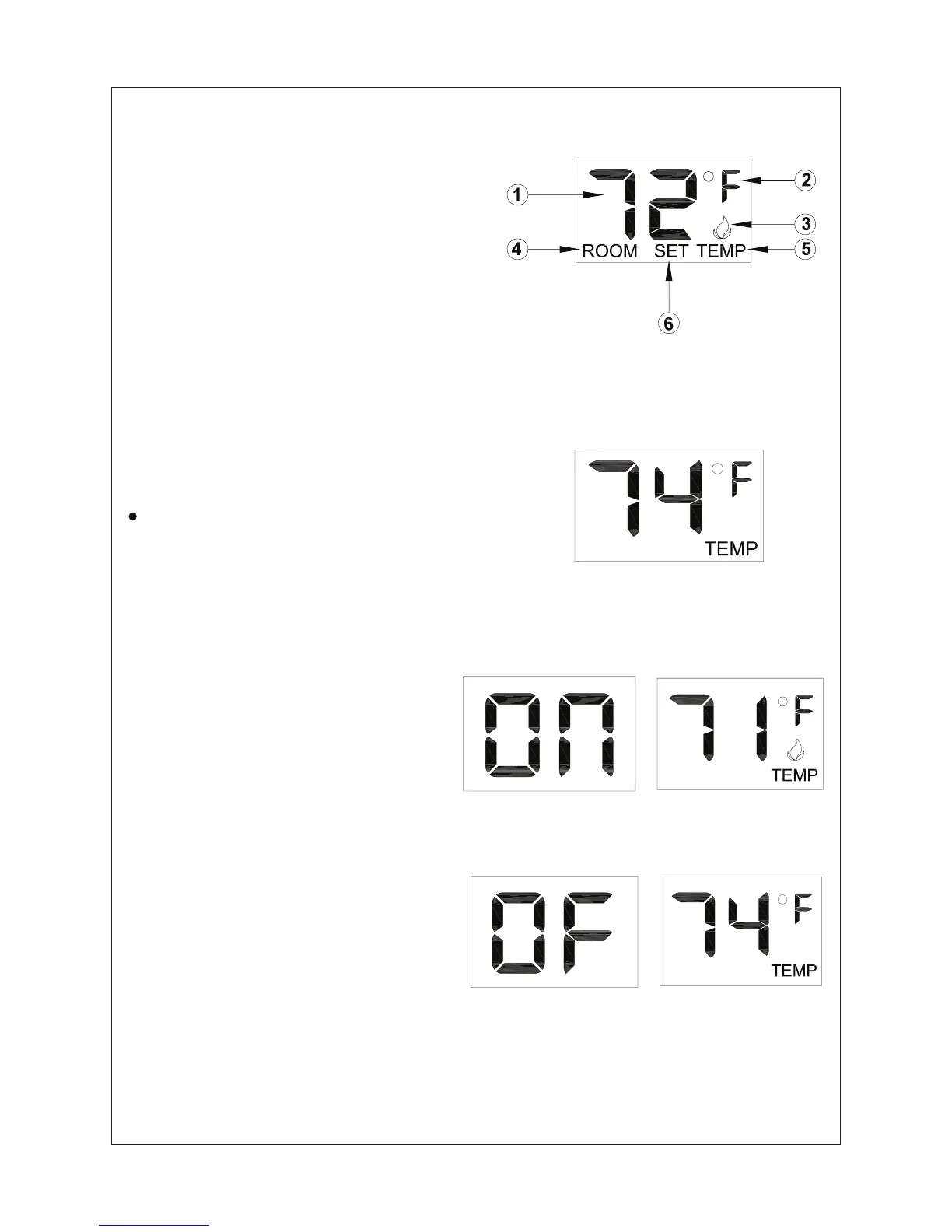
ON OPERATION
Press the ON key and the appliance
ame will come on. During this time
the LCD screen will show ON (Figure
44). After 3 seconds the LCD screen will
default to display room temperature and
the word TEMP will show (Figure 45).
(Flame icon will appear on LCD screen
in manual on mode).
OFF OPERATION
Press the OFF key and the appliance
ame will shut off. During this time
the LCD screen will show OF (gure 46).
After 3 seconds the LCD screen will
default to display room temperature
and the wood TEMP will show (gure
47).
LCD Liquid Crystal Display
1
. DISPLAY Indicates CURRENT room
temperature.
2. °F OR °C Indicates degrees Fahrenheit
or Ceisius.
3. FLAME Indicates bumer/valve in
operation.
4. ROOM Indicates remote is in THERMO
operation.
5. TEMP Appears during manual operation.
6. SET Appears during time the of setting
the desired temperature in the thermo operation.
SETTING°F/°C SCALE
The factory setting for temperature is °F. To
change this setting to°C ,
First
Press the ON key and the OFF key on the
transmitter at the same time this will change
from°F to °C. Follow this same procedure to
change from°C back to°F.



 To Next Page