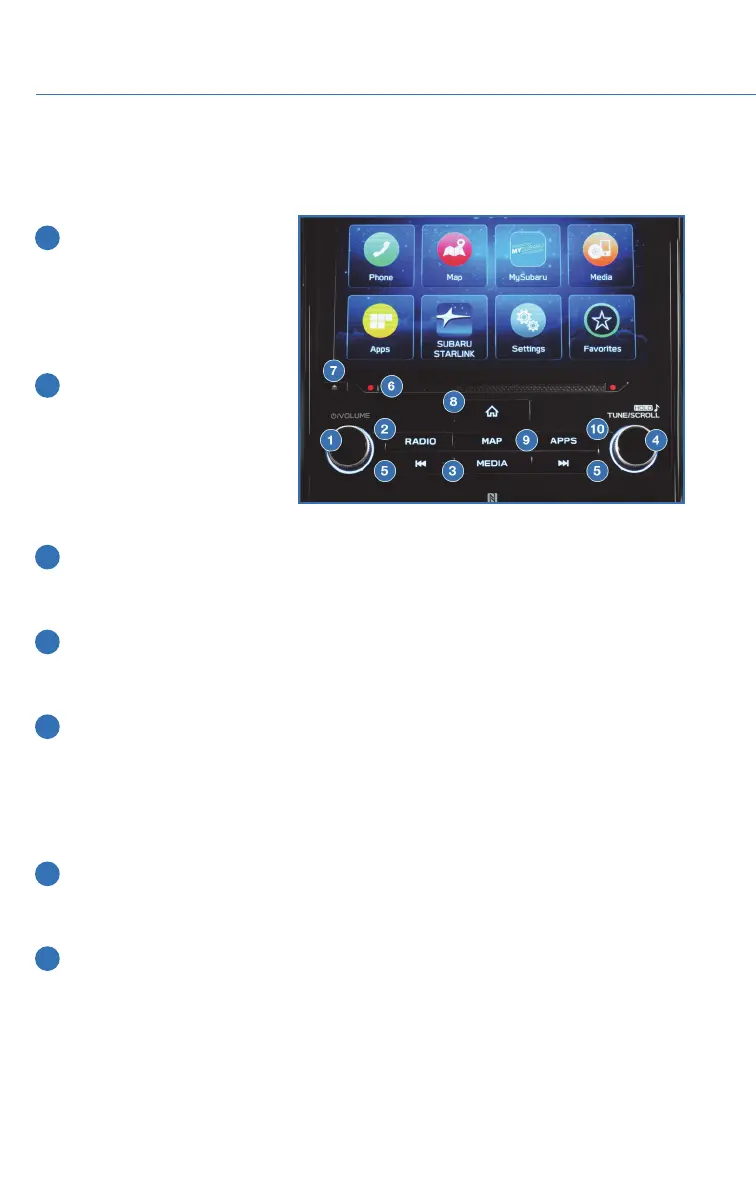
BUTTONS
Radio Functions
1 Power/Volume Control
Press the power/volume
control knob to mute or
un-mute the audio. Rotate
the knob left to decrease or
right to increase the volume.
2 Radio
Press the RADIO button to
display the AM/FM/SXM
screen. The different tuner
modes can be selected by
touching the source you
want to hear.
3 Media
Press the MEDIA button to display the media screen. Select the media source you
want to hear. Connected media will display in white.
4 Tune
Rotate the knob to change the radio station or select the next track/media file. Press
and hold the knob to display the sound settings screen.
5 Seek
Press the seek up or seek down button to seek the next or previous radio frequency.
You can also use the seek up or down buttons to select different audio tracks from
media sources. Press and hold to fast-forward or rewind
CD Player Functions (if equipped)
6 Load
Insert the disc into the loading slot. The CD will automatically be drawn in and begin
playing the first track.
7 Eject
Press the Eject button on the left side of the loading slot to remove the CD from the
player.
STARLINK OVERVIEW
48















 To Next Page