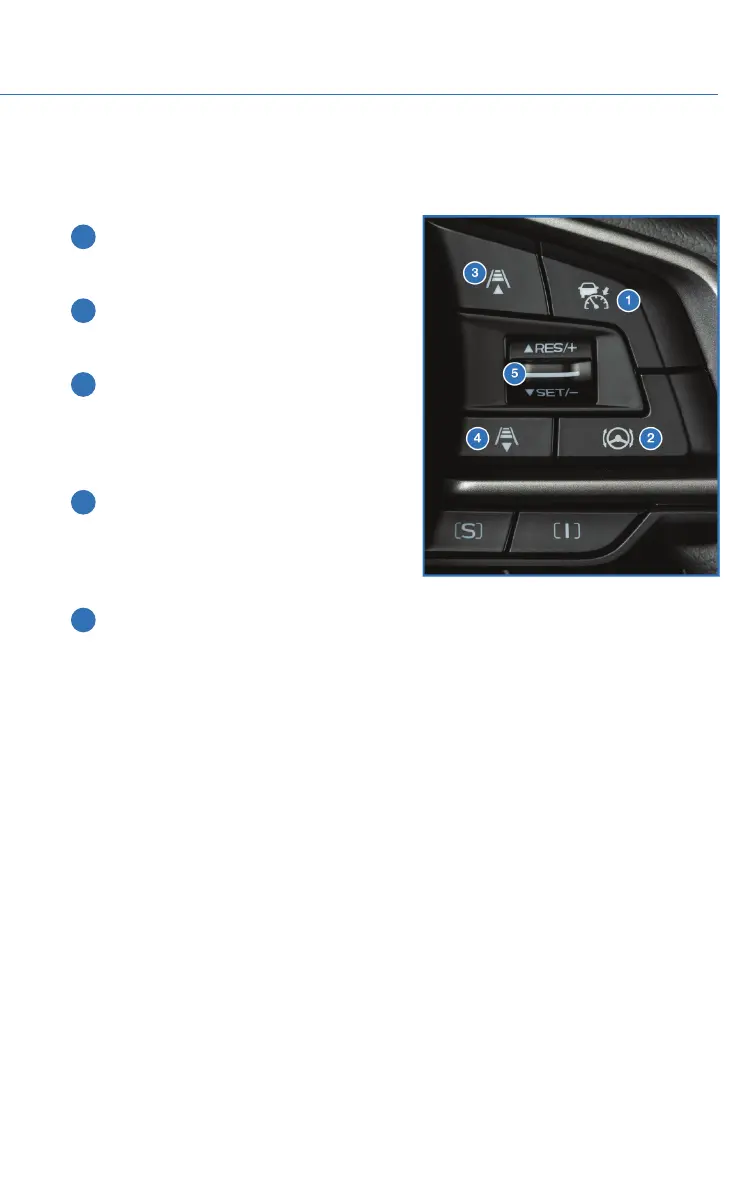
STEERING WHEEL CONTROLS
Advanced Adaptive Cruise Control
1 Adaptive Cruise Control On/Off: Press
to turn Advanced Adaptive Cruise
Control on or off.
2 Lane Keep Assist: Press to turn on or off
Lane Centering or Lane Departure
Prevention.
3 Increase Distance: Press to increase the
following distance setting while using
Advanced Adaptive Cruise Control. Press
and hold to change to Conventional
Cruise Control.
4 Decrease Distance: Press to decrease
the following distance setting while using
Advanced Adaptive Cruise Control. Press
and hold to change to Conventional
Cruise Control.
5 Resume (RES)/Increase Speed and Set
(SET)/Decrease Speed: Press the
switch down to set an initial target speed. Once set, press up or down to adjust the
target speed.
• Adjust by 5 mph:
• Briefly press the switch up to increase the target speed by 5 mph.
• Briefly press the switch down to decrease the target speed by 5 mph.
• Adjust by 1 mph:
• Press and hold the switch up to increase the target speed in 1 mph increments.
• Press and hold the switch down to decrease the target speed in 1 mph
increments.
• The Cruise Control Acceleration Characteristics can be adjusted to four different
levels depending on your preference. The four levels are:
•Lv.1Eco
• Lv. 2 Comfort
• Lv. 3 Standard
• Lv. 4 Dynamic
To change this setting, use the steering wheel mounted “i/SET” switches to access
the EyeSight
®
settings menu on the Combination Meter Display (CMD).
Advanced Adaptive Cruise Control
Switches
EYESIGHT
85















 To Next Page