CLOCK
The clock can be set manually or automatically. When set to “Auto”, the clock
automatically adjusts when a Bluetooth
®
connected phone is paired (vehicles without
navigation), or through the GPS signal (vehicles with navigation system).
Manually
Use the STARLINK
®
Touchscreen to set the clock:
1 Press the “Home” button.
2 Select “Settings”.
3 Select “Vehicle”.
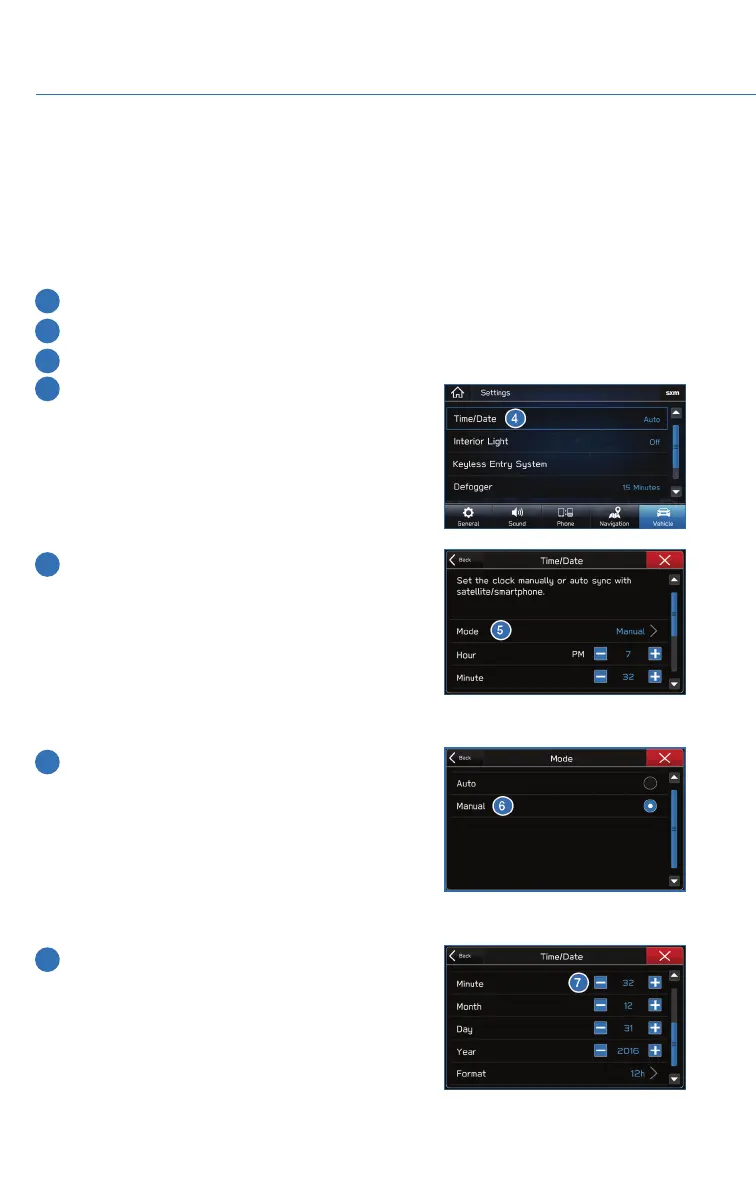
4 Select “Time/Date”.
5 Select “Mode”.
6 Select “Manual”.
7 Now adjust the time and date using the “+” and
“-” buttons. Select the check mark when finished.
For black-and-white Multi-Function Display
(MFD), use the “+” and “-” buttons next to the
clock.
SETTINGS AND UPDATES
76















 To Next Page