Automatically
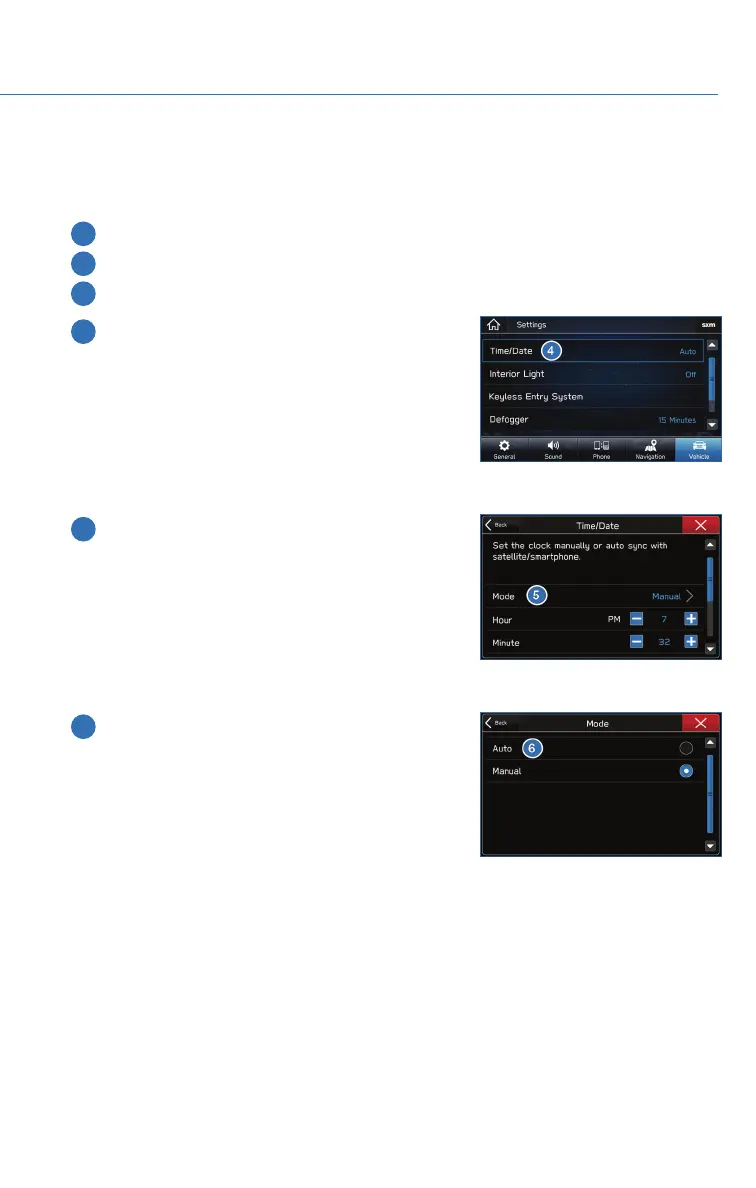
To set the clock automatically, the “Auto” mode must be selected in the clock adjustment
setting. To set the clock:
1 Press the “Home” button.
2 Select “Settings”.
3 Select “Vehicle”.
4 Select “Time/Date”.
5 Select “Mode”.
6 Select “Auto”. Select the check mark when
finished.
The clock automatically adjusts as follows:
• Systems with Navigation: Automatically adjusts the
clock when a GPS signal is available.
• Systems without Navigation: Automatically adjusts
the clock when a phone is paired and connected via
Bluetooth
®
. “Phonebook Download” must be enabled in the Phone Settings.
For step-by-step procedure to pair a phone to the SUBARU STARLINK
®
Touchscreen, see
page 94 for Android devices or page 98 for Apple devices.
SETTINGS AND UPDATES
77















 To Next Page