Audio/Audio set
. Before using Bluetooth devices,
users of any electrical medical
device other than implantable
cardiac pacemakers, cardiac re-
synchronization therapy-pace-
makers or implantable cardiover-
ter defibrillators should consult
the manufacturer of the device
for information about its opera-
tion under the influence of radio
waves. Radio waves could have
unexpected effects on the opera-
tion of such medical devices.
CAUTION
Do not leave your portable player in
the vehicle. In particular, high tem-
peratures inside the vehicle may
damage the portable player.
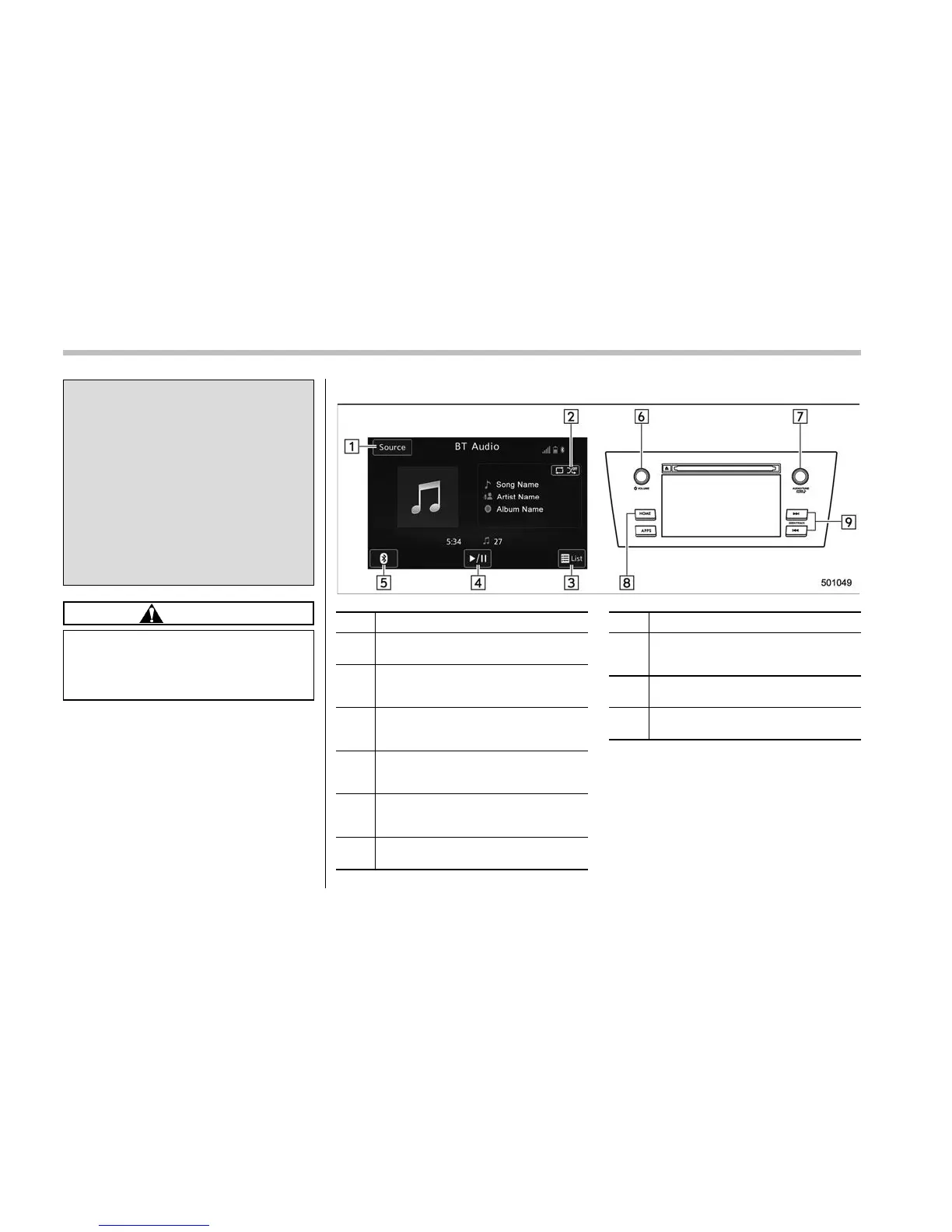
! Control screen and audio panel
No. Function
&
1
Select to display the audio source
selection screen.
&
2
Select to display the play mode
currently selected. Refer to “Select
play mode” F5-59.
&
3
Select to display as a list (for the
models with AVRCP Ver. 1.4 or high-
er).
&
4
The track pauses when touched dur-
ing playback and plays when touched
during pause.
&
5
Select to open Bluetooth Settings.
Refer to “Setting Bluetooth details”
F5-68.
&
6
Turn to adjust volume.
Press to turn the audio system on/off.
No. Function
&
7
Turn to select a track.
Press to select an audio source. Refer
to “Selecting an audio source” F5-17.
&
8
Select to display the sound setting
screen. Refer to “Unit settings” F5-18.
&
9
Press to select a track.
Press and hold to fast forward/rewind.
5-58











 To Next Page