& How to change the hands-
free phone system
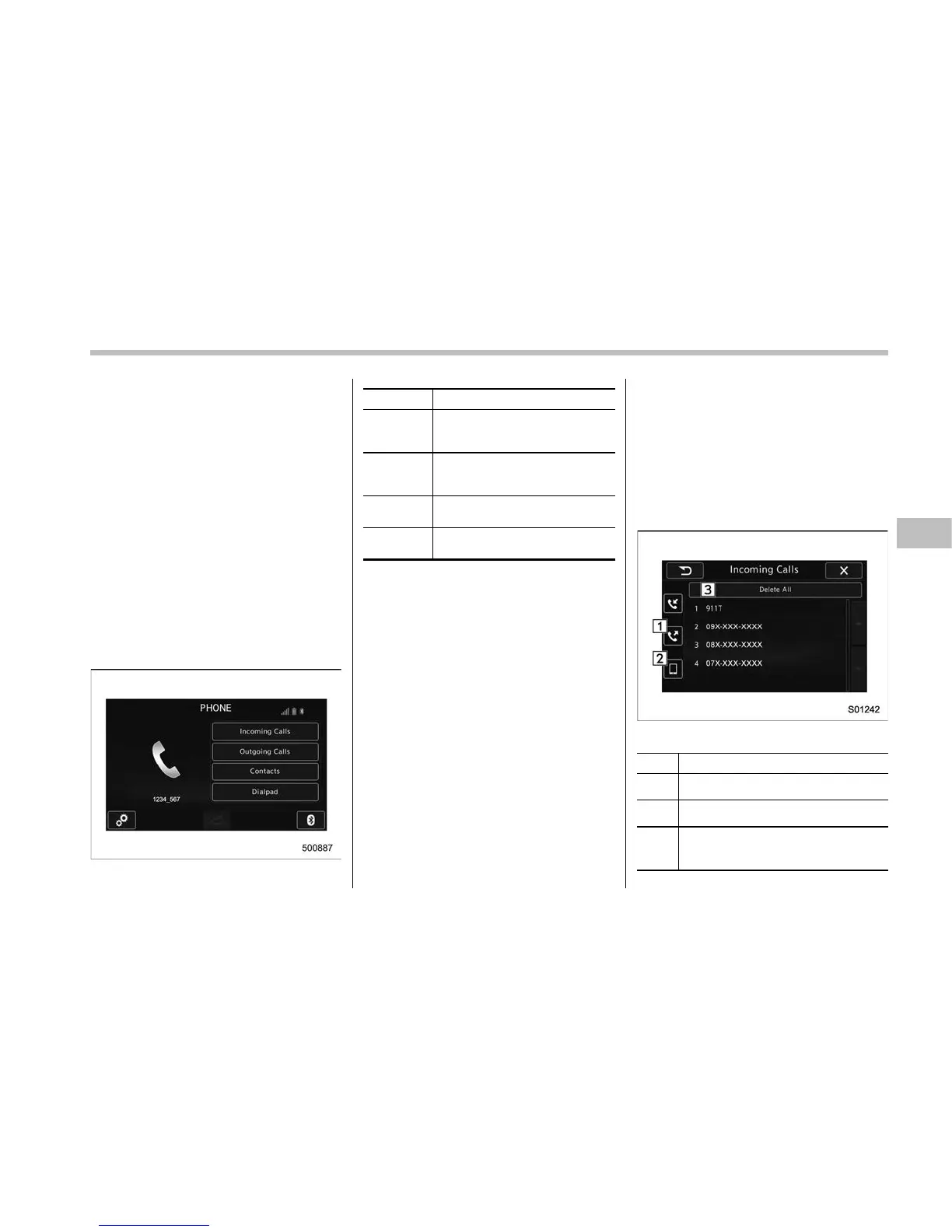
The phone (menu) screen can be used to
make a phone call. To display the hands-
free operation screen, press the HOME
button and then select the “PHONE” key,
or press the off hook switch on the
steering wheel.
& Making a call
There are several methods by which a call
can be made, as described below.
1. Press the HOME button on the audio
panel.
2. Touch the “PHONE” key.
3. Select the desired key to make a call
from the list.
Item Function
Incoming
Calls
Display the history of incoming
calls. Refer to “By incoming
calls” F5-73.
Outgoing
Calls
Display the history of outgoing
calls. Refer to “By outgoing calls”
F5-74.
Contacts
Display the phonebook. Refer to
“By contacts list” F5-74.
Dialpad
Dial a phone number. Refer to
“By Dialpad” F5-75.
NOTE
You can also make a call by using the
following functions.
. Make a call using the off hook
switch on the steering wheel. Refer to
“By off hook switch” F5-76.
. Make a call using voice operation.
Refer to “Voice command system” F5-
80.
! By incoming calls
On the phone (menu) screen, select the
“Incoming Calls” key to open the “Incom-
ing Calls” screen.
You can make a call by selecting an item
in the incoming call history list.
If there is no incoming call history, a
message appears to indicate that there
is no incoming call history data.
Incoming Calls screen
No. Function
&
1
Open the “Outgoing Calls” screen.
&
2
Open the “Contacts” screen.
&
3
Delete all incoming call history data.
The “Delete All” key is disabled when
there is no incoming call history.
Audio/Hands–free phone system
– CONTINUED –
5-73










 To Next Page