In case of emergency/Electronic parking brake – if the electronic parking brake cannot be released (models with electronic parking
brake system)
Electronic parking brake – if
the electronic parking brake
cannot be released (models
with electronic parking brake
system)
Contact your SUBARU dealer and have
your SUBARU dealer release the electro-
nic parking brake.
Access key – if access key
does not operate properly
CAUTION
Keep metallic objects, magnetic
sources and signal transmitters
away from the area between the
access key and the push-button
ignition switch. They may interfere
with the communication between
the access key and the push-button
ignition switch.
The following functions may be inoperable
because of strong radio signals in the
surrounding area or the access key
battery being low.
. Locking/unlocking doors
. Switching power status
. Starting the engine
In such cases, perform the following
procedure. When the battery of the access
key is discharged, replace it with a new
one. Refer to “Replacing battery of access
key” F11-50.
& Locking and unlocking
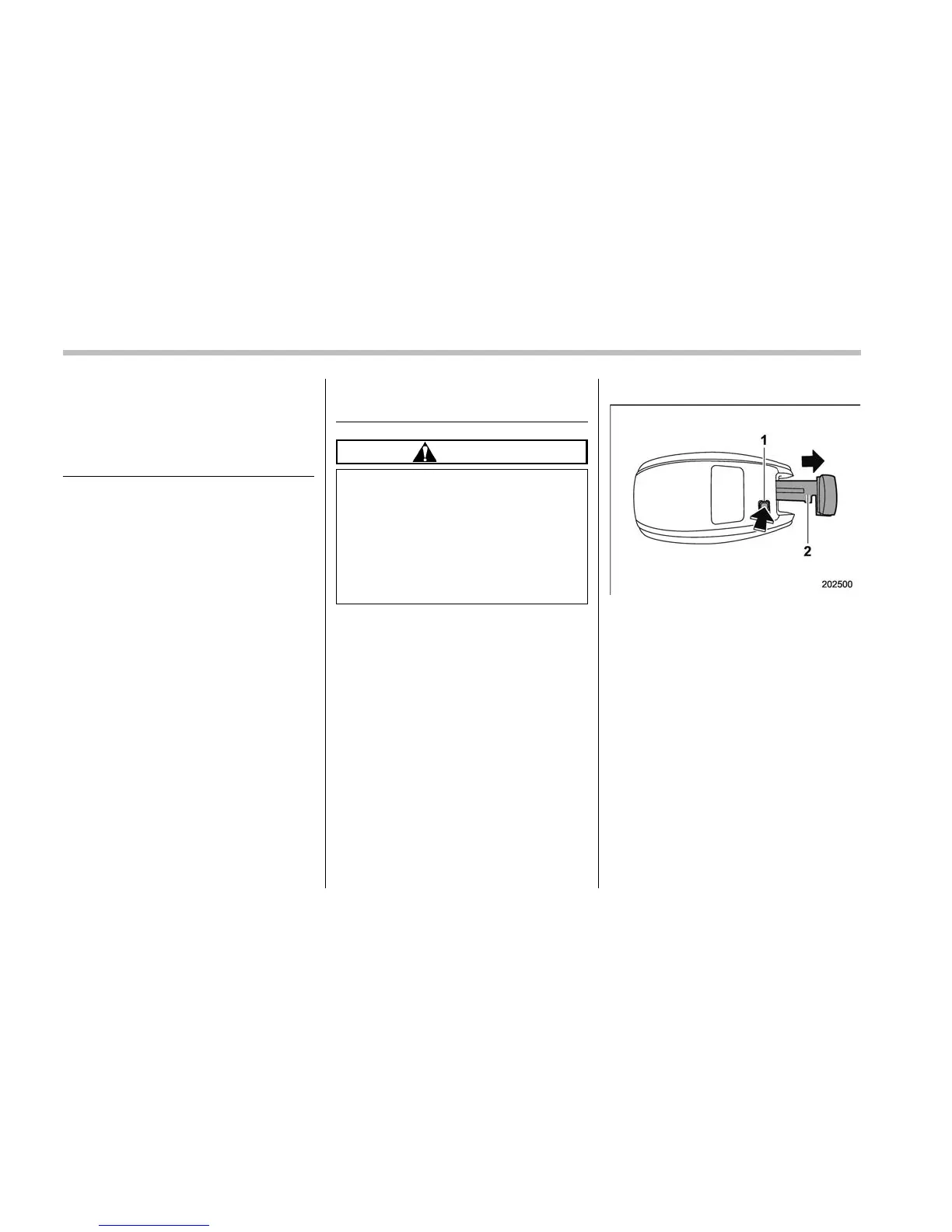
1) Release button
2) Mechanical key
While pressing the release button of the
access key, take out the mechanical key.
Lock or unlock the driver’s door with the
mechanical key.
NOTE
After locking or unlocking, be sure to
reinsert the mechanical key into the
access key.
& Switching power status
1. Apply the parking brake.
2. Shift the shift lever into neutral (MT
models) or the select lever into the “P”
position (CVT models).
9-16











 To Next Page