14
Operation
2.6 Checking the desaturation time
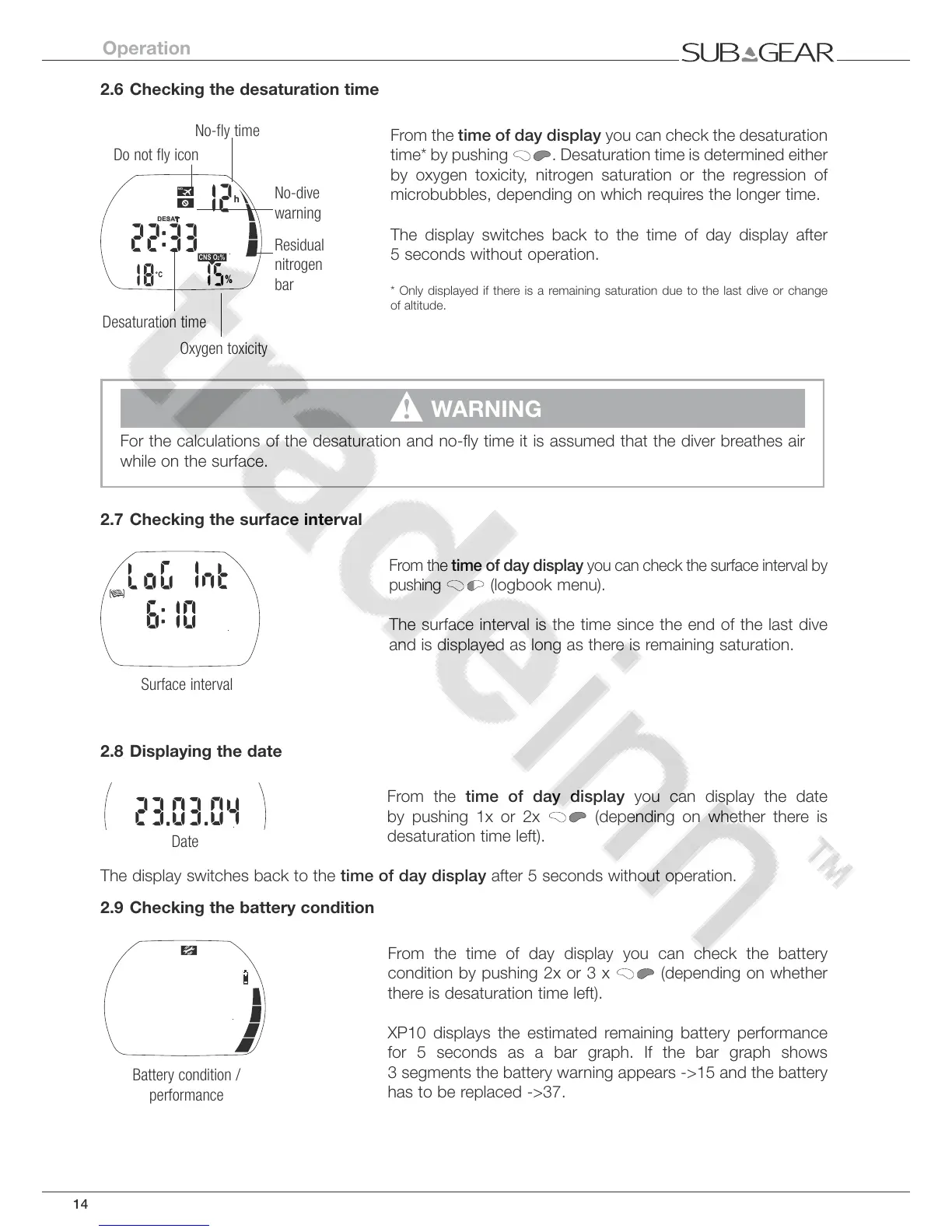
From the time of day display you can check the desaturation
time* by pushing
. Desaturation time is determined either
by oxygen toxicity, nitrogen saturation or the regression of
microbubbles, depending on which requires the longer time.
The display switches back to the time of day display after
5 seconds without operation.
* Only displayed if there is a remaining saturation due to the last dive or change
of altitude.
!
WARNING
For the calculations of the desaturation and no-fly time it is assumed that the diver breathes air
while on the surface.
2.7 Checking the surface interval
From the time of day display you can check the surface interval by
pushing
(logbook menu)
.
The surface interval is the time since the end of the last dive
and is displayed as long as there is remaining saturation.
2.8 Displaying the date
From the time of day display you can display the date
by pushing 1x or 2x
(depending on whether there is
desaturation time left).
The display switches back to the time of day display after 5 seconds without operation.
2.9 Checking the battery condition
From the time of day display you can check the battery
condition by pushing 2x or 3 x
(depending on whether
there is desaturation time left).
XP10 displays the estimated remaining battery performance
for 5 seconds as a bar graph. If the bar graph shows
3 segments the battery warning appears ->15 and the battery
has to be replaced ->37.



 To Next Page