5
English
Quick reference
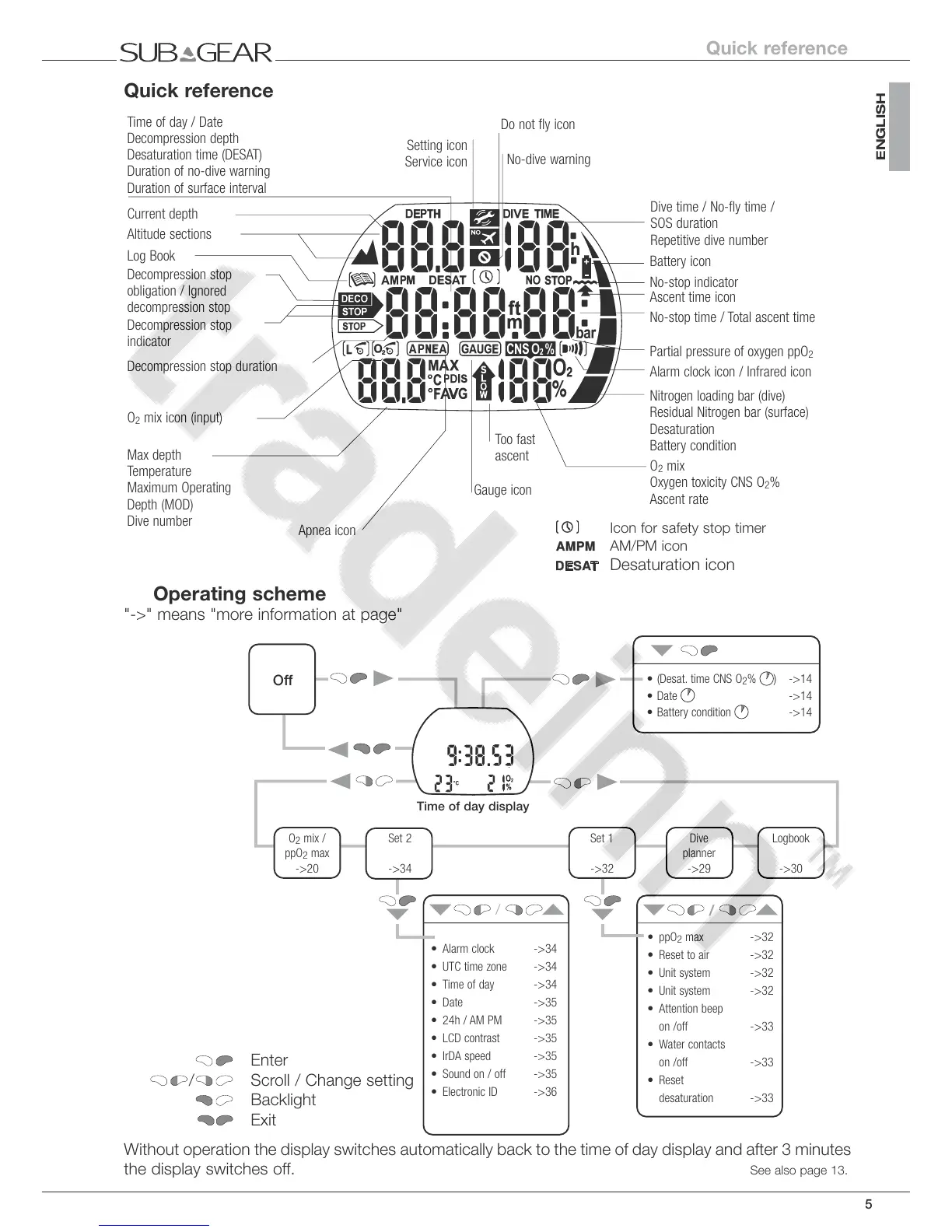
Time of day / Date
Decompression depth
Desaturation time (DESAT)
Duration of no-dive warning
Duration of surface interval
Current depth
Do not fly icon
No-dive warning
Battery icon
No-stop indicator
Ascent time icon
No-stop time / Total ascent time
Partial pressure of oxygen ppO
2
Alarm clock icon / Infrared icon
Nitrogen loading bar (dive)
Residual Nitrogen bar (surface)
Desaturation
Battery condition
O
2
mix
Oxygen toxicity CNS O
2
%
Ascent rate
Too fast
ascent
Gauge icon
Dive time / No-fly time /
SOS duration
Repetitive dive number
Altitude sections
Log Book
Decompression stop
obligation / Ignored
decompression stop
Decompression stop
indicator
Decompression stop duration
O
2
mix icon (input)
Setting icon
Service icon
Apnea icon
Max depth
Temperature
Maximum Operating
Depth (MOD)
Dive number
Icon for safety stop timer
AMPM
AM/PM icon
DESAT
Desaturation icon
Operating scheme
"->" means "more information at page"
/
/
Enter
/ Scroll / Change setting
Backlight
Exit
Off
Time of day display
• (Desat. time CNS O
2
% ) ->14
• Date
->14
• Battery condition
->14
• ppO
2
max ->32
• Reset to air ->32
• Unit system ->32
• Unit system ->32
• Attention beep
on /off ->33
• Water contacts
on /off ->33
• Reset
desaturation ->33
• Alarm clock ->34
• UTC time zone ->34
• Time of day ->34
• Date ->35
• 24h / AM PM ->35
• LCD contrast ->35
• IrDA speed ->35
• Sound on / off ->35
• Electronic ID ->36
O
2
mix /
ppO
2
max
->20
Set 2
->34
Set 1
->32
Logbook
->30
Dive
planner
->29
Without operation the display switches automatically back to the time of day display and after 3 minutes
the display switches off. See also page 13.
Quick reference



 To Next Page