29
English
Dive planner
IV Dive planner
PLn: XP10
has a dive planner which allows the planning of no-stop dives.
Basis of the planning: • selected fraction of oxygen and MOD
• water temperature of the most recent dive
• altitude range (if any)
• status of saturation at the time the dive planner is selected
• assuming a normal workload of the diver and observance of
the prescribed ascent rates
1 Planning a no-stop dive
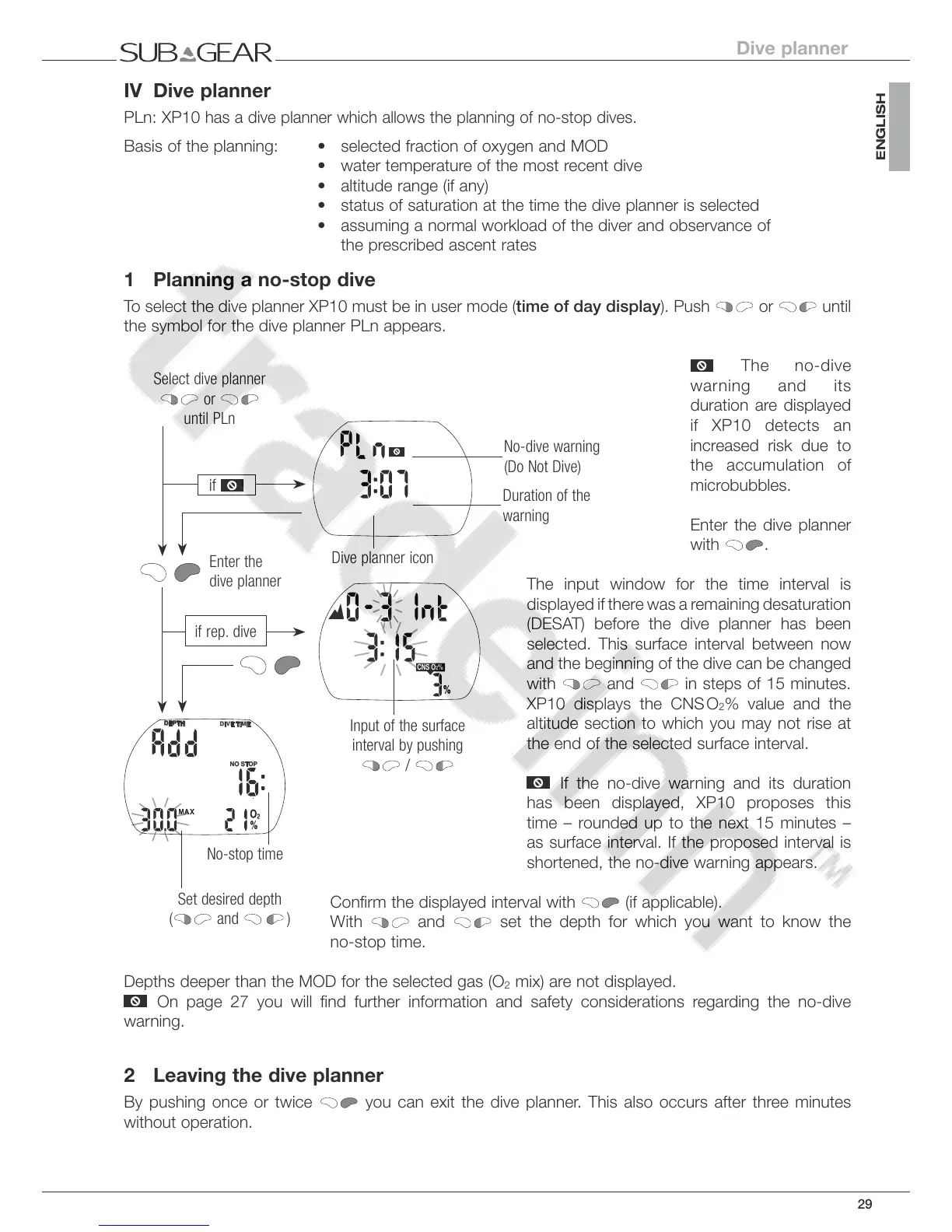
To select the dive planner XP10 must be in user mode (time of day display). Push or until
the symbol for the dive planner PLn appears.
The no-dive
warning and its
duration are displayed
if XP10 detects an
increased risk due to
the accumulation of
microbubbles.
Enter the dive planner
with
.
The input window for the time interval is
displayed if there was a remaining desaturation
(DESAT) before the dive planner has been
selected. This surface interval between now
and the beginning of the dive can be changed
with
and in steps of 15 minutes.
XP10 displays the CNS O
2
% value and the
altitude section to which you may not rise at
the end of the selected surface interval.
If the no-dive warning and its duration
has been displayed, XP10 proposes this
time – rounded up to the next 15 minutes –
as surface interval. If the proposed interval is
shortened, the no-dive warning appears.
Confirm the displayed interval with
(if applicable).
With and set the depth for which you want to know the
no-stop time.
Depths deeper than the MOD for the selected gas (O
2
mix) are not displayed.
On page 27 you will find further information and safety considerations regarding the no-dive
warning.
2 Leaving the dive planner
By pushing once or twice you can exit the dive planner. This also occurs after three minutes
without operation.
Input of the surface
interval by pushing
/



 To Next Page