31
English
Operation
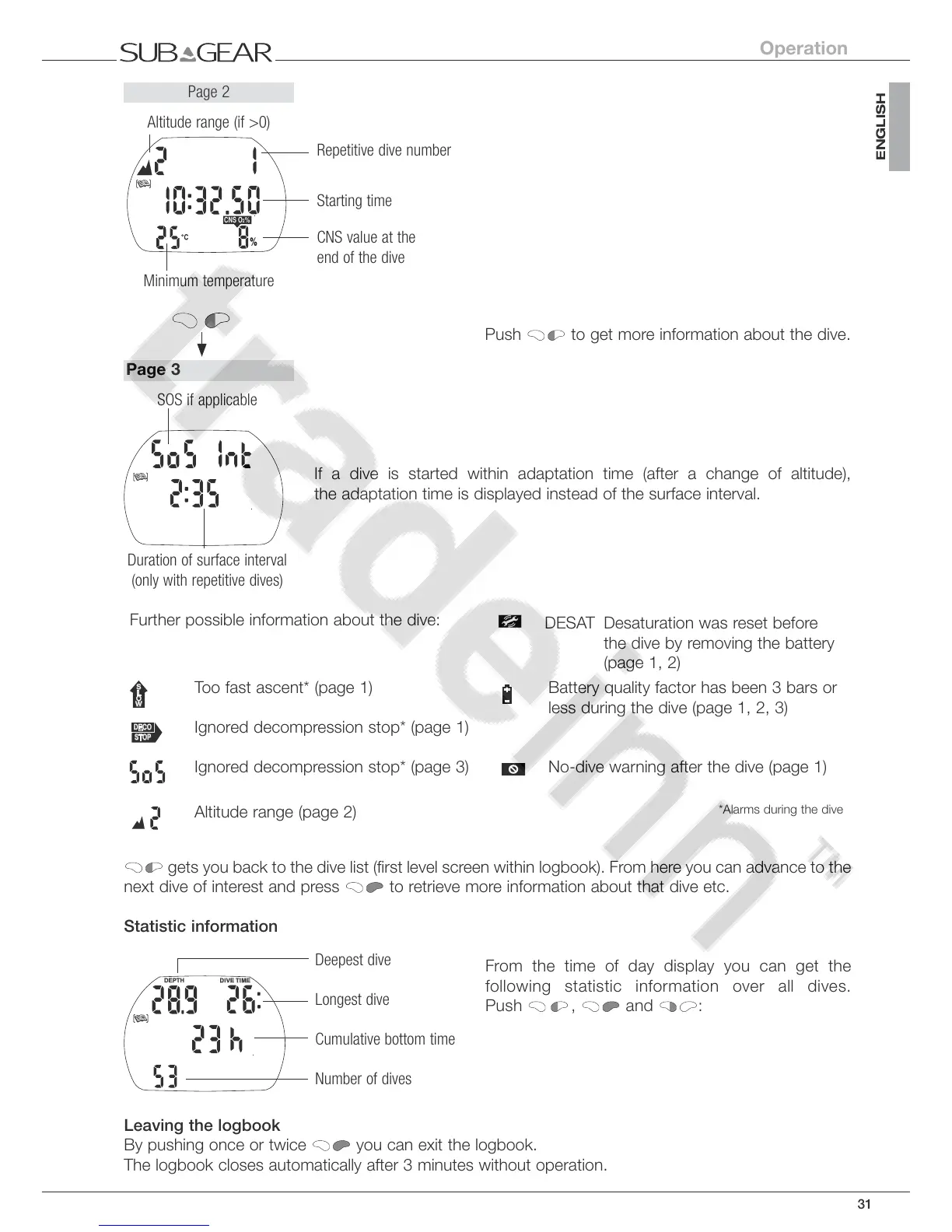
Push to get more information about the dive.
If a dive is started within adaptation time (after a change of altitude),
the adaptation time is displayed instead of the surface interval.
Further possible information about the dive:
DESAT Desaturation was reset before
the dive by removing the battery
(page 1, 2)
Too fast ascent* (page 1) Battery quality factor has been 3 bars or
less during the dive (page 1, 2, 3)
Ignored decompression stop* (page 1)
Ignored decompression stop* (page 3) No-dive warning after the dive (page 1)
Altitude range (page 2)
*Alarms during the dive
gets you back to the dive list (first level screen within logbook). From here you can advance to the
next dive of interest and press to retrieve more information about that dive etc.
Statistic information
From the time of day display you can get the
following statistic information over all dives.
Push
, and :
Leaving the logbook
By pushing once or twice
you can exit the logbook.
The logbook closes automatically after 3 minutes without operation.
Repetitive dive number
Starting time
CNS value at the
end of the dive
Page 2
Minimum temperature
Altitude range (if >0)
Duration of surface interval
(only with repetitive dives)
SOS if applicable
Page 3
Deepest dive
Longest dive
Cumulative bottom time
Number of dives



 To Next Page