S CLASS™ 2 cutter OPOSCAM User’s Manual
Contour Cutting 3-14
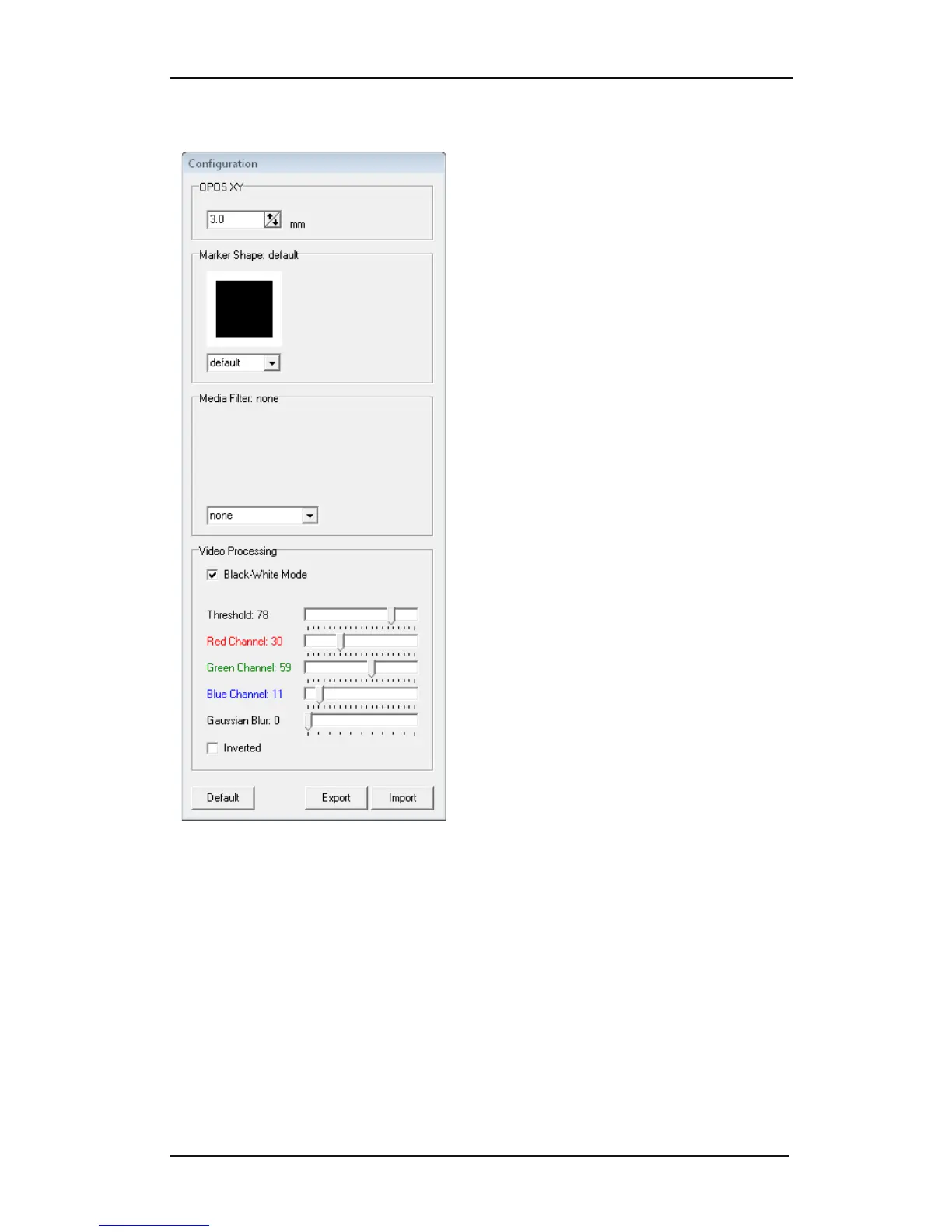
3.6.2 Configuration Window
Thickness of the OPOSXY line. This value has to
be the same as the thickness of the printed
OPOSXY line, otherwise the program will not
recognize the line. If the line is recognized, then
a green rectangle is put around it
Mark Shape: With this an earlier saved mark
shape can be chosen.
Media Filter: With this an earlier saved mark
shape can be chosen.
The program Camera Control does always its
calculation in black-white mode. If this option is
checked, then the user can see which the camera
takes in account for its calculations. This option
is checked by default after installation. The
program switches to color mode when setting
media Filter.
The color filters and threshold sliders can be
used to filter out colors or darker patches in the
media. If those sliders are used to try and get a
better image, then it is recommended to check
the black-white box so the user can see what the
computer actually calculates with. Settings of
the slider can be saved for future reference.


 To Next Page