SummaCut D60-D120 Service Manual
3.2.2. FRONT PANEL CONTROLS
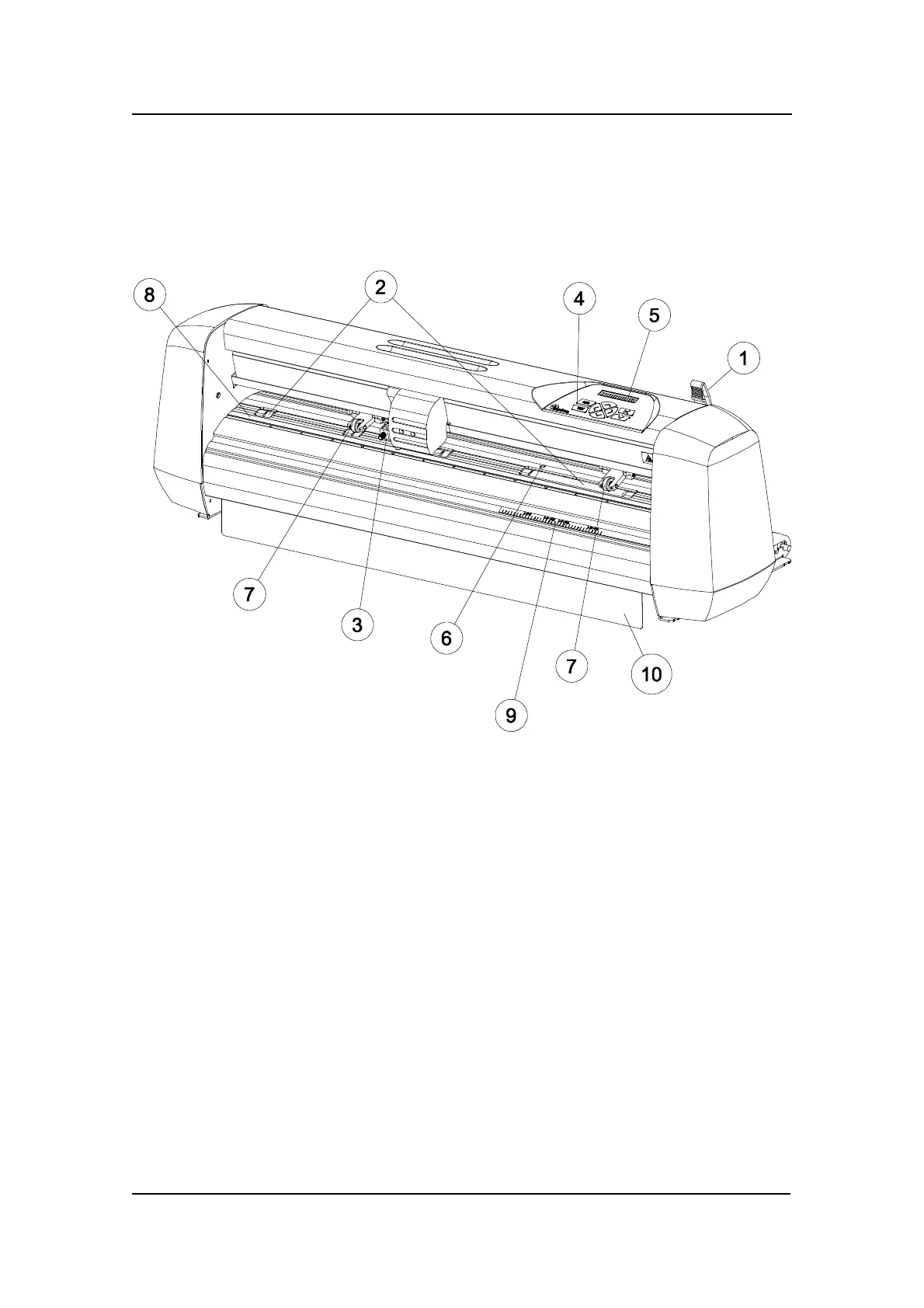
The figure below shows the location of the main components.
SUMMACUT SERIES, FRONT VIEW
1. Pinch roller lever arm: - This lever is used to raise and lower the pinch rollers
during media loading.
2. Media Drive Sleeves: - The media drive sleeves move the media only when the
pinch rollers are in the ‘down’ position.
3. Tool Carriage: - The tool carriage is the mount for the knife holder and the pen.
4. Control Panel: - The control panel contains 8 keys. All cutter activity can be
initiated from the control panel. Each control panel function is explained in
Section 1.
5. Display: - The 16-character display informs the user about the current status of
the cutting process or actions, which need to be taken.
6. Sensor: - The sensor detects the end of media to avoid any damage to the
cutting strip
I-6 Introduction



 To Next Page