33
Software Reference
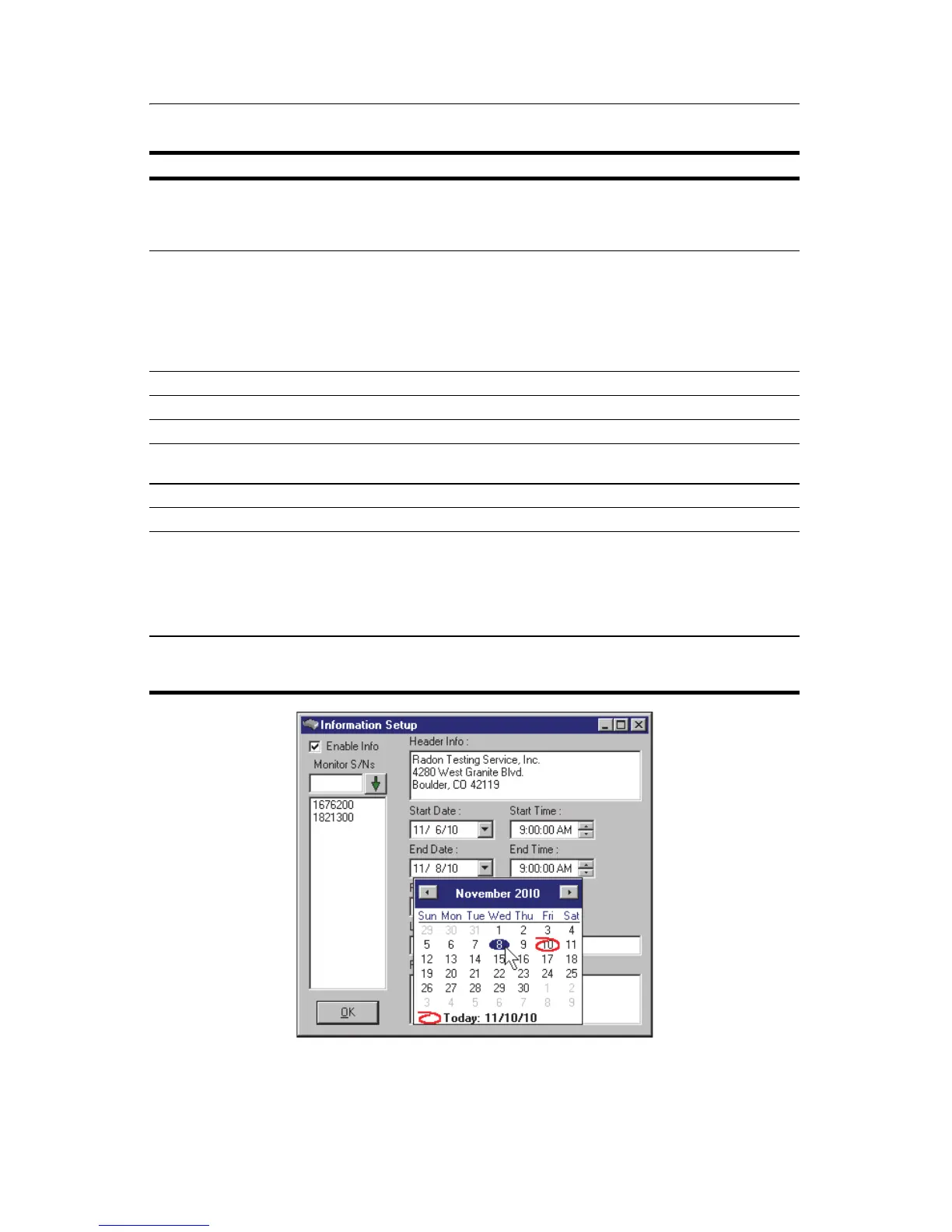
Figure 6-2. Information Setup Calendar Feature
Table 3. Radon Monitor Report Information
Parameter Description
Enable Info • Mark this checkbox if you want the information to appear in
the report.
• Clear this checkbox if you want none of the information to ap-
pear in the report.
Monitor S/Ns Enter the serial number for each Model 1027 you are using, and
click the down arrow to place the serial number in the list.
• Prior to transferring a report to your computer, double-click the
serial number you want to appear in the Radon Monitor S/N
box.
• To remove a serial number from the list, click on it and then
click Delete.
Header Info Enter text to appear at top of report.
Start Date/Start Time Select date and time test started.
End Date/End Time Select date and time test ended.
Radon Monitor S/N In S/N list, double-click serial number of Model 1027 used in test
to select it.
Location Enter location of Model 1027 during the test.
Footer Info Enter text to appear at bottom of report.
Date boxes (Figure 6-2) • Use drop down arrow to open a calendar, then scroll to de-
sired month and double-click desired date. Selected date ap-
pears in Date box.
• Alternately, type date directly in box, or highlight month, day
or year and increment or decrement value using up/down ar-
row keys.
Time boxes • Type in times desired, or
• Highlight hours, minutes, or seconds and click arrows to incre-
ment or decrement selected value.



 To Next Page