9
Features of your Origins Espresso Machine
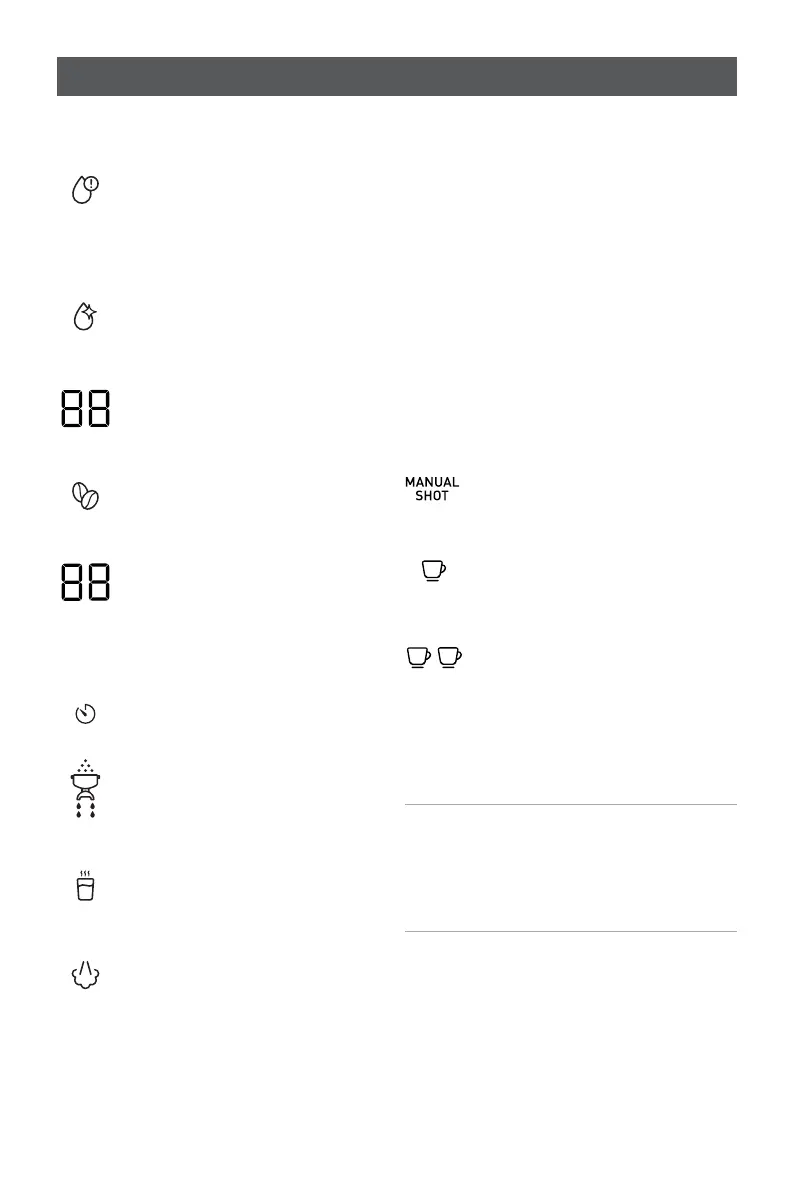
1. LED Display
(Icons displayed left to right).
1A. Low Water Alert
Illuminates when the water in
the reservoir needs topping up
and flashes when the unit has
run out of water.
1B. Clean Icon
Illuminates when the cleaning
cycle needs to be performed.
1C. Grind Setting Position
Indicates the grind size selected
when rotating the bean hopper.
1D. Grind Icon
Illuminates whenever the bean
hopper is installed.
1E. Extraction Timer
Counts in one second intervals
whilst your espresso is brewing
to allow timing of the perfect
espresso.
1F. Timer Icon
Illuminates during extraction.
1G. Group Handle Icon
Illuminates to show the unit is
performing grind or brewing
functions.
1H. Hot Water Icon
Illuminates when Hot Water
is being dispensed.
1I. Steam Icon
Illuminates when steam
is being dispensed.
2. Power on Toggle Switch
Push down to turn espresso
machine on and off.
3. Power on Indicator
Illuminates whenever the unit
is turned on, illumination will
pulse during heat-up.
4. Espresso Extraction Buttons
All three icons will illuminate when
machine is ready for a selection to be
made. When the button is pressed the
icon will remain illuminated and the
other icons will go out.
4A. Manual Shot Button
Press to start and stop the
manual dose of your espresso
.
4B. ONE CUP Button
Press for a perfectly dosed
single espresso shot.
4C. TWO CUP Button
Press for a perfectly dosed
double espresso shot.
5. Hot Water and Steam Selection Dial
Rotate to select the appropriate
function.
Note: Dual Thermoblock Heating
System means you can extract coffee
and steam milk at the same time. You
cannot extract coffee and dispense hot
water at the same time.











 To Next Page