SunFounder 3in1 Kit
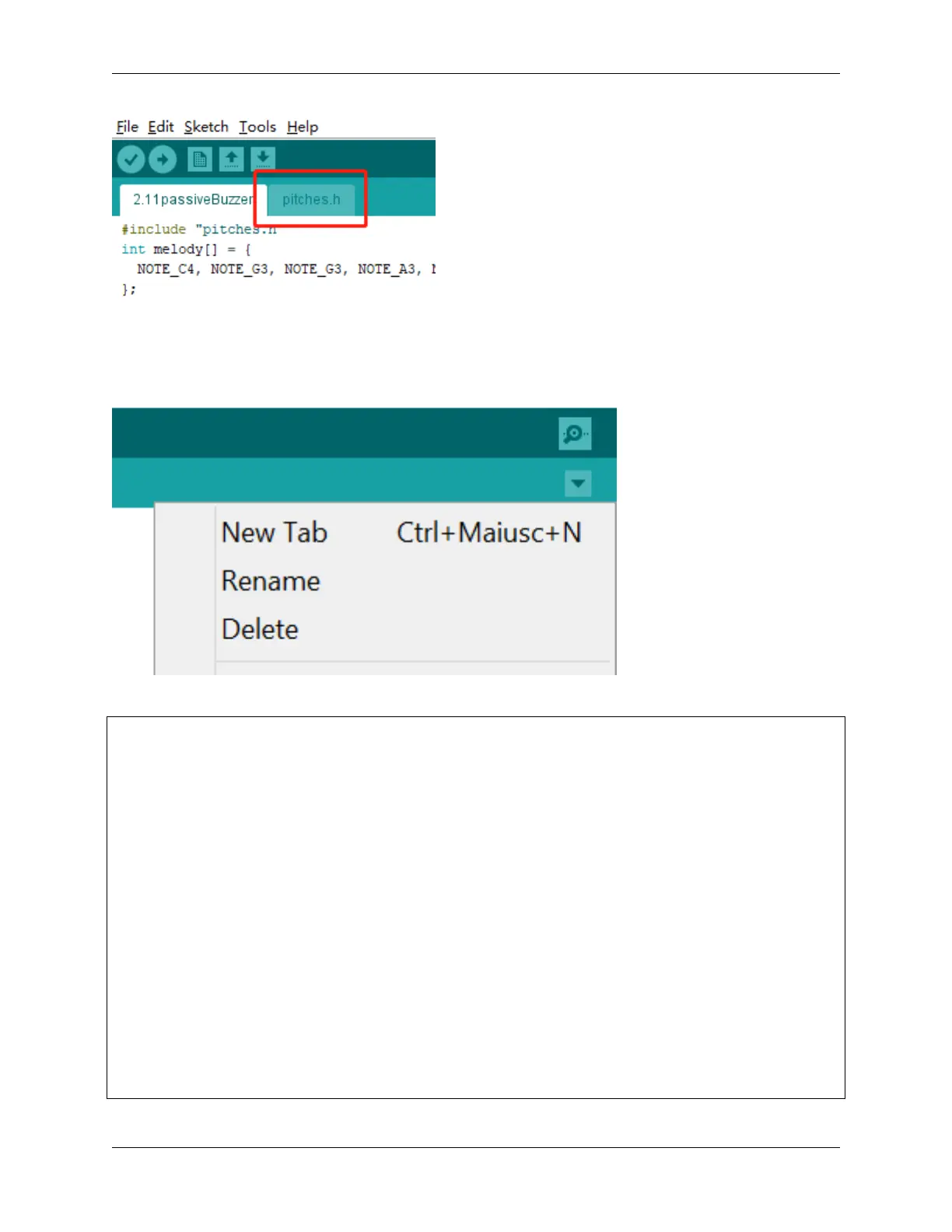
After you open the code file, if you cannot open the pitches.h code, you can just create one manually. The steps are
as follows:
To make the pitches.h file, either click on the button just below the serial monitor icon and choose New Tab, or use
Ctrl+Shift+N.
Then paste in the following code and save it as pitches.h:
/*****************
Public Constants
*****************/
#define NOTE_B0 31
#define NOTE_C1 33
#define NOTE_CS1 35
#define NOTE_D1 37
#define NOTE_DS1 39
#define NOTE_E1 41
#define NOTE_F1 44
#define NOTE_FS1 46
#define NOTE_G1 49
#define NOTE_GS1 52
#define NOTE_A1 55
#define NOTE_AS1 58
#define NOTE_B1 62
#define NOTE_C2 65
#define NOTE_CS2 69
#define NOTE_D2 73
#define NOTE_DS2 78
(continues on next page)
154 Chapter 4. Basic Projects



 To Next Page