User Manual 2 LCD Operation
7
2.3 Main Screen
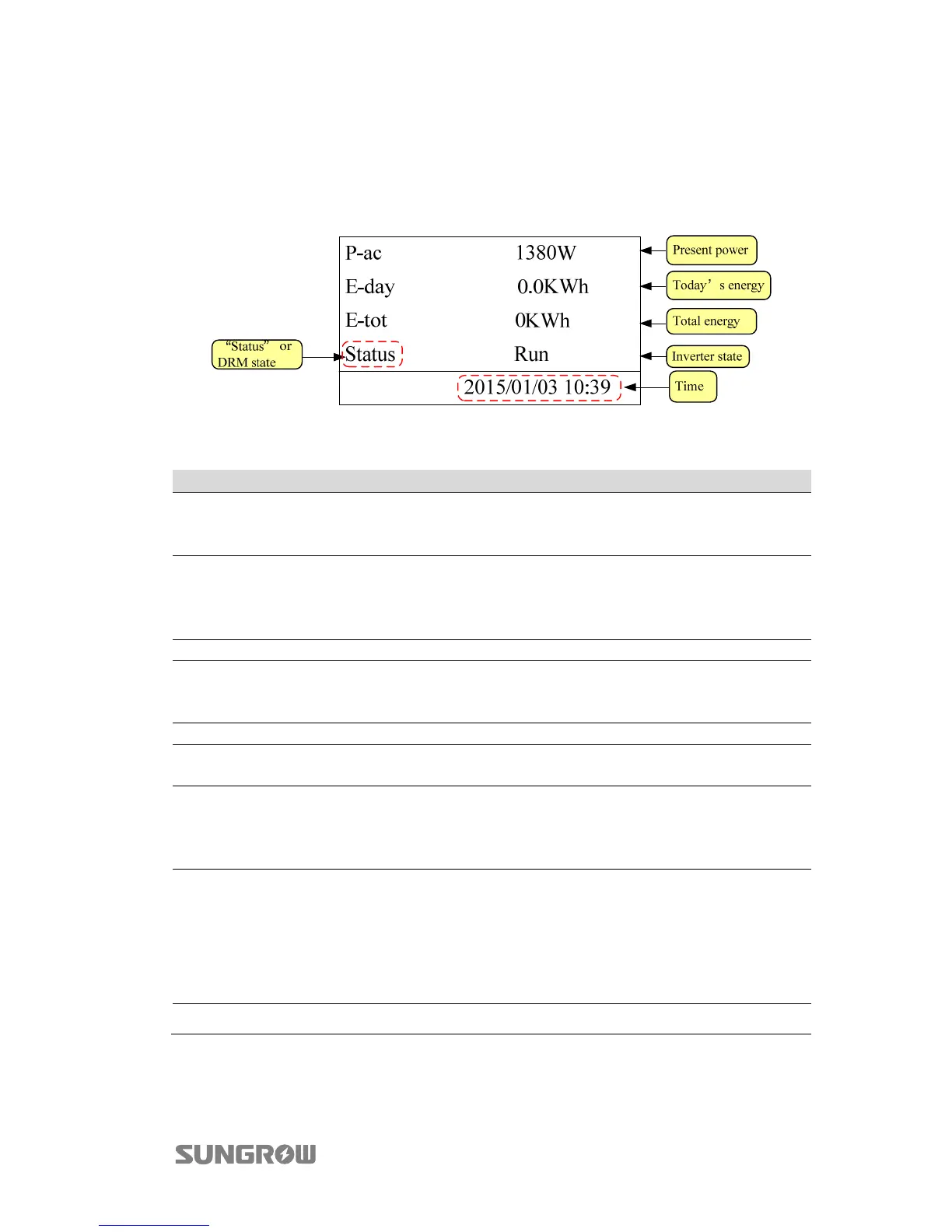
The LCD display will enter the main screen after successful commissioning, as shown
in Fig. 2-2.
Fig. 2-2 Main screen
Tab. 2-2 Description of the main screen
Status Description
Run
After being energized, inverter tracks the PV arrays’ maximum power
point (MPP) and converts the DC power into AC power. This is the
normal operation mode.
Standby
Inverter enters Standby mode when DC input is insufficient or with the
DRM0 command from the DRED. In this mode inverter will wait within
the Standby duration (set by user, refer to “2.9 Setting the Running
Parameters”).
Stop Inverter is stopped.
Key-stop
Inverter will stop running by manual “stop” via the LCD menu. In this
way, inverter internal DSP stops. To restart the inverter, manually start
via the LCD menu.
Startup The inverter is initializing and synchronizing with the grid.
Dispatch
Inverter output power can be adjusted via the LCD menu. The value of
Pac limit is lower than 100%.
Derating
Output derating is a way to protect the inverter form overload or
potential faults.
Situations require inverter power derating are too high internal
temperature, too low grid voltage and so on.
Fault ххх
If a fault occurs, inverter will automatically stop running, disconnect the
AC relay, and display the fault information on the LCD display with the
“FAULT” indicator on. “ххх” is the fault code, e.g. “010”.
Once the fault is removed in recovery time (set by user, refer to “2.9
Setting the Running Parameters”), inverter will automatically resume
running.
Warn ххх Warning information is detected. “ххх” is the warning code, e.g. “070”.



 To Next Page