User Manual 2 LCD Operation
15
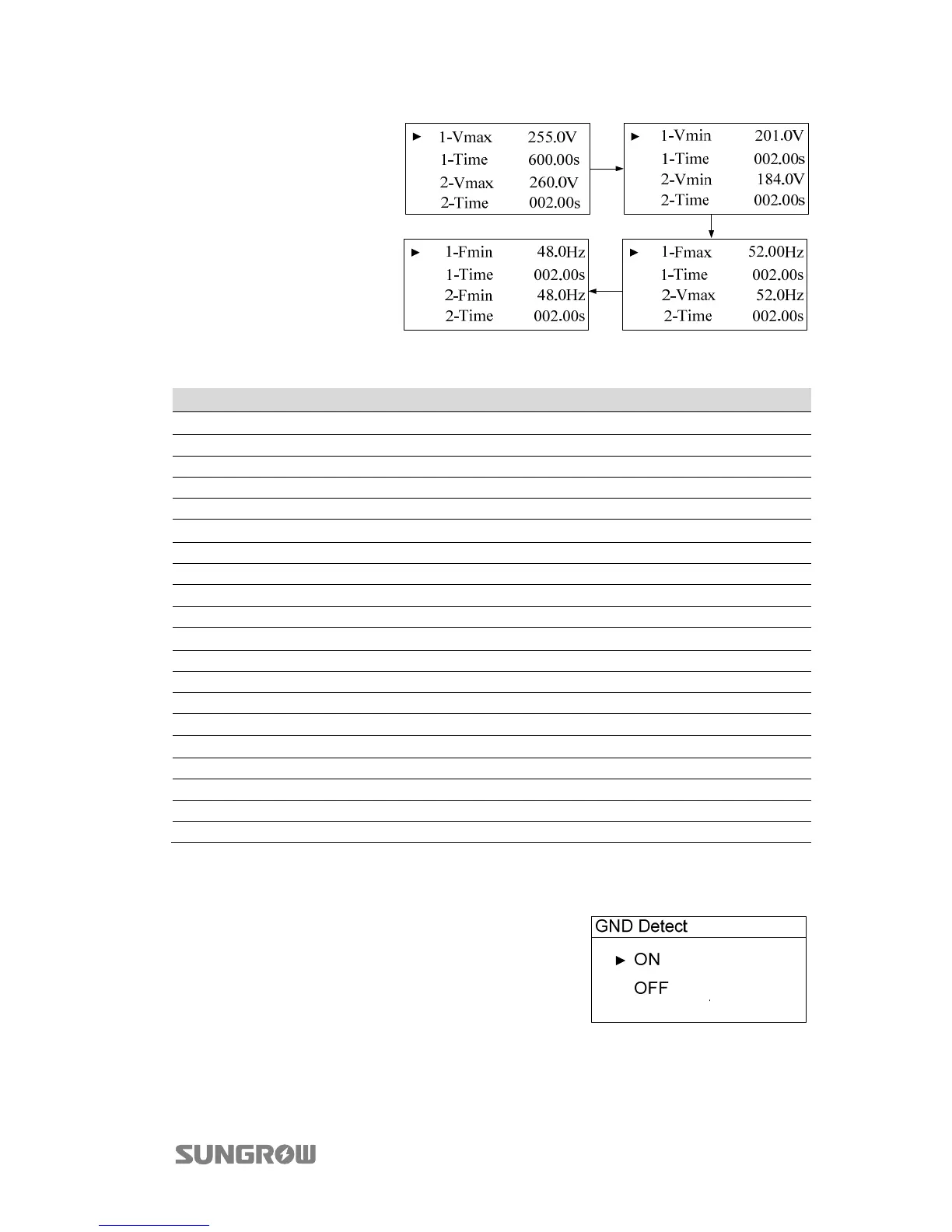
Multi-stage Protection
Parameter Setting:
Touch to select
parameter, touch to
move cursor and touch
to set the appropriate
value. Confirm settings
by pressing .
Tab. 2-8 Multi-stage Protection Parameters Explanation
Parameter Explanation
Max-V. prot
Over-voltage protection
1-Vmax Stage 1 Grid over-voltage (U>)
1-Time Stage 1 Grid over-voltage (U>) tripping time
2-Vmax Stage 2 Grid over-voltage (U>>)
2-Time Stage 2 Grid over-voltage (U>>) tripping time
Min-V. prot
Under-voltage protection
1-Vmin Stage 1 Grid under-voltage (U<)
1-Time Stage 1 Grid under-voltage (U<) tripping time
2- Vmin Stage 2 Grid under–voltage (U<<)
2-Time Stage 2 Grid under–voltage (U<<) tripping time
Max-F. prot
Over-frequency protection
1- Fmax Stage 1 Grid over-frequency (f>)
1- Time Stage 1 Grid over-frequency (f>) tripping time
2- Fmax Stage 2 Grid over-frequency (f>>)
2- Time Stage 2 Grid over-frequency (f>>) tripping time
Min-F. prot
Under-frequency protection
1- Fmin Stage 1Grid under-frequency (f<)
1- Time Stage 1 Grid under-frequency (f<) tripping time
2- Fmin Stage 2 Grid under-frequency (f<<)
2- Time Stage 2 Grid under-frequency (f<<) tripping time
2.10.3 GND Detection
Touch to select ON/Off and confirm settings by
pressing .
Select ON to enable the GND Detect function.
When the enclosure of the inverter is not grounded, the code 106 will be shown on the
main screen and the buzzer inside will sound at the same time.



 To Next Page