2 LCD Operation User Manual
8
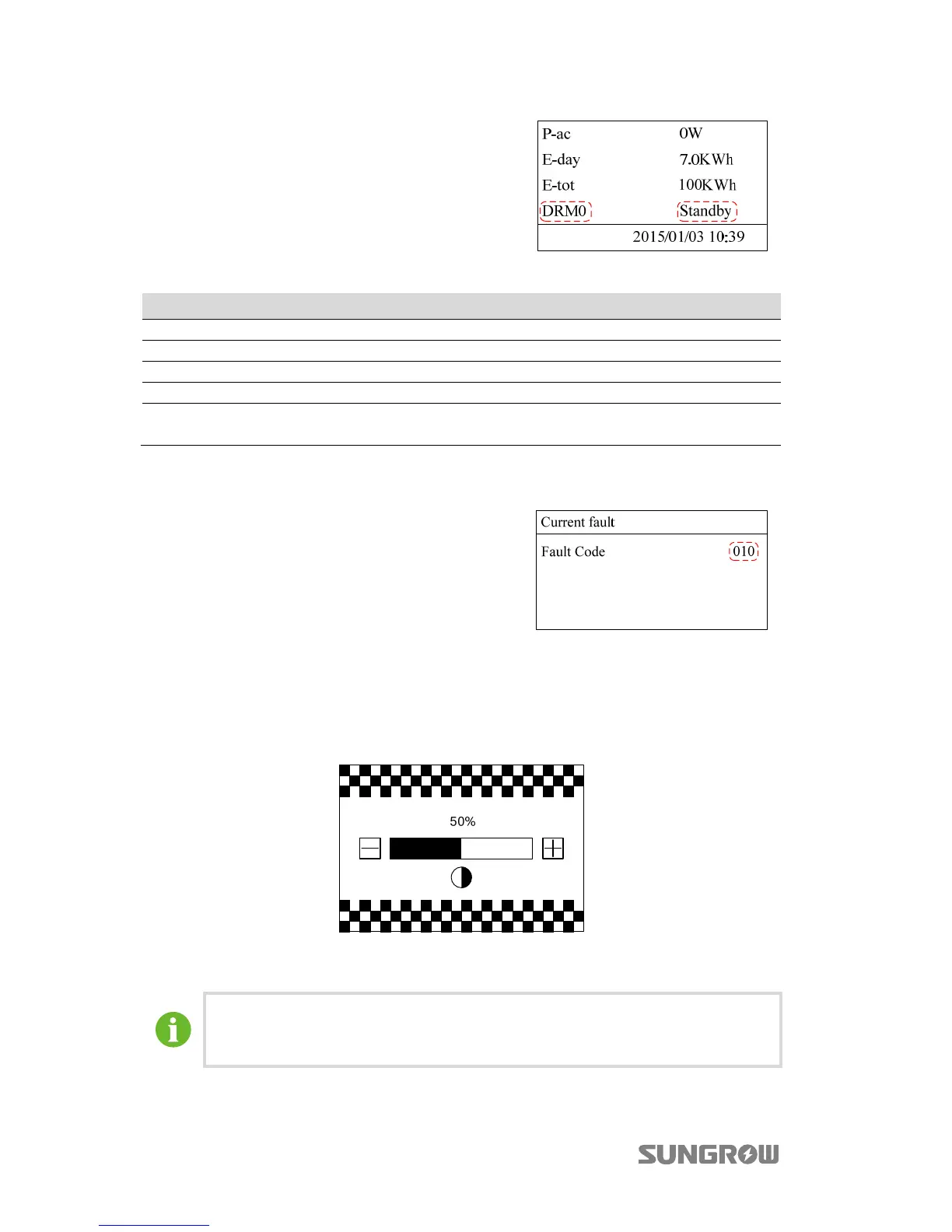
If a DRED is connected to the eShow and the
DRED activates a DRM command, the DRM
state will be shown on the main screen, as
shown in the figure.
Tab. 2-3 Demand Response Modes (DRMs)
Mode Explanation
DRM0 The inverter is in the state of standby.
DRM5 The export power to the grid is 0%.
DRM6 The export power to the grid is no more than 50% of the rated power.
DRM7 The export power to the grid is no more than 75% of the rated power.
DRM8
The export power to the grid is 100%, but subject to the constraints from
other active DRMs.
Viewing Current Fault
If inverter is in “Fault
state, touch to
view “Current fault” information. To know
the meaning of the fault code, please
refer to “3.1 Troubleshooting”.
2.4 Contrast Adjustment
Step 1 Press/touch on the main screen to enter the contrast adjustment screen.
Step 2 Touch to increase the setting value and touch to decrease the value.
Step 3 Press to confirm the contrast setting.
Contrast adjustment range: 0…100%
Recommended value: 50% or 60%.



 To Next Page