User Manual 2 LCD Operation
17
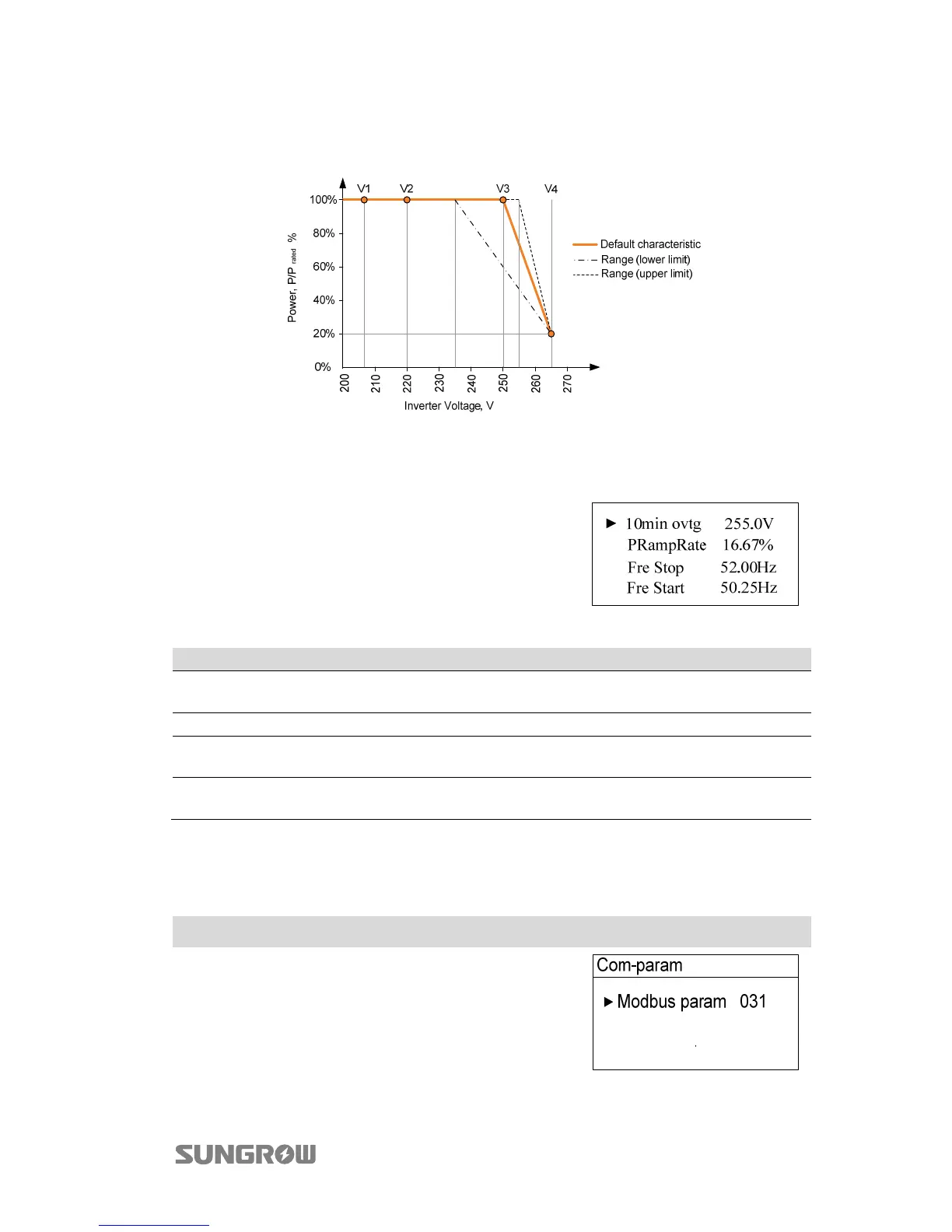
The response curve is defined by the voltage reference values and corresponding
power levels.
Fig. 2-5 Power Response Curve in P(u) Mode
2.10.7 Setting Other Parameters
Touch to move the cursor and touch to
change value. Press to confirm setting.
Tab. 2-10 Description of Other Parameters
Parameter Description Default Range
10min ovtg
10-minute overvoltage protective
value
255.0 V 244 V...258 V
PRampRate The ramp rate of power variation 16.67% 5% ~100%
Fre Stop
The Stop frequency value for
over-frequency derating
52.00 Hz 51.00Hz...52.00Hz
Fre Start
The Start frequency value for
over-frequency derating
50.25 Hz 50.25Hz...52.00Hz
2.11 Setting the Communication Parameters
Main Screen (Press )→Menu (Touch ×6)→Com-param (Press )
Touch to move the cursor and touch to set the
appropriate value. Confirm settings by pressing .
Device address range: 1-247.



 To Next Page