2 LCD Operation User Manual
12
2.9 Setting the Running Parameters
Main Screen (Press )→Menu (Touch ×4)→Run-param (Press )
On the “Run-param” screen, touch to select one
item and press to enter the setting interface.
For each item, touch to move the cursor and
touch to set the appropriate value.
Confirm settings by pressing .
Tab. 2-6 Description of Running Parameters
Parameter Description Default Range
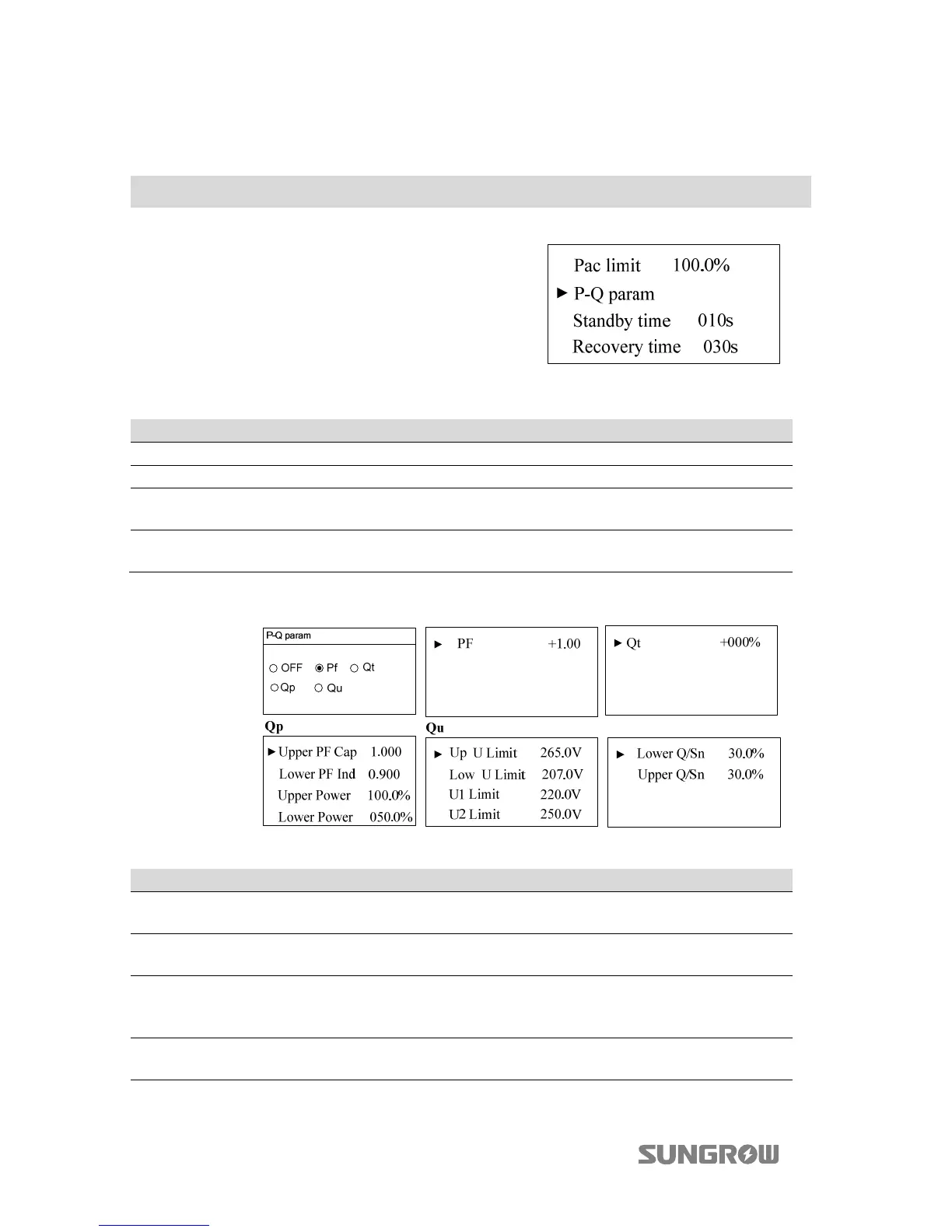
Pac limit Inverter active power limitation 100.0% 0~100%
P-Q param Power factor param - -
Standby time
Time from inverter standby to
startup
10s 20~255s
Recovery time
Time from inverter fault is
removed to standby
30s
[IT: 300s]
0-900s
Select P-Q param and touch to select the mode. Press to enter the submenu.
Tab. 2-7 Description of P-Q param
Parameter Description Default Range
OFF
Disable the function of
reactive power regulating.
- -
PF Inverter output power factor +1.000
-1.000~-0.800/
+0.800~+1.000
Qt
The maximum ratio of reactive
power to rated apparent
power as %.
-060%...+060%
Qp Upper PF Cap
Power factor of point P1 in the
Qp mode curve
1.000 0.9…1



 To Next Page