52
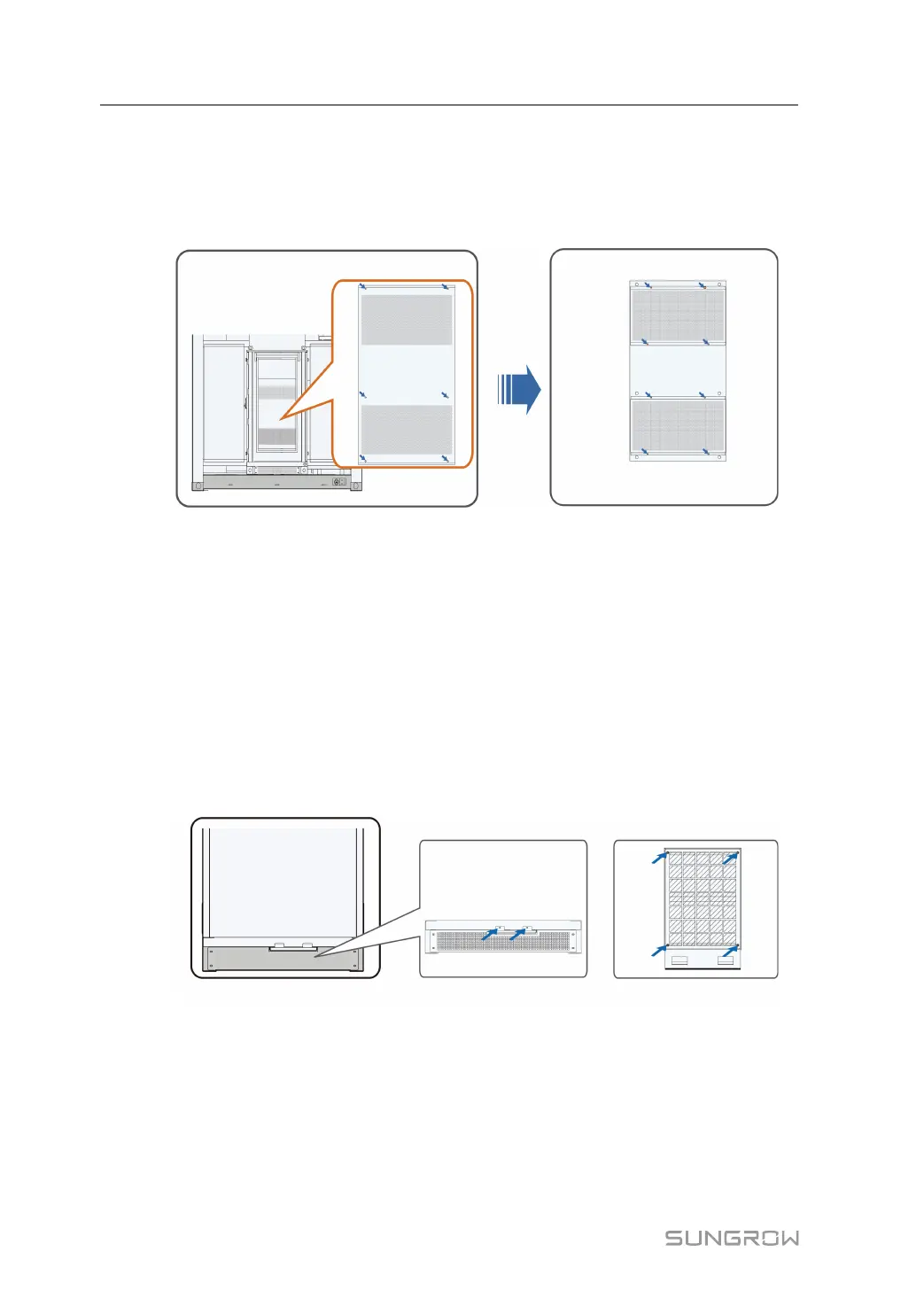
9.3.1 Checking and Replacing Air Inlets/Outlets of Heat Exchanger
step 1 Remove the bolts at the four corners of the heat exchanger board.
step 2 Loosen the screws at the four corners of the air inlet and outlet of the heat exchanger and
remove the air inlet grid cover.
step 3 Take out the filter and replace it with a new one.
step 4 Reinstall the filter.
step 5 Restore the grid cover of the air inlet and outlet.
- - End
9.3.2 Checking and Replacing Air Inlet of Power Distribution Cabinet
step 1 Remove the two M5 bolts securing the dustproof filter mounting board at the bottom of the
power distribution cabinet.
step 2 Pull out the pressing plate on the dustproof filter.
step 3 Remove the M4 bolts at the four corners of the pressing plate and replace the dustproof filter.
step 4 Install the dustproof filter mounting board in reverse steps.
- - End
9.4 Painting Make-up Measures
Check for the damages of the MV Station appearance:
Situation 1: smudginess on the surface caused by water and dust that can be cleaned
9 Routine Maintenance System Manual



 To Next Page