Home
Supernote
Tablet
A6 X2 Nomad
Page 44
Supernote A6 X2 Nomad - Page 44
159 pages
Manual
Save Page as PDF
To Next Page
To Next Page
To Previous Page
To Previous Page
Loading...
44
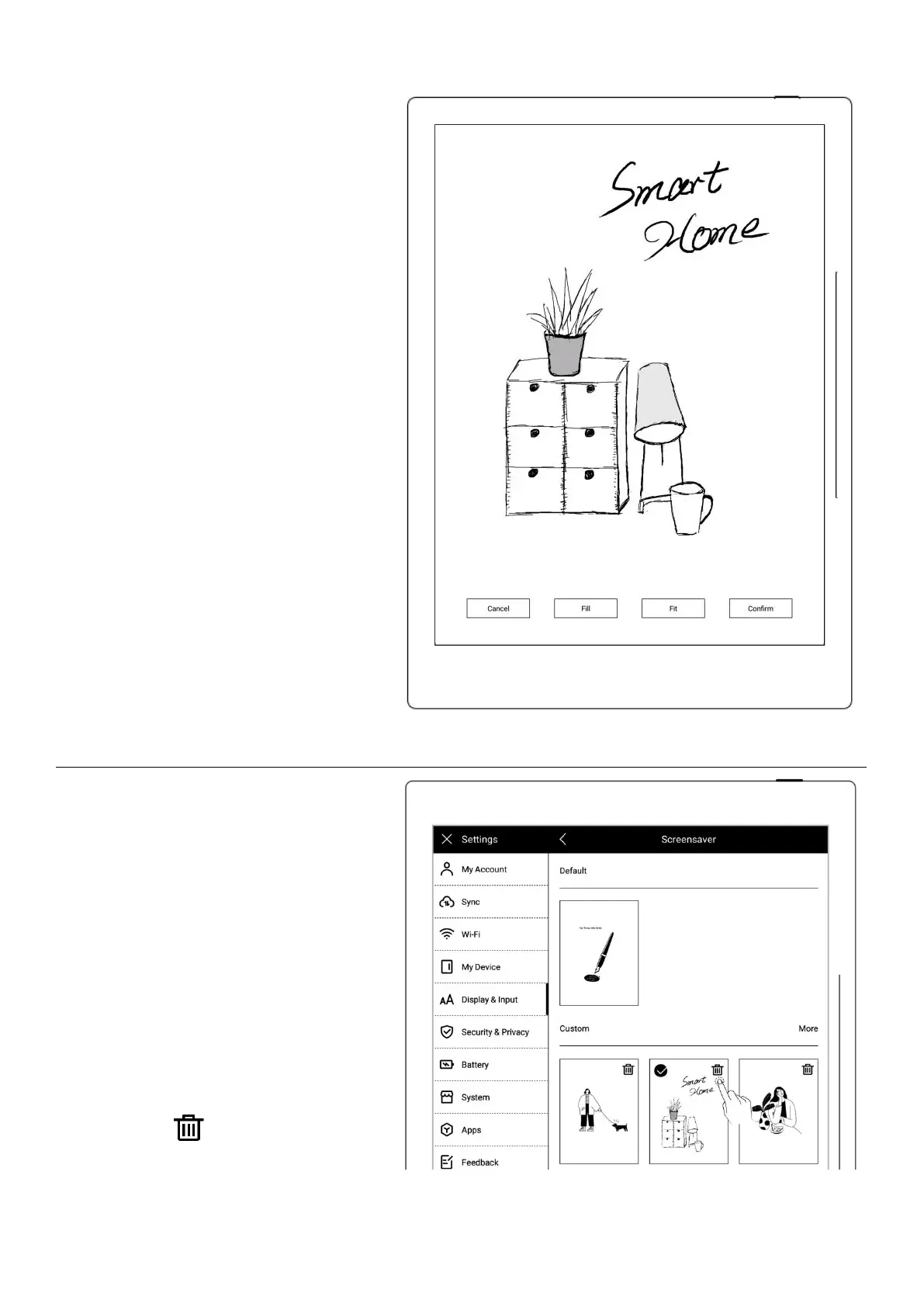
6
、
Pr
eview
a
screen
save
r
The
pre
view
image
can
be
zoo
med
in/out
and
mov
ed.
T
ap
"
Fill
"
and
"
Fit
"
to
adjust
the
image
T
ap
“OK
”
7
、
Afte
r
setting
completes
,
the
page
goes
to
the
cus
tom
Screen
sav
er
The
late
st
si
x
scr
een
sav
er
s
will
be
display
ed
T
ap
the
customiz
ed
image
to
enter
pre
view
mode
to
re-ad
just
the
image
T
ap
"
"
to
delete
recently
set
screen
saver
(the
original
43
45
Table of Contents
Main Page
default chapter
2
Table of Contents
2
Applicable Models
8
Specifications
8
Chapter 1 Quick Start
10
Power on and the Initial Settings
10
Connect to Wi-Fi
11
Sign up and Log in
12
Chapter 2 Gestures and Toolbar
15
Gestures
15
Top Menu Bar
19
Toolbar
21
Introduce the Toolbar
21
Using the Toolbar
25
Page Number Bar
29
Eraser Gesture
30
Chapter 3 Basic Settings
33
Language, Date & Time
33
Stylus
37
Keyboard
40
Screensaver
42
Low Power Consumption
45
Synchronization
46
Third Party Application
51
Custom the Sidebar Menu
52
Bluetooth
53
Chapter 4 Handwriting and Drawing
54
Create a New Notebook
54
Rename a Notebook
56
Set a Notebook Cover
56
Change Templates
59
Using Layers
60
Using Headings
62
Using Keywords
64
Organize Handwriting
66
Copy/Cut/Paste Handwriting
66
Move Handwriting
68
Zoom In/Zoom out Handwriting
68
Rotate Handwriting
69
Organize
69
Delete/Insert Note
69
Copy/Move Note
70
Cut/Copy Current Note Page
72
Using Links
72
Using Real-Time Recognition Notes
75
Return to Page before Jumping
78
Export and Share
79
Chapter 5 Read, Digest & Annotation
80
Import Documents
80
Change the Fonts
82
Adjust Screen Contrast
83
PDF Gesture Zoom
84
PDF Trimming
86
PDF Export
87
Bookmarks and Table of Contents
88
Annotation
90
Digest and Annotation
91
Highlights and Comments
93
Chapter 6 TXT
95
Chapter 7 Word
96
New Word File
96
Browse Mode
97
Pinch to Zoom
98
Repage View
98
Editing
99
Proofreader's Marks
100
Delete
101
Line Break
101
Transpose
102
Insert Handwritten
102
Insert Space
104
Chapter 8 Convenient Features
105
Organize Files
105
Protect Files
109
Star Tag
109
Browse & Access
111
Screen Mirroring
112
Search
113
Quick Access
115
Recent Access
117
Chapter 9 Mailbox Function
117
Login
118
Settings
122
Compose
124
Inbox
125
Delete Local Emails
126
Read and Unread
126
Chapter 10 Calendar Function
127
Manage Account
127
Settings
129
Switch View
129
Select the Date
130
Using Events
130
View Notes
135
Recognize Titles for Event
135
Chapter 11 Basic Functions
136
USB Connection
136
Usb Otg
136
Wake up from Sleep Mode
137
Reboot/Update
139
Reset
140
Power Off/Shutdown
141
Chapter 12 Privacy and Security
142
Privacy
142
User Experience Project ON/ off
142
Security
142
Screen-Lock Password
143
File Password
145
Chapter 13 Cloud
149
Register and Log in
149
Cloud Service
151
Chapter 14 Safety
153
Chapter 15 FAQ and Troubleshooting
155
Q:how to Make Custom Image Templates
155
Q:how to Import Document Customized Fonts
157
Q:how to Get Supernote Partner APP
157
Q:what Should I Do When the Device Freezes or Fails to Boot
158
Related product manuals
Supernote A6X
17 pages
Supernote A5 X
162 pages
Supernote X
110 pages



 To Next Page