Chapter 2: Installation
2-21
Power Button
1
NIC1 LED
Reset Button
2
HDD LED
Power LED
#3-4
Ground
Ground
1920
NIC2 LED
X
NMI
Ground
OH/Fan Fail LED
Vcc
X
Power Fail LED
Vcc
Vcc
Vcc
Vcc
#1-2
Vcc
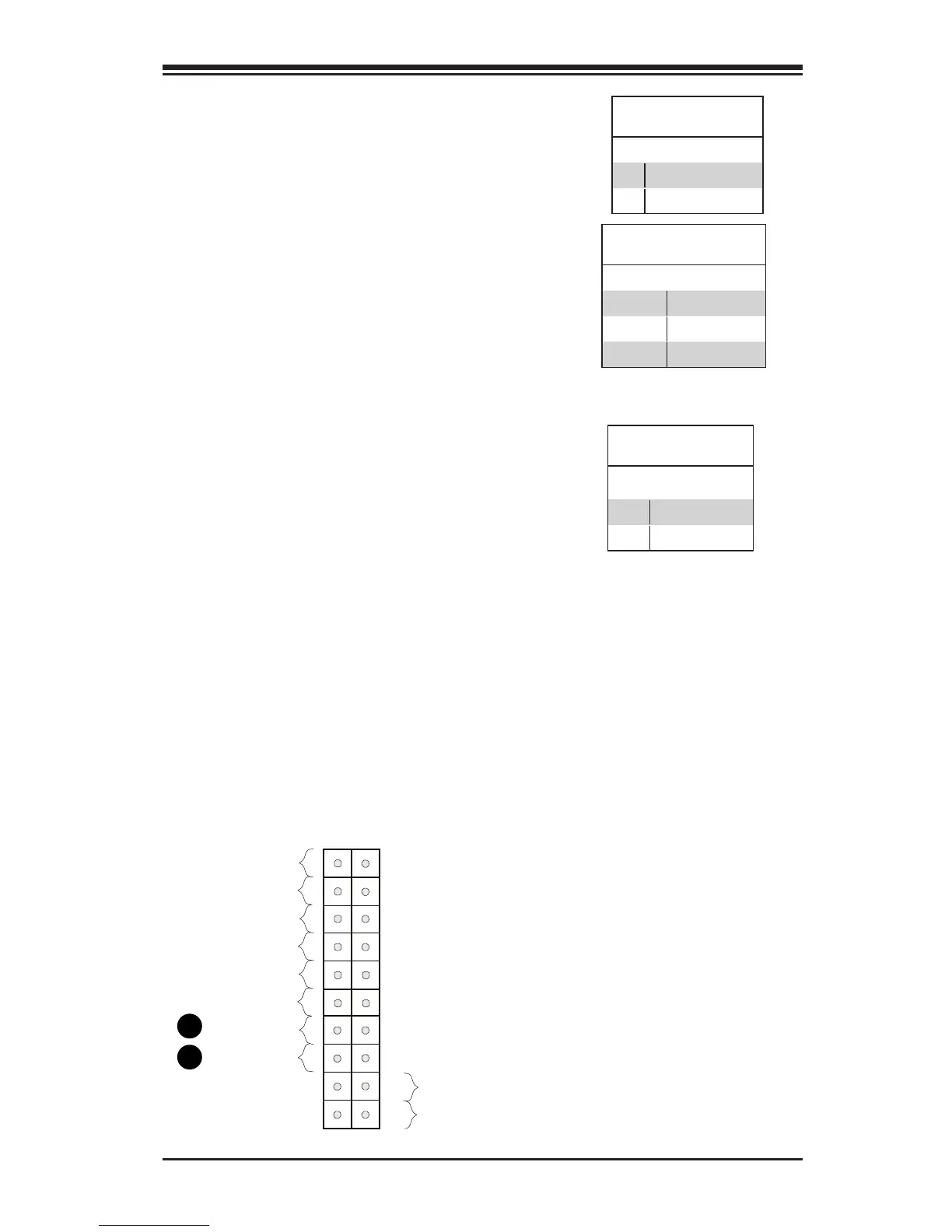
A. Overheat/Fan Fail
B. Power Fail
Overheat (OH)/Fan Fail
Connect an LED cable to OH/Fan Fail
connections on pins 7 and 8 of JF1 to
provide warnings for chassis overheat/
fan failure. Refer to the table on the right
for pin denitions.
OH/Fan Fail LED
Pin Denitions (JF1)
Pin# Denition
7 Vcc
8 OH/Fan Fail LED
OH/Fan Fail Indicator
Status
State Denition
Off Normal
On Overheat
Flashing Fan Fail
B
A
Power Fail LED
The Power Fail LED connection is located
on pins 5 and 6 of JF1. Refer to the table
below for pin denitions.
Power Fail LED
Pin Denitions (JF1)
Pin# Denition
5 No Connection
6 Power Fail


 To Next Page