10
ⒸCopyright 2007 Suprema Inc.
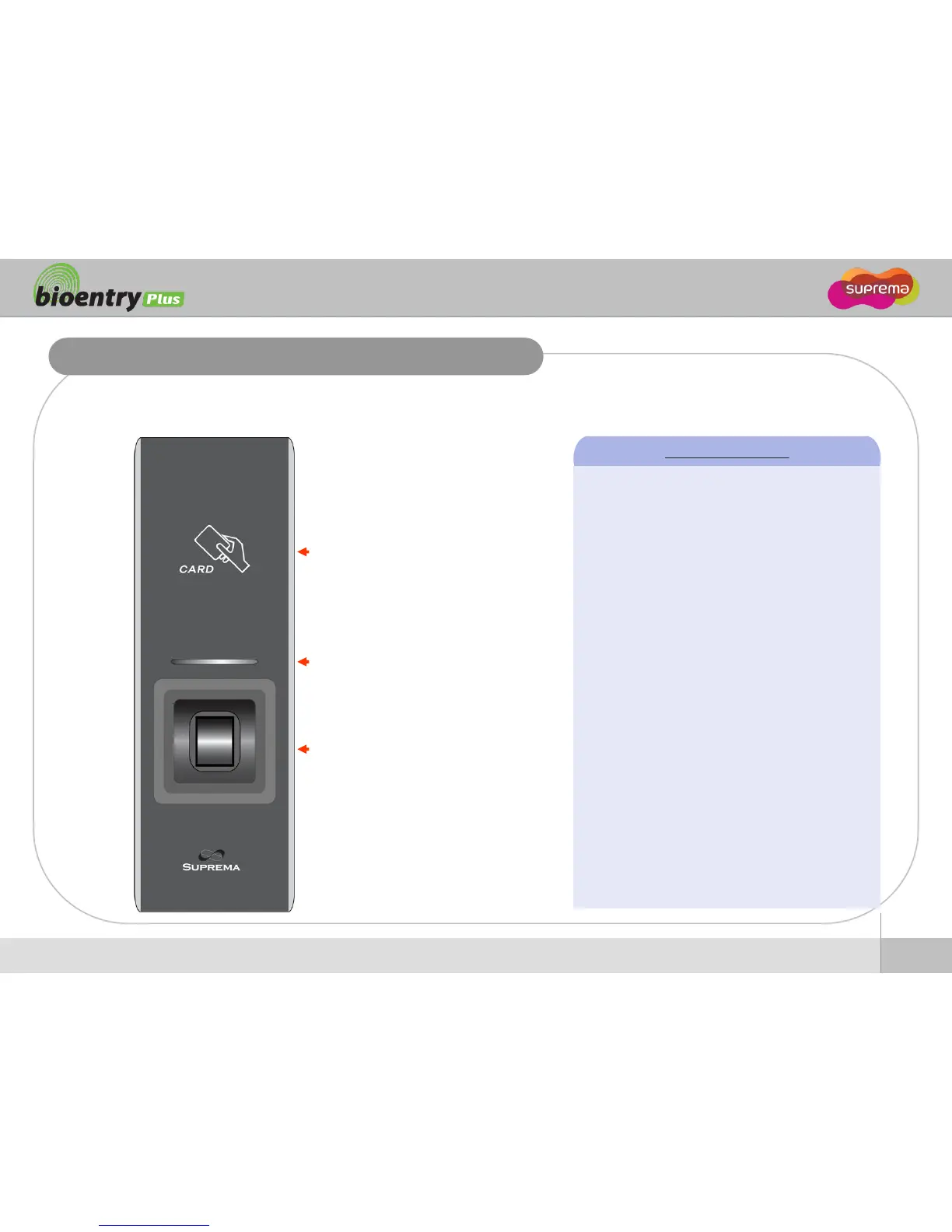
Front
Front Side
RF card reading part
Place an RF card over the
picture
LED
Display current status using
seven different colors
Fingerprint sensing part
Place a finger on a sensor
surface
LED Status per Color
Green : Authorization Success
Red : Authorization Fail
Pink : On Processing
Flicker Blue/Sky-Blue Color per 2sec : Normal
Flicker Red/Pink Color per 2sec : Locked
Flicker Blue/Red Color per 2sec : Initialized
Time due to the Internal Battery Discharge
Flicker Blue/Yellow Color per 2sec : DHCP
Fail
Flicker Red Color per 2sec : Failed. Please
contact to your distributor or Suprema
Flicker Yellow Color per 2sec : Waiting Input
Flicker Yellow Color per 1sec : Receiving IP
Address from DHCP server


 To Next Page