Home
suprema
Card Reader
bioentry PLUS
Page 15 (Power Connection)
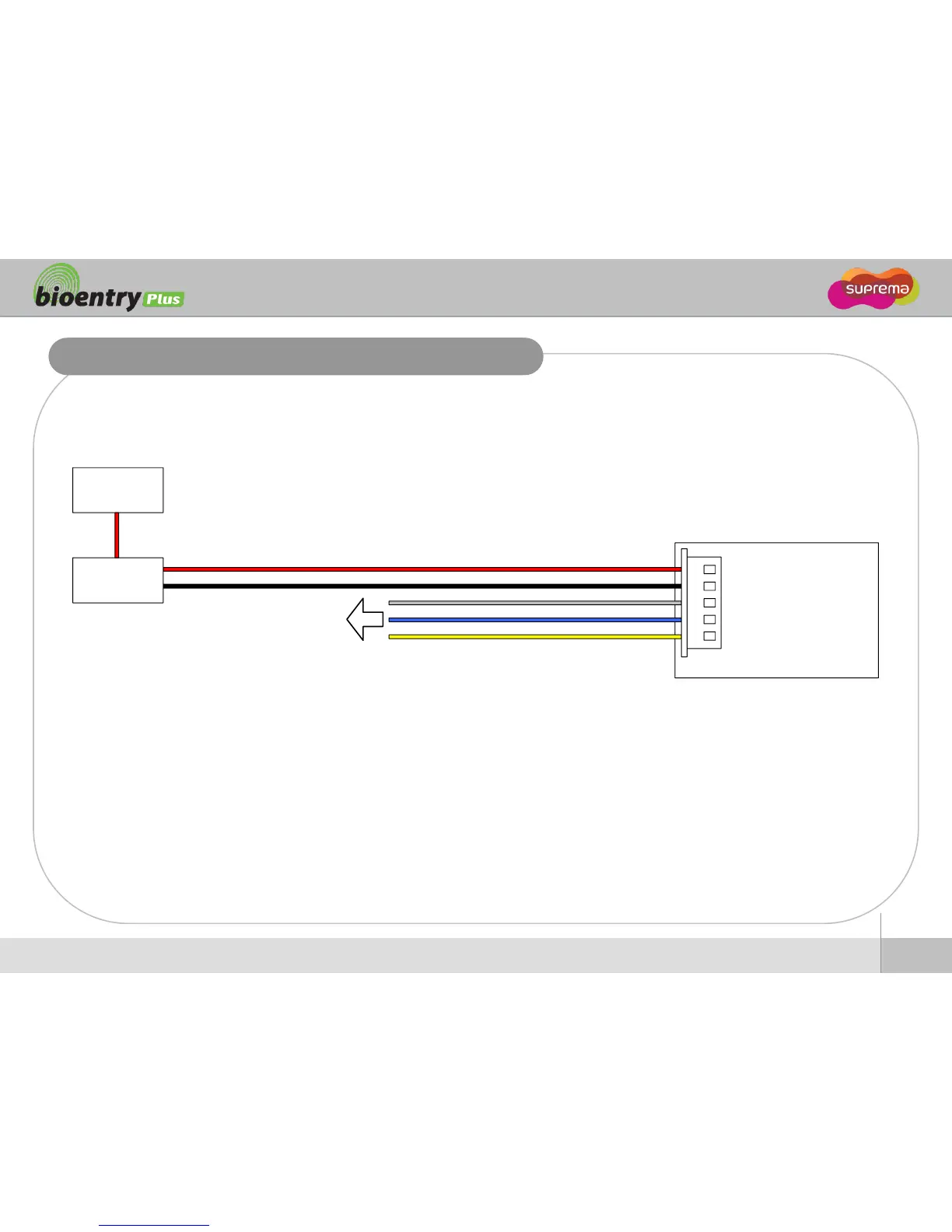
suprema bioentry PLUS - Power Connection; Power Supply Diagram; Recommended Power Specs
35 pages
Manual
Save Page as PDF
To Next Page
To Next Page
To Previous Page
To Previous Page
Loading...
15
Ⓒ
Copy
right
2007
Suprema Inc.
Power Conn
ection
Recommended
power supply
12V
±
10%, at least 500mA
.
Comply
with standard IEC/EN 60950
-
1.
To share the power w
ith other dev
ices, use a power supply w
ith higher current ratings.
BioEntry Plus
(5) TRX- (Yellow)
(4) TRX+ (Blue)
(3) Signal GND (Gray)
(2) Power GND (Black)
(1) Power 12V (Red)
RS-485
DC
Power supply
UPS
(optional)
14
16
Table of Contents
Main Page
Table of Contents
2
Safety Precautions
3
Basics of Fingerprint Recognition
5
How to Place a Finger
6
Product Contents
8
Optional Accessories
9
Front Side
10
Bottom and Back Side
11
Product Dimension
12
Cables and Connectors
13
Installation of Wall-Mount Bracket
14
Power Connection
15
Ethernet Connection
16
RS485 Connection
18
Relay Connection
20
Digital Input Connection
23
Wiegand Input/Output
25
Wiegand Output
25
How to Initialize Network Setting
26
Network Default Setting
26
Installation Reference
27
Electrical Specification
30
Troubleshooting
31
Device Cleaning
32
FCC Rules
33
Specifications
34
Related product manuals
suprema BioEntry W2
30 pages
suprema BioEntry Series
22 pages
suprema Xpass
34 pages
suprema Xpass S2
30 pages


 To Next Page