5
Getting to know your Sureshotgps
TM
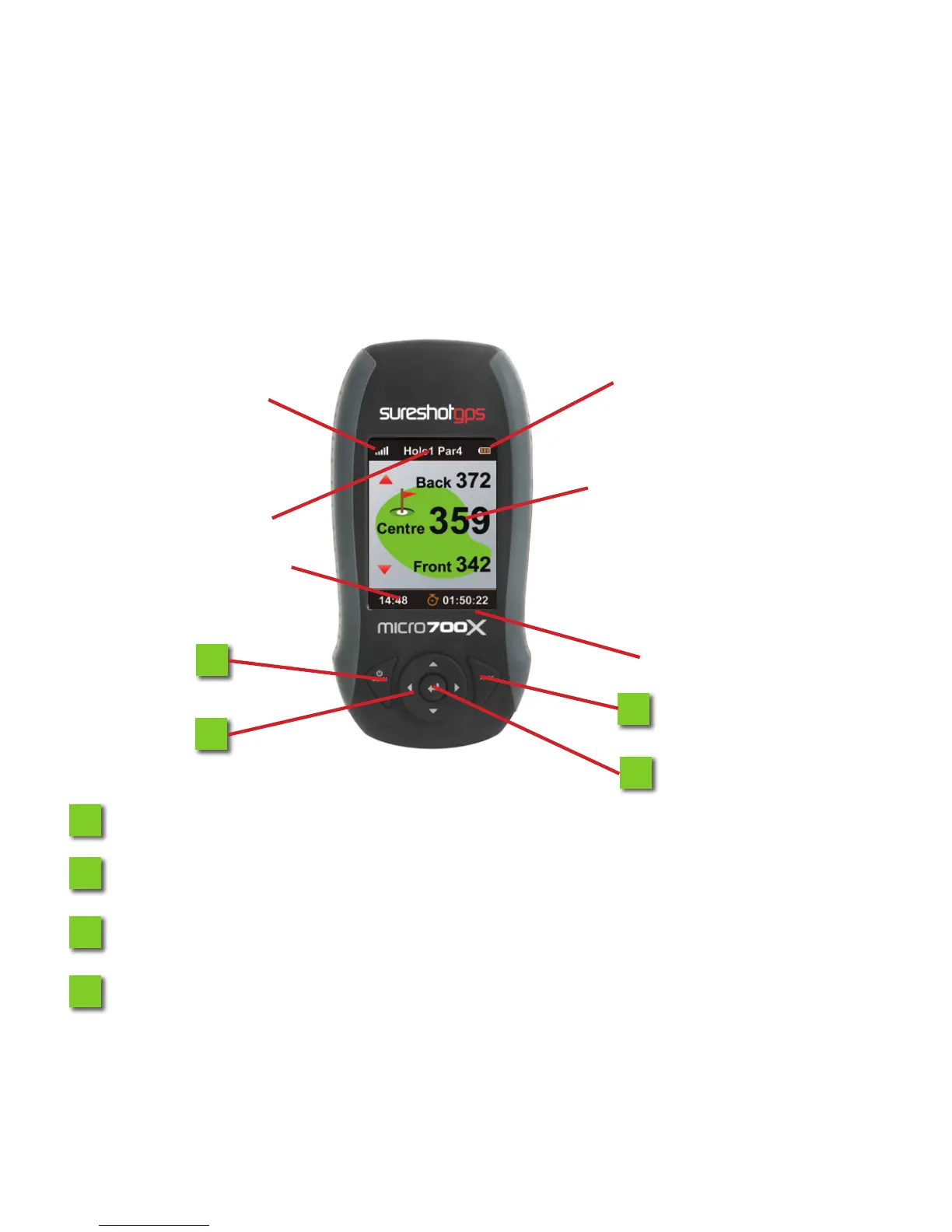
Satellite Signal
Hole & Par
Time
Round Timer
Distance between current
position and green (cen-
tre, front and back)
Battery Status
1
1
2
2
3
3
4
4
Menu/On Key: To power on/o Micro700X and access main menu.
Navigation Key (Up, Down, Le, Right)
Enter Key: To conrm menu selection, desired course, mark shot distance.
Page Key: To switch displayed page, set starting point of shot distance and
map/edit course data.
6.0 Map Course 16
6.1 Start Mapping 16
6.2 Map Green Position 17
6.3 Map a Hazard 17
6.4 Edit Course 18
6.5 Delete Course 18
7.0 Settings Menu 19
7.1 Scoring Type 19
7.2 Handicap 19
7.3 Club Measurement 19
7.4 Scorecard History 20
7.1 Yard/Metre Option 20
7.2 Reset Round Time 20
7.3 Backlight 21
7.4 Auto Power O 21
7.5 Auto Hole Advance 22
7.6 Set Time 22
7.7 Time Format 23
7.8 Device Info 23
8.0 Sureanalysis Soware 24
8.1 System Requirements 24
9.0 Troubleshooting 25
10.0 Warranty Info 27
11.0 Declaration of Conformity 30
12.0 Soware Licensing 31



 To Next Page