EN
17
4.6 Setpoint Value Selection
The frequency setpoint value (speed setpoint value) can be predetermined by various sources, and the
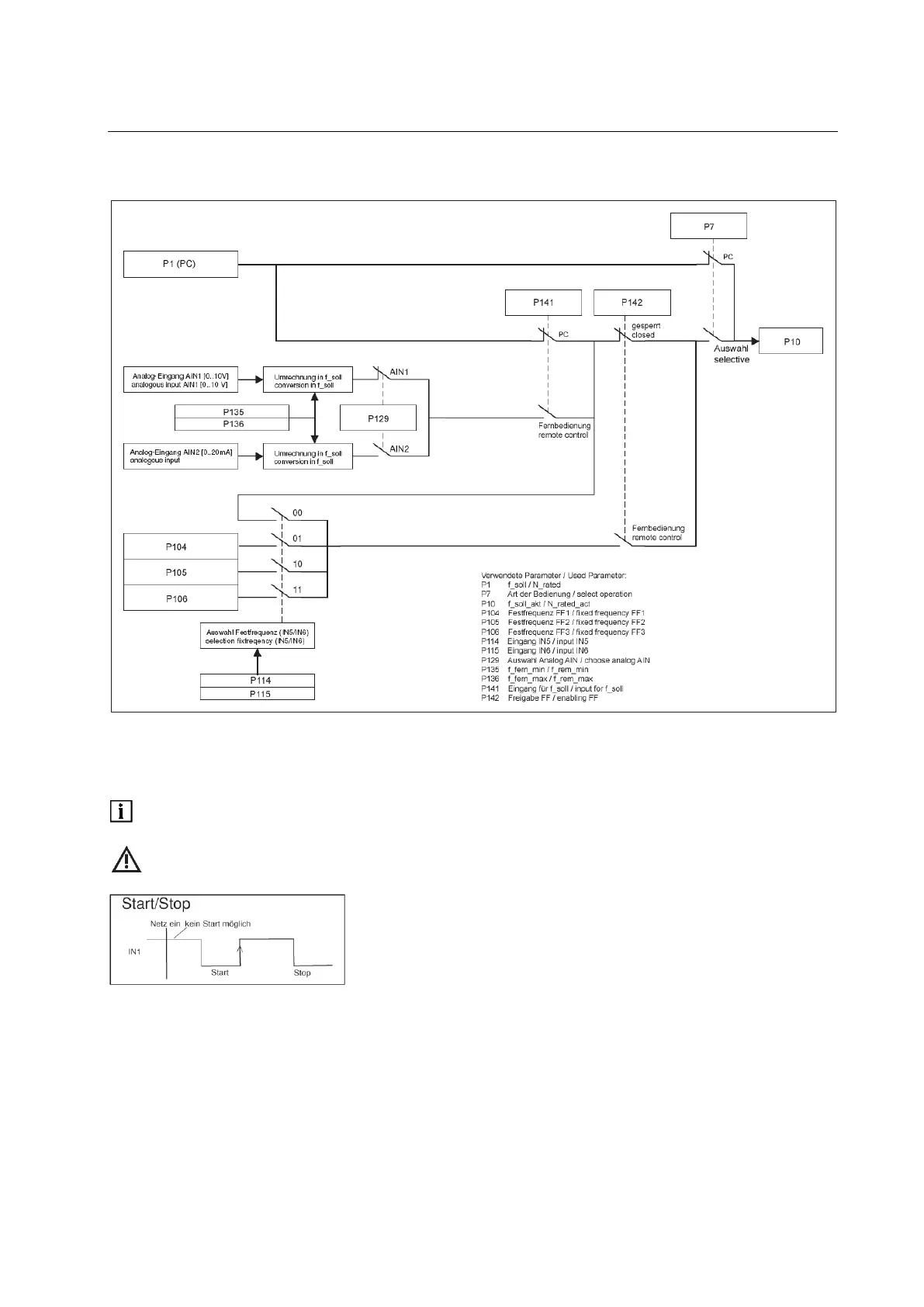
mode of operation is shown in the following figure.
Picture: setpoint value selection
In order to use the setpoint value of the PC in P1-N_rated, the "PC application" is set to P7-select
operation. This enables the functions start/stop and assigned frequency to be controlled via the PC.
Following a power failure, an automatic start by the installed start signal at IN1 is prevented. A flank at
the start entry is necessary.
When starting via the PC, FB IN1 (P110) must be placed at "Off".
Alternatively, you can adjust P7-select operation to "selection"; P141-input for f_soll to “PC application" ;
and P142-enabling FF to “blocked".
In order to use the setpoint value from analogue input AIN1 or AIN2, set P7-select operation to
"selection"; P141-input for f_soll to “remote control"; P142-enabling FF to “blocked" ; and P129-choose
analog AIN to the desired analogue input. The scale of the analogue inputs is carried out via P135-
f_rem_min and P136-f_rem_max.


 To Next Page