Make sure ...
• Press the POWER button to turn on the TV/VCR.
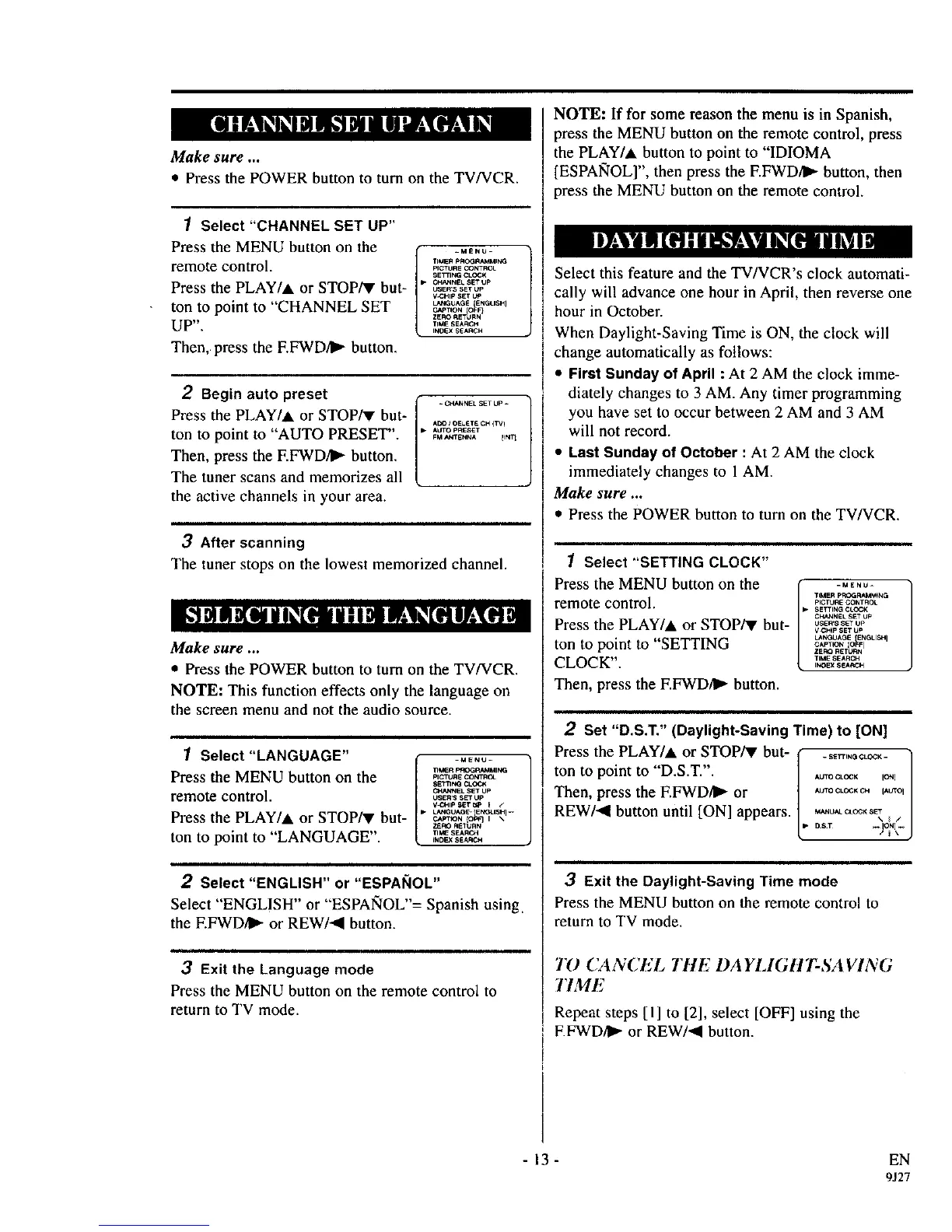
1 Select "CHANNEL SET UP"
Press the MENU button on the
remote control.
Press the PLAY/A or STOP/V but-
ton to point to "CHANNEL SET
UP".
Then, press the EFWD/II) button.
-MENU-
TIMER pFOGRAMMING
pICTURE CONTROL
SETTING CLOCK
C,H_NNEL SE? UP
_SEF;S SET UP
V"3HIp SET t_P
L_CGUAG£ {ENGLISH I
C,_P]ION IOFF}
ZERO RETURN
TIME SEA_3H
INDEX SEARCH
2 Begin auto preset
Press the PLAY/A or STOP/V but-
ton to point to "AUTO PRESET".
Then, press the F.FWD/_ button.
The tuner scans and memorizes all
the active channels in your area.
Ado i OLETE CH (TV)
AO1X_pRESET
FM _ITEt,'t4A lINT1
3 After scanning
The tuner stops on the lowest memorized channel.
Make sure ...
• Press the POWER button to turn on the TV/VCR.
NOTE: This function effects only the language on
the screen menu and not the audio source.
1 Select "LANGUAGE"
Press the MENU button on the
remote control.
Press the PLAY/A or STOP/v but-
ton to point to "LANGUAGE".
_MENU_
TIleR PI_ RAMMIk_I
pICTURE CONTROL
$ETTItCO CLOQ_
(_H,_EL SET UP
USERS SET Up
_* LANGU_- Et,K_LISHI-
C_PT_ON {01_3 I \
Z_RO REIIJRN
rIME SEARCH
_NDEXSEARCH
2 Select "ENGLISH" or "ESPAI_IOL"
Select "ENGLISH" or "ESPANOL"= Spanish using.
the EFWD/I_- or REW/al button.
,,, ,,,
3 Exit the Language mode
Press the MENU button on the remote control to
return to TV mode.
NOTE: If for some reason the menu is in Spanish,
press the MENU button on the remote control, press
the PLAY/A button to point to "IDIOMA
[ESPAIq'OL]", then press the EFWD/)) button, then
press the MENU button on the remote control.
Select this feature and the TV/VCR's clock automati-
cally will advance one hour in April, then reverse one
hour in October.
When Daylight-Saving Time is ON, the clock will
change automatically as follows:
• First Sunday of April : At 2 AM the clock imme-
diately changes to 3 AM. Any timer programming
you have set to occur between 2 AM and 3 AM
will not record.
• Last Sunday of October : At 2 AM the clock
immediately changes to 1AM.
Make sure ...
• Press the POWER button to turn on the TV/VCR.
1 Select "SETTING CLOCK"
Press the MENU button on the ( -ME.O-
L
TIMER PF_OGRAMM_t4G
remote control. _,_.E_o.,.oL
SETTING CLOCK
CF_NNEL SET U_'
Press the PLAY/A or STOP/V but- osE,.ss_o,
V_H_p SET Up
LNC_t IAGE [ENttLISH I
ton to point to "SETTING o,_,_, _o_,_
ZERO RETt,_,I
CLOCK" TIME SEARCH
INDEX SEARCH
Then, press the F.FWD/I_- button.
2 Set "D.S.T." (Daylight-Saving Time) to [ON]
Pressthe PLAY/A or STOP/V but- f ...... O_LO_- )
ton to point to "D.S.T.". / ....... /
Then, press the F.FWDII_ or ] OOLO,, "O'/
REW/al button until [ON] appears. [ M'_U'_*LO_,,_,]
3 Exit the Daylight-Saving Time mode
Press the MENU button on the remote control to
return to TV mode.
TO CANCEL TIlE DA YLIGtlT-SA VING
17ME
Repeat steps [I] to [2], select [OFF] using the
EFWD/I_ or REW/al button.
- 13 - EN
9J27



 To Next Page