This feature provides a method of indexing the start-
ing point so that it can be easily returned to in either
fast forward or rewind mode.
• The index mark will be made automatically when
the REC button is pressed. It will also be marked
at the starting point of Timer recording and OTR.
• The index mark will not be recorded if the
PAUSE/STILL button is pressed and released dur-
ing recording.
• The time gap between making the index marks on
the tape should be greater than 1 minute for SP
recording, 2 minutes for LP recording and 3 min-
utes for SLP recording.
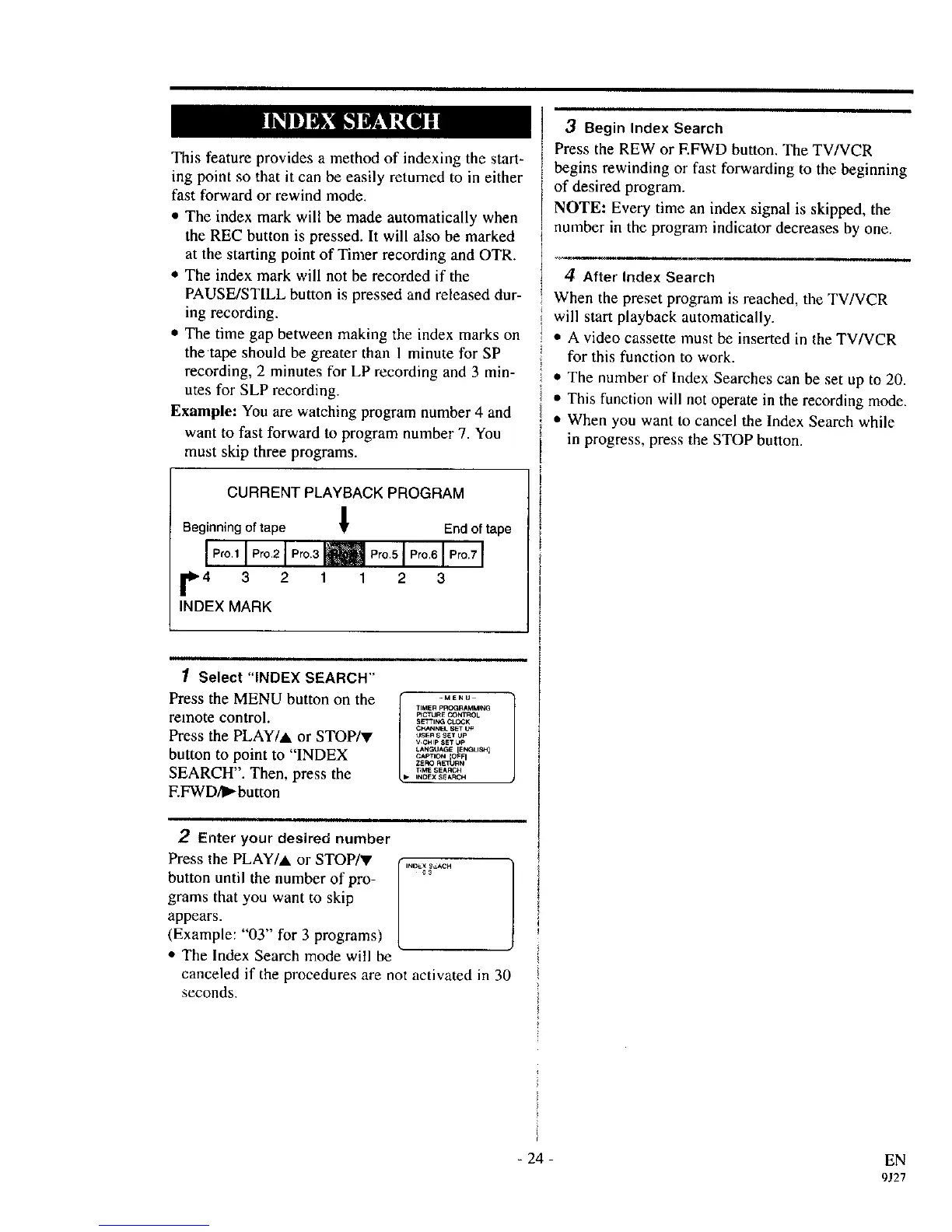
Example: You are watching program number 4 and
want to fast forward to program number 7. You
must skip three programs.
CURRENT PLAYBACK PROGRAM
Beginning of tape ! End of tape
I Pro.11 Pro.2I Pro.3m Pro.5] Pro.6 I Pro.7I
r4 3 2 1 1 2 3
INDEX MARK
1 Select "INDEX SEARCH"
Press the MENU button on the
remote control.
Press the PLAY/A or STOP/y
button to point to "INDEX
SEARCH". Then, press the
F.FWD/l_button
, i
2 Enter your desired number
Press the PLAY/A or STOP/v
button until the number of pro-
grams that you want to skip
appears.
(Example: "03" for 3 programs)
• The Index Search mode will be
canceled if the procedures are not activated in 30
seconds.
3 Begin Index Search
Press the REW or F.FWD button. The TV/VCR
begins rewinding or fast forwarding to the beginning
of desired program.
NOTE: Every time an index signal is skipped, the
number in the program indicator decreases by one.
m
4 After Index Search
When the preset program is reached, the TV/VCR
I will start playback automatically.
I
'_ • A video cassette must be inserted in the TV/VCR
for this function to work.
• The number of Index Searches can be set up to 20.
• This function will not operate in the recording mode.
• When you want to cancel the Index Search while
in progress, press the STOP button.
- 24 - EN
9J27



 To Next Page