MANUAL CLOCh" SETTING
Make sure ...
• TV/VCR power must be turned on.
In the example below, the clock is to be set to:
DATE May 1st, 2000
SETTING TIME 5:40PM
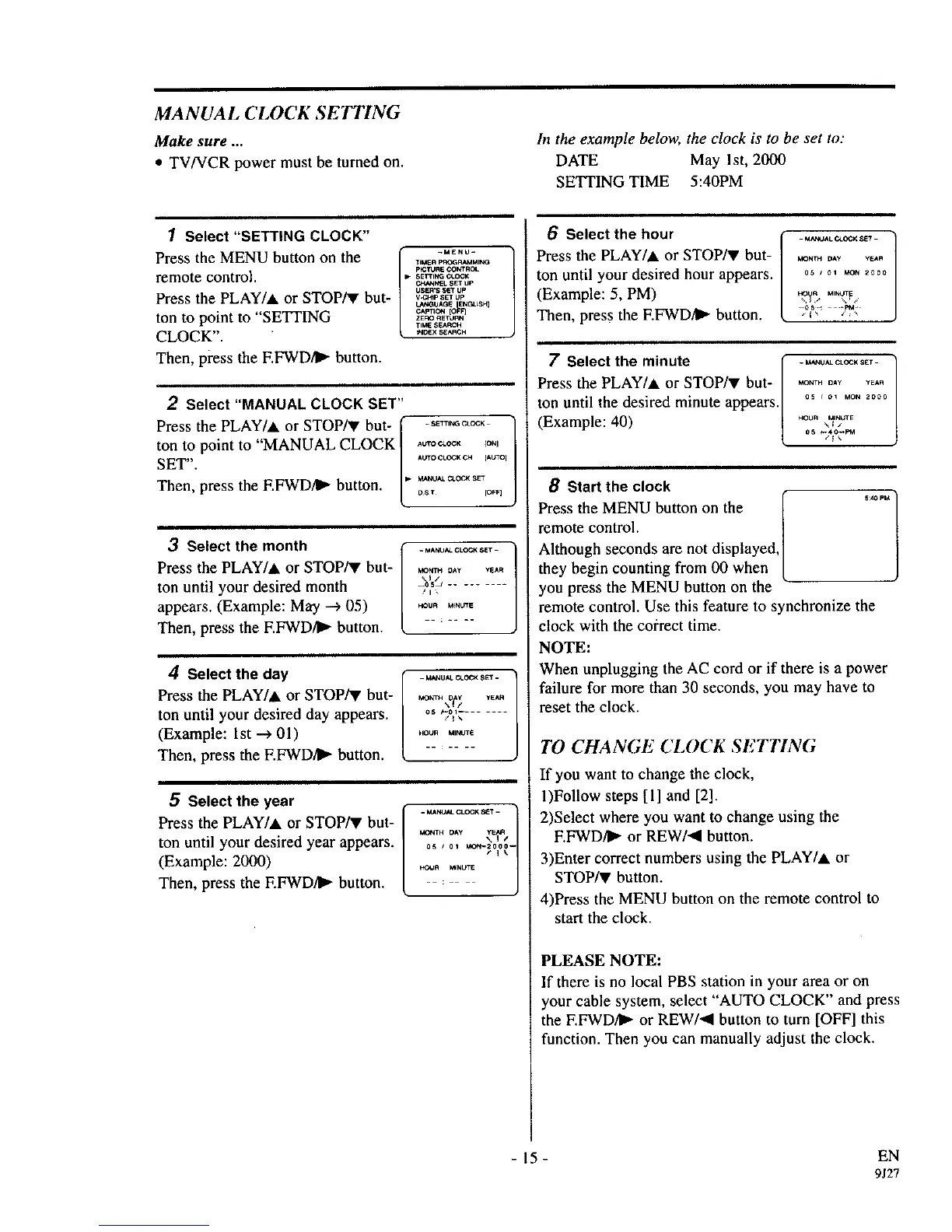
1 Select "SETTING CLOCK"
Press the MENU button on the [" -.E.U-
"tIMERPr_K;O_MIt, IG
/
p_TURE GO_'ROL
remote control. ,. sE_,,_o._
_1. SET UP
USER'S SET UP
Press the PLAY/A or STOP/V but ........
t._',IGUAGE ENF_._SH]
O.pTIO_ [O_F]
ton to point to "SETTING / zE_o_u_
TIE S_,/_CH
CLOCK". t. .... ,_.
Then, press the EFWD/I_ button.
2 Select "MANUAL CLOCK SET"
Press the PLAY/A or STOP/V but- _ -s_T,_o_ ]
ton to point to "MANUAL CLOCK [ ,_o_.o_, _o,j
/
SET". _oro eL_K CH [AUTOI
• M_KJAL CLOCK SET
Then, press the EFWD4_ button, os_ ,o_
3 Select the month f _.,__c_o_,-
Press the PLAY/at or STOP/V but- [ .o....... _,.
ton until your desired month V_:',,,,--
appears. (Example: May --> 05) ........
Then, press the F.FWD/I_ button. : ....
4 Select the day
Press the PLAY/at or STOP/V but-
ton until your desired day appears.
(Example: 1st --->01)
Then, press the EFWD/I_ button.
_UAL _A. O_K _ET -
os P-ol ........
,_OUR MIf,_TE
5 Select the year f. __,__o_o_- /
Press the PLAY/at or STOP/v but- / _ .... ,_?_
ton until your desired year appears ............ 1
(Example: 2000) l _ ...... _ i
Then, press the EFWD/I_ button. --
6 Select the hour
Press the PLAY/at or STOP/V but-
ton until your desired hour appears.
(Example: 5, PM)
Then, press the EFWD/I_- button.
MONTH DAy vEan
05 J 01 _ 2000
7 Select the minute [ -.,_u._c_s_T
Pressthe PLAY/& or STOP/V but- / .o,_._,, _,,
ton until the desired minute appears./ °' ' °' _o, _000
(Example: 40) [ "°0_.'"_'_,_,_,
8 Start the clock
Press the MENU button on the /
remote control. ]
[
Although seconds are not displayed, ]
they begin counting from 00 when L
you press the MENU button on the -
remote control. Use this feature to synchronize the
clock with the co_:rect time.
NOTE:
When unplugging the AC cord or if there is a power
failure for more than 30 seconds, you may have to
resetthe clock.
TO CHANGE CLOCK SETTING
If you want to change the clock,
1)Follow steps [1] and [2].
2)Select where you want to change using the
EFWD/IP" or REW/<I button.
3)Enter correct numbers using the PLAY/at or
STOP/_ button.
4)Press the MENU button on the remote control to
start the clock.
PLEASE NOTE:
If there is no local PBS station in your area or on
your cable system, select "AUTO CLOCK" and press
the EFWD/I_ or REW/_I button to turn [OFF] this
function. Then you can manually adjust the clock.
- 15- EN
9J27



 To Next Page