Table 4-3
Storage shelf I/O module components (continued)
DescriptionComponentNumber
Indicates the I/O status for this module.
■ Dark—Off
■ Steady green—Ready
■ Flashing green— Activity
Note: The first I/O module is ready a few seconds after
the shelf is turned on. The second I/O module is ready
a few seconds after the first module.
I/O module status LED6
Secures the module in the storage shelf.Latch7
The Symantec Storage Shelf has two power supplies that are installed side-by-side
in the rear panel. The power supplies use load balancing to provide power to the
storage shelf during normal operation. If one power supply fails, the other
automatically takes up the entire load. The Global Enclosure status LED on the
front panel of the storage shelf also shows when a power supply is not running.
This LED remains amber until both power supplies provide power to the storage
shelf.
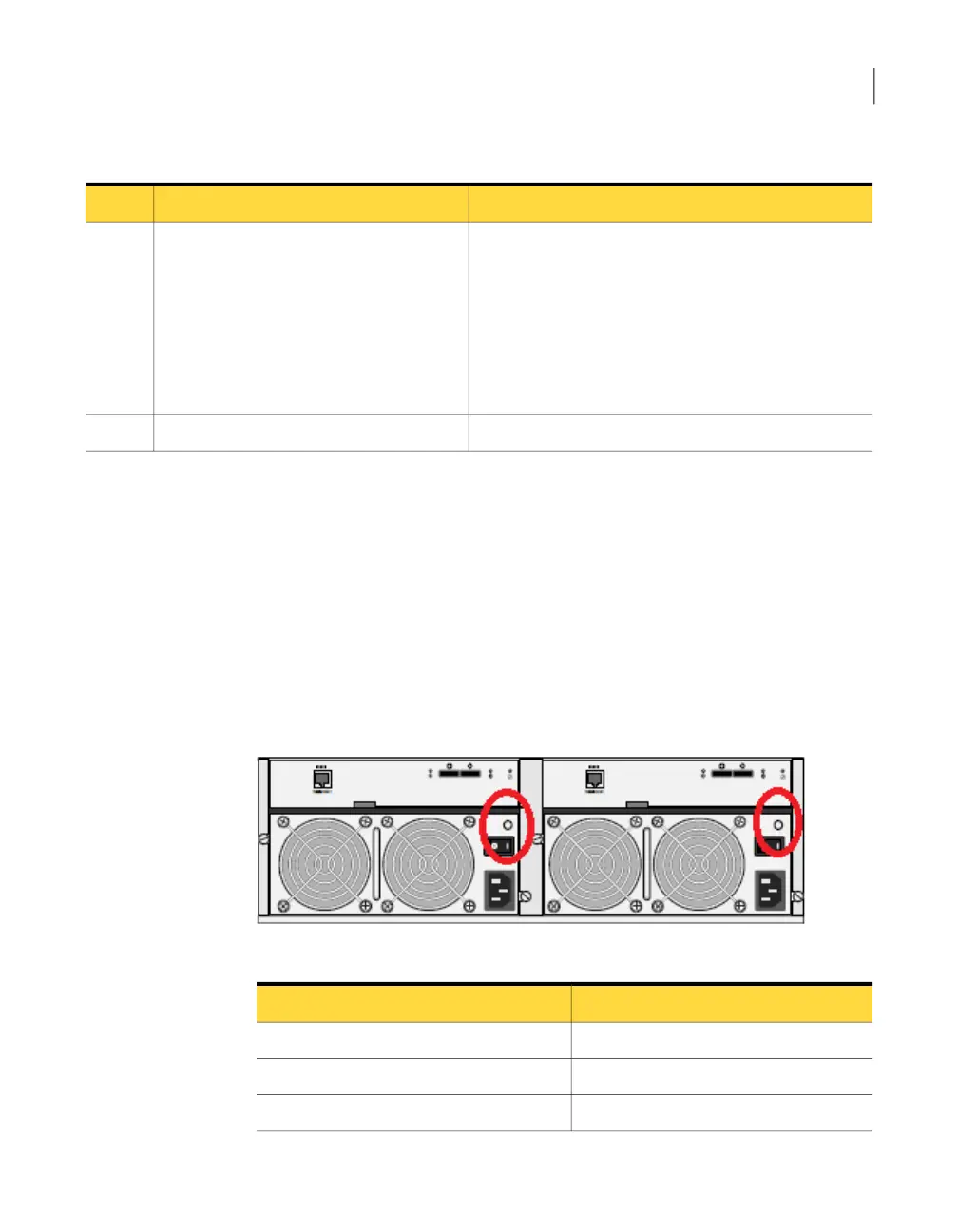
Figure 4-6 shows the storage shelf power supplies located under the I/O modules.
The LED on each power supply is circled. Table 4-4 provides the information about
the power supply LED states.
Figure 4-6
Storage shelf power supply
Table 4-4
Power Supply LED states
StateColor
Power supply is not in operation.Off
Power is on and the system is in operation.Steady green
Power supply is OK but not in operation.Flashing green
46About the Symantec Storage Shelf
About the storage shelf rear panel



 To Next Page