Getting Started 1 - 5
Connecting to the Host Computer
Batch Connection
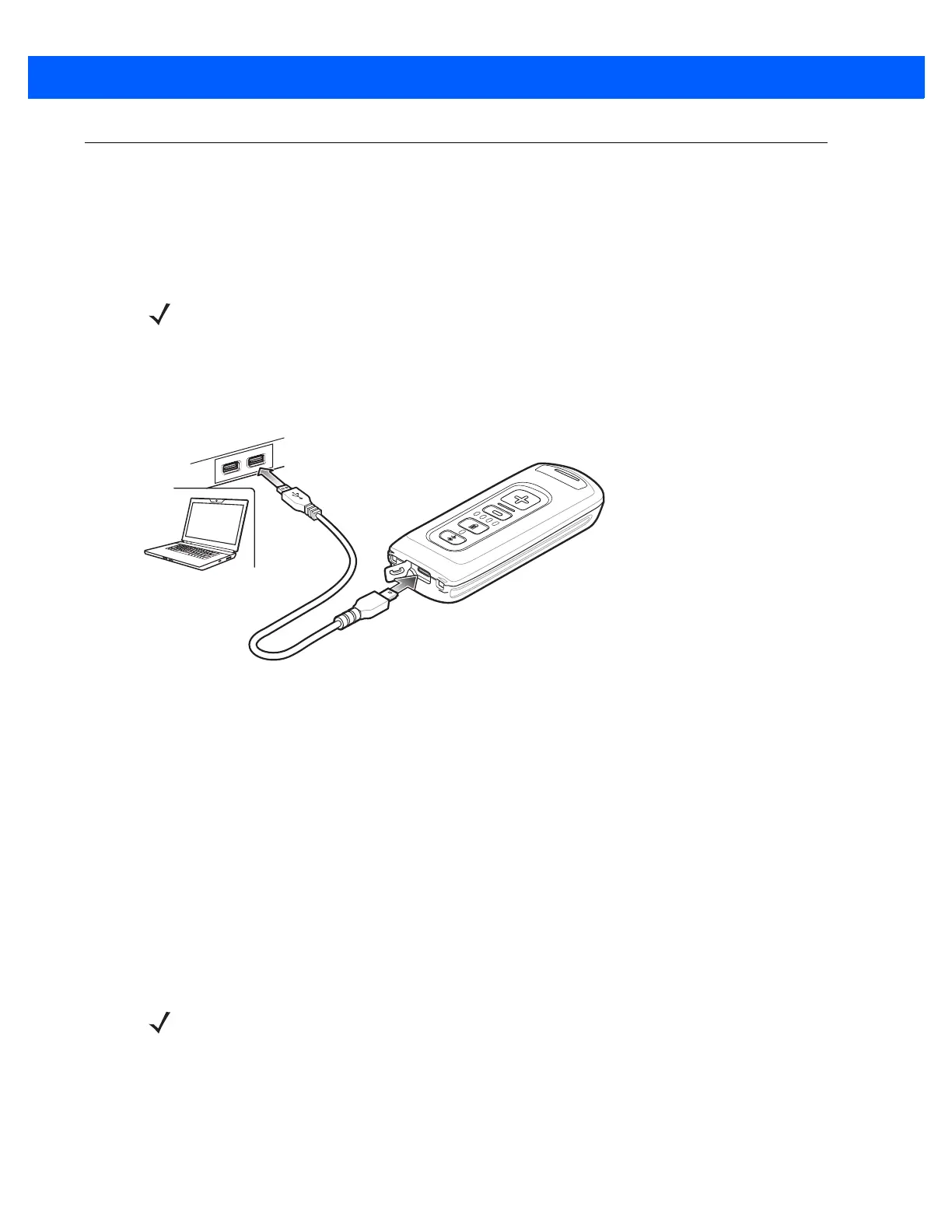
The micro USB cable enables communication between the CS4070 and a PC, and charges the battery in the
CS4070.
To connect the CS4070 to a USB device:
1. Connect the USB A end of the USB cable to a USB port of the host or device.
2. Connect the micro USB connector of the cable to the CS4070.
Figure 1-4
Micro USB Cable Communication
Bluetooth Connection: Development Options
Serial Port Profile
This Bluetooth profile emulates a serial cable to provide a simply implemented wireless replacement for
existing RS-232 based serial communications applications, including familiar control signals. It is the preferred
communication profile implementation because accidental key strokes from the keyboard or touch screen on
the host are not entered into the bar code data stream.
Human Interface Device Emulation
This Bluetooth profile is a lightweight wrapper of the Human Interface Device protocol defined for USB. Data
transmitted from the Bluetooth scanner appears as keyboard entries to the Bluetooth host (Smartphone, PC,
etc).
NOTE To enter batch scanning mode, the scanner cannot be paired to a Bluetooth host.
NOTE Wedge data appears within whichever application has input focus.



 To Next Page