EasyManua.ls Logo

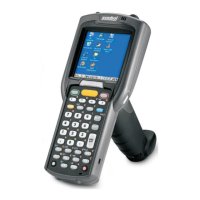
Symbol MC3090BT - User Manual

Symbol MC3090BT
94 pages
Print Icon
To Next Page IconTo Next Page
Loading...
MC3000
User Guide

Table of Contents

Question and Answer IconNeed help?

Do you have a question about the Symbol MC3090BT and is the answer not in the manual?

Summary

Revision History

About This Guide

Introduction and Documentation

Overview of the guide and its related documentation set.

Configurations and Chapter Descriptions

Details product configurations and summarizes chapter content.

Conventions, Related Resources, and Support

Covers document conventions, related manuals, and support contact information.

Chapter 1. Getting Started

Initial Setup and Components

Covers unpacking, parts identification, and basic computer characteristics.

Battery and Power Management

Details battery charging, replacement, and power-on procedures.

Operation and Assembly Procedures

Guides on calibration, waking, demo window, and strap/door assembly.

Chapter 2. Operating the MC3000

Introduction, Power, and Keypads

Covers chapter intro, power button functions, and keypad types.

Desktop, Taskbar, and Data Entry

Explains desktop, taskbar, and methods for entering information.

Scanning, Imaging, and Resetting

Details scanning, imager features, and resetting the mobile computer.

Chapter 3. Using Bluetooth

Bluetooth Basics and Security

Explains Bluetooth technology, AFH, and security considerations.

Device Management and Modes

Covers enabling/disabling, power states, and connection modes.

Services and Connections

Guides on discovering services, file transfer, and various connection types.

Summary

Revision History

About This Guide

Introduction and Documentation

Overview of the guide and its related documentation set.

Configurations and Chapter Descriptions

Details product configurations and summarizes chapter content.

Conventions, Related Resources, and Support

Covers document conventions, related manuals, and support contact information.

Chapter 1. Getting Started

Initial Setup and Components

Covers unpacking, parts identification, and basic computer characteristics.

Battery and Power Management

Details battery charging, replacement, and power-on procedures.

Operation and Assembly Procedures

Guides on calibration, waking, demo window, and strap/door assembly.

Chapter 2. Operating the MC3000

Introduction, Power, and Keypads

Covers chapter intro, power button functions, and keypad types.

Desktop, Taskbar, and Data Entry

Explains desktop, taskbar, and methods for entering information.

Scanning, Imaging, and Resetting

Details scanning, imager features, and resetting the mobile computer.

Chapter 3. Using Bluetooth

Bluetooth Basics and Security

Explains Bluetooth technology, AFH, and security considerations.

Device Management and Modes

Covers enabling/disabling, power states, and connection modes.

Services and Connections

Guides on discovering services, file transfer, and various connection types.

Symbol MC3090BT Specifications

General IconGeneral
BrandSymbol
ModelMC3090BT
CategoryTouch terminals
LanguageEnglish

Related product manuals