Getting Started 1-15
Strap/Door Assembly Removal and Replacement (MC3090-G)
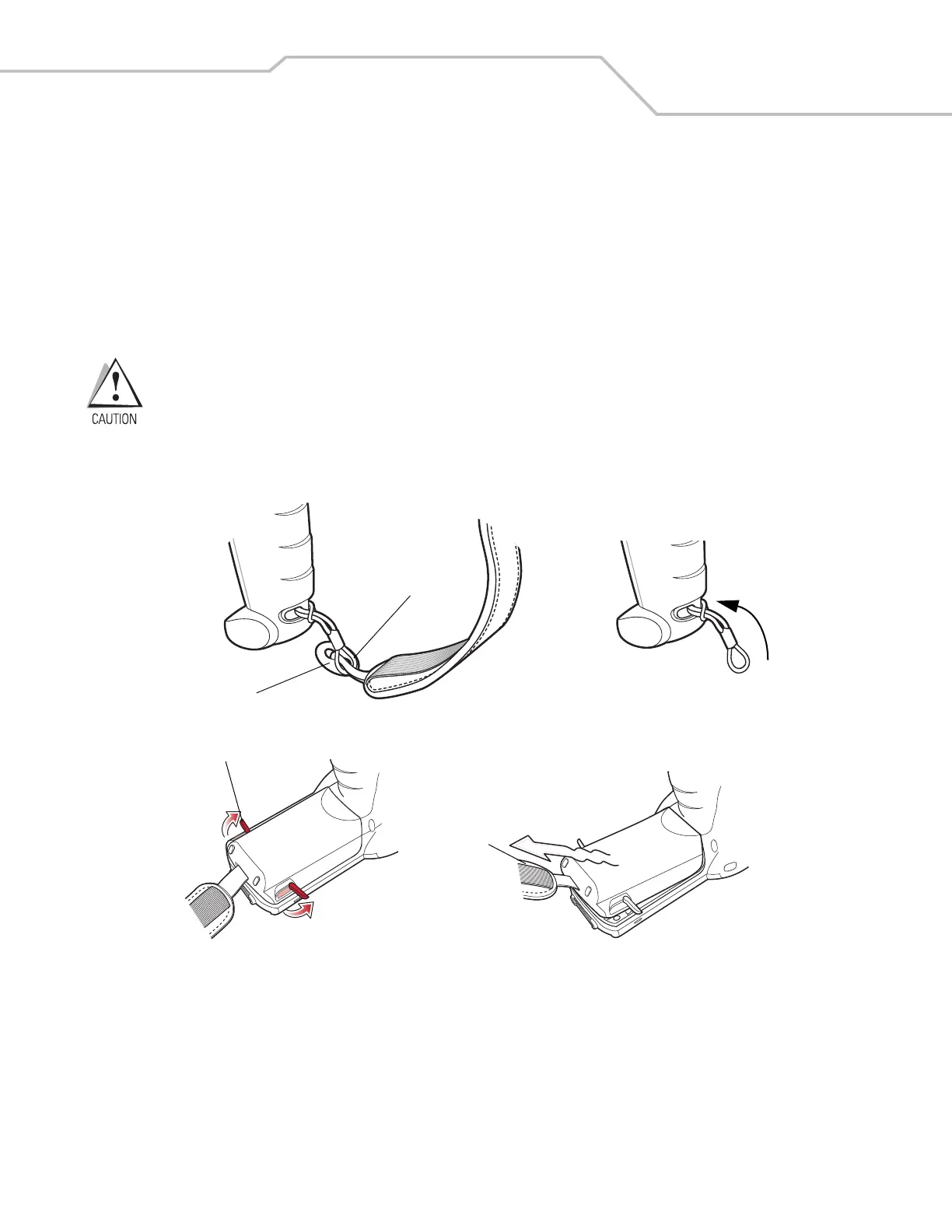
The Strap/Door Assembly consists of a hand strap and the battery door. Before removing the Strap/Door Assembly, press the red
Power button to turn off the screen and set the mobile computer to suspend mode.
To remove the Strap/Door Assembly:
1. Slip the button through the loop.
2. Remove loop section from handle.
3. Rotate the latches to the open position.
Do not lift up on the latches when removing the Strap/Door Assembly. Lift up on the Hand Strap only.
4. Lift the Hand Strap to lift the Strap/Door Assembly off, bottom first.
Reverse the procedure to replace the Strap/Door Assembly.
Figure 1-13. Strap/Door Removal and Replacement (MC3090-G)
Strap/Door
Assembly
Latches
Button
Loop



 To Next Page