MC3000 User Guide3-10
Bonding with Discovered Device(s)
A bond is a relationship created between the mobile computer and another Bluetooth device in order to exchange information in a
secure manner. Creating a bond involves entering the same PIN on the two devices to bond. Once a bond is created, and the Bluetooth
radios are turned on, the devices recognize the bond and are able to exchange information without re-entering a PIN.
To bond with a discovered Bluetooth device:
1. Discover remote devices. See Discovering Bluetooth Device(s) on page 3-8.
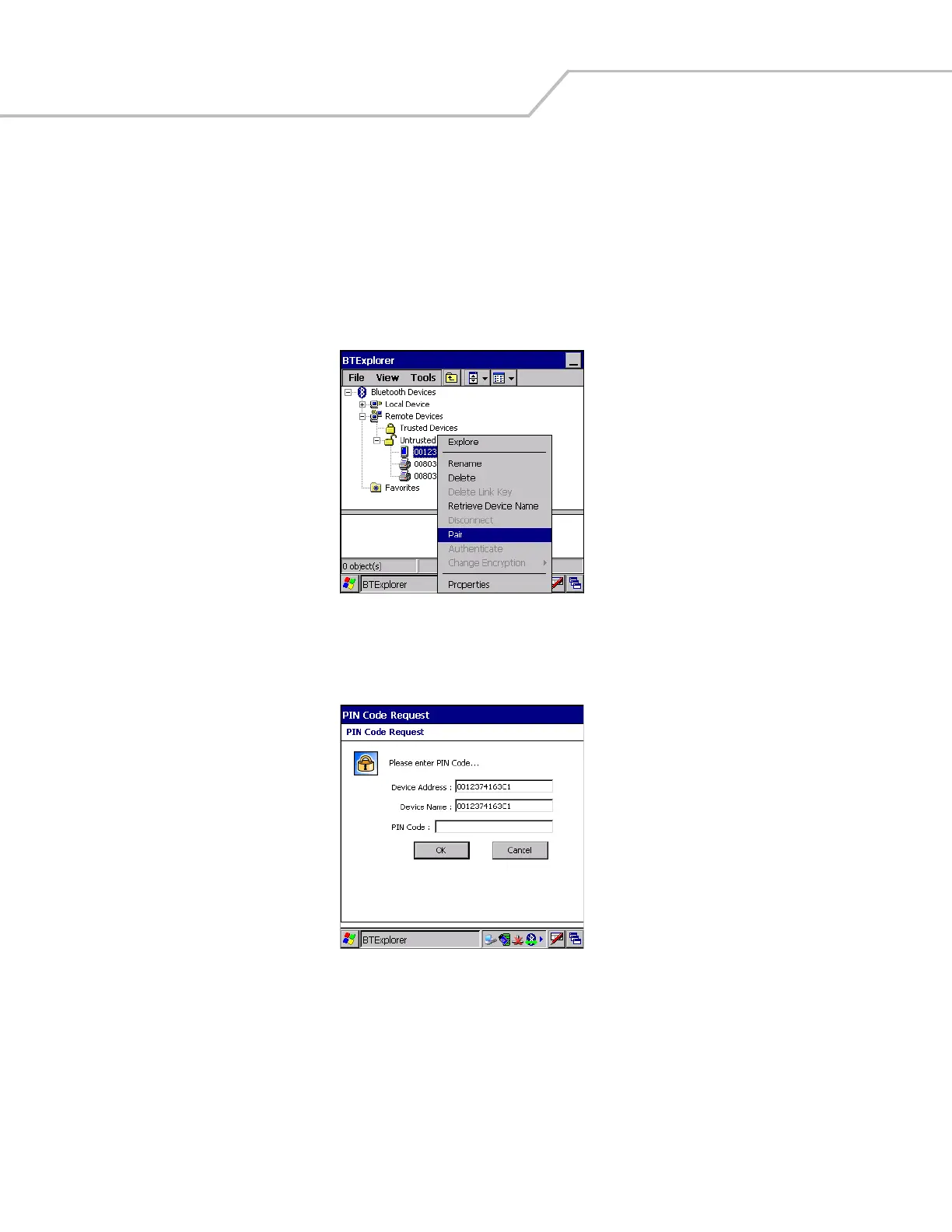
2. In the Untrusted Devices folder, tap and hold on a device to pair with.
Figure 3-11. Pair a Remote Device
3. Select Pair from the pop-up menu.
4. On the mobile computer, the PIN Code Request window appears.
Figure 3-12. PIN Code Request Window
5. In the PIN Code: text box, enter the PIN number (between 1 and 16 characters) and then tap OK.
6. On the remote device, enter the same PIN number.


 To Next Page