Using Bluetooth 3-13
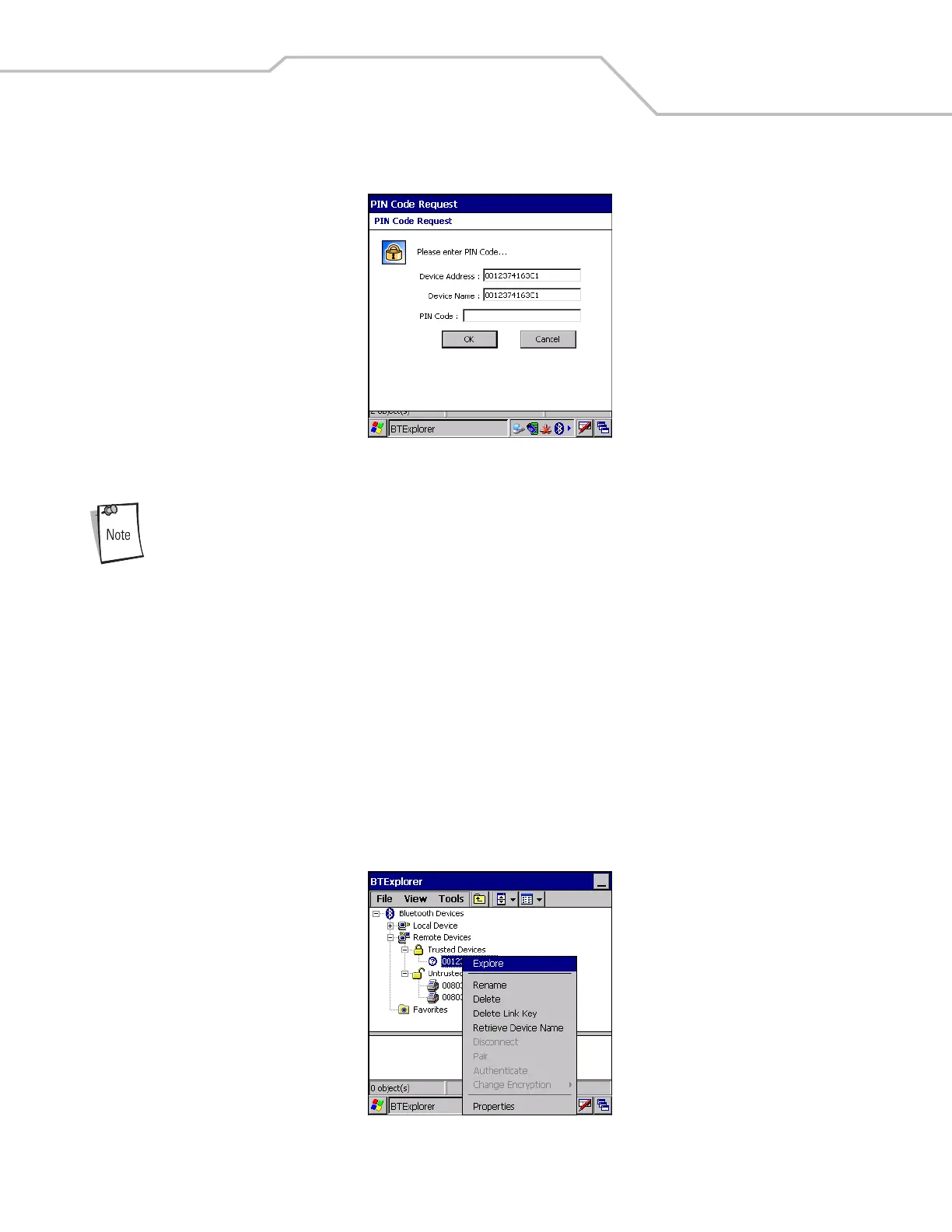
2. When prompted to bond with the remote device the PIN Code Request window appears.
Figure 3-17. PIN Code Request Window
Connections to untrusted devices are a security risk.
3. In the PIN Code: text box, enter the same PIN that was entered on the device requesting the bond. The PIN must be between
1 and 16 characters.
4. In the Device Name: text box, edit the name of the device requesting the bond, if desired.
5. Tap OK.
6. The bond is created and the mobile computer can now exchange information with the other device.
Discovering Services
Before services can be used, you must first discover remote devices and then bond to those devices.
To determine what services are available on a bonded remote device:
1. Tap the Bluetooth icon and select Show BTExplorer.
2. In BTExplorer window, tap and hold on the remote device and select Explore from the pop-up menu.
Figure 3-18. Discovering Services


 To Next Page